Primero borraremos todos los controles de la lección anterior y crearemos una ventana vacía simple sin ningún componente.
#pragma comment(linker, "/SUBSYSTEM:windows /ENTRY:mainCRTStartup")
#pragma execution_character_set("utf-8")

#include <GLFW/glfw3.h>
#include "imgui.h"
#include "backends/imgui_impl_glfw.h"
#include "backends/imgui_impl_opengl3.h"
#include <cstdio>
#include <string>
#include <fstream>
#include <windows.h>
#include <io.h>
#include <commdlg.h>  // Cabecera necesaria para diálogos de archivos

#include <iostream>
using namespace std;

// Configurar fuente para solucionar el problema de caracteres deformados "??" al escribir texto
// Añade la ruta de fuente correspondiente a tu entorno o usa la fuente por defecto del sistema
void SetupFont(ImGuiIO& io)
{
    // Ruta común de fuente china en Windows
    const char* font_path = "C:/Windows/Fonts/msyh.ttc"; // Microsoft YaHei
    float font_size = 18.0f;

    // Cargar rango de caracteres chinos simplificados frecuentes
    ImVector<ImWchar> ranges;
    ImFontGlyphRangesBuilder builder;
    builder.AddRanges(io.Fonts->GetGlyphRangesChineseSimplifiedCommon());
    builder.BuildRanges(&ranges);

    // Cargar fuente personalizada
    io.Fonts->AddFontFromFileTTF(font_path, font_size, nullptr, ranges.Data);

    // Si necesitas soporte multilingüe puedes añadir lo siguiente:
    // io.Fonts->AddFontFromFileTTF(font_path, font_size, nullptr, io.Fonts->GetGlyphRangesJapanese());
    // io.Fonts->AddFontFromFileTTF(font_path, font_size, nullptr, io.Fonts->GetGlyphRangesKorean());
}


int main()
{

    if (!glfwInit())
    {
        printf("Fallo al inicializar GLFW\n");
        return -1;
    }

    const char* glsl_version = "#version 330";
    glfwWindowHint(GLFW_CONTEXT_VERSION_MAJOR, 3);
    glfwWindowHint(GLFW_CONTEXT_VERSION_MINOR, 3);
    glfwWindowHint(GLFW_OPENGL_PROFILE, GLFW_OPENGL_CORE_PROFILE);

    GLFWwindow* window = glfwCreateWindow(800, 600, "Título", nullptr, nullptr);
    if (!window)
    {
        glfwTerminate();
        return -1;
    }
    glfwMakeContextCurrent(window);
    glfwSwapInterval(1);

    IMGUI_CHECKVERSION();
    ImGui::CreateContext();
    ImGuiIO& io = ImGui::GetIO();
    ImGui::StyleColorsLight();

    SetupFont(io); // Cargar fuente para corregir caracteres deformados

    ImGui_ImplGlfw_InitForOpenGL(window, true);
    ImGui_ImplOpenGL3_Init(glsl_version);

    while (!glfwWindowShouldClose(window))
    {
        glfwPollEvents();

        ImGui_ImplOpenGL3_NewFrame();
        ImGui_ImplGlfw_NewFrame();
        ImGui::NewFrame();

        ImGui::SetNextWindowPos(ImVec2(0, 0));
        ImGui::SetNextWindowSize(io.DisplaySize);

        ImGuiWindowFlags window_flags = ImGuiWindowFlags_NoDecoration
            | ImGuiWindowFlags_NoMove
            | ImGuiWindowFlags_NoResize
            | ImGuiWindowFlags_NoSavedSettings;

        ImGui::PushStyleVar(ImGuiStyleVar_WindowRounding, 0.0f);
        ImGui::PushStyleVar(ImGuiStyleVar_WindowBorderSize, 0.0f);

        ImGui::Begin("Título", nullptr, window_flags);

        // Zona de definición de controles de interfaz inicio

        // Fin zona controles

        ImGui::End();
        ImGui::PopStyleVar(2);

        ImGui::Render();
        int width, height;
        glfwGetFramebufferSize(window, &width, &height);
        glViewport(0, 0, width, height);
        glClearColor(0.12f, 0.12f, 0.12f, 1.f);
        glClear(GL_COLOR_BUFFER_BIT);
        ImGui_ImplOpenGL3_RenderDrawData(ImGui::GetDrawData());

        glfwSwapBuffers(window);
    }

    ImGui_ImplOpenGL3_Shutdown();
    ImGui_ImplGlfw_Shutdown();
    ImGui::DestroyContext();
    glfwDestroyWindow(window);
    glfwTerminate();
    return 0;
}Lenguaje del código: C++ (cpp)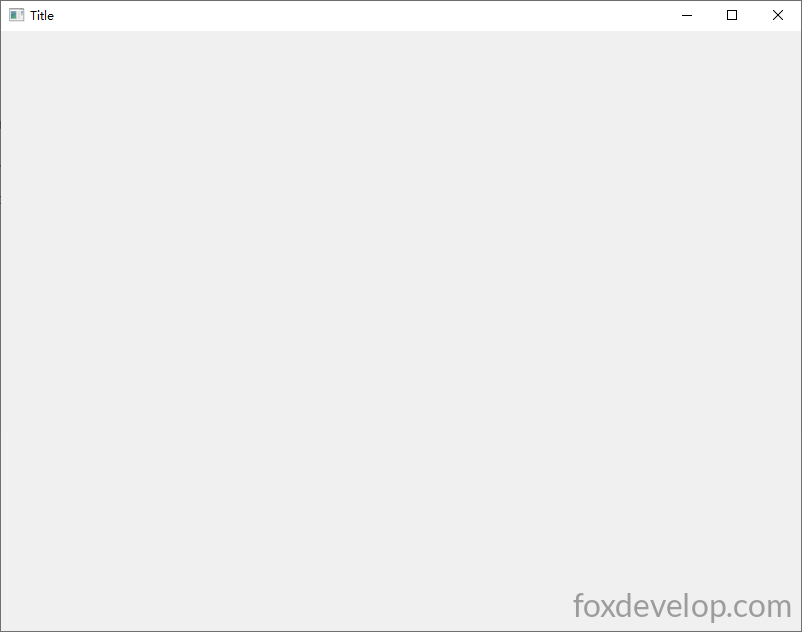
A continuación crearemos uno a uno cada control de ImGui.
Cuadro de texto
ImGui::Text("Hola, mundo %d", 123);Lenguaje del código: PHP (php)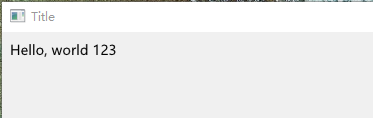
Simplemente imprime texto de izquierda a derecha empezando desde la esquina superior izquierda.
Botón
        // Mostrar botón, el código interno se ejecuta al pulsarlo
        if (ImGui::Button("Guardar"))
        {
            // El código aquí se ejecuta después del clic
        }Lenguaje del código: PHP (php)
Hay muchísimos controles, veamos el ejemplo completo a continuación que renderiza todos los componentes.
#pragma comment(linker, "/SUBSYSTEM:windows /ENTRY:mainCRTStartup")
#pragma execution_character_set("utf-8")

#include <GLFW/glfw3.h>
#include "imgui.h"
#include "backends/imgui_impl_glfw.h"
#include "backends/imgui_impl_opengl3.h"
#include <cstdio>
#include <string>
#include <cstring>
#include <windows.h>
#include <io.h>
#include <iostream>
using namespace std;

// Configurar fuente para solucionar el problema de caracteres deformados "??" al escribir texto
// Añade la ruta de fuente correspondiente a tu entorno o usa la fuente por defecto del sistema
void SetupFont(ImGuiIO& io)
{
    // Ruta común de fuente china en Windows
    const char* font_path = "C:/Windows/Fonts/msyh.ttc"; // Microsoft YaHei
    float font_size = 18.0f;

    // Cargar rango de caracteres chinos simplificados frecuentes
    ImVector<ImWchar> ranges;
    ImFontGlyphRangesBuilder builder;
    builder.AddRanges(io.Fonts->GetGlyphRangesChineseSimplifiedCommon());
    builder.BuildRanges(&ranges);

    // Cargar fuente personalizada
    io.Fonts->AddFontFromFileTTF(font_path, font_size, nullptr, ranges.Data);

    // Si necesitas soporte multilingüe puedes añadir lo siguiente:
    // io.Fonts->AddFontFromFileTTF(font_path, font_size, nullptr, io.Fonts->GetGlyphRangesJapanese());
    // io.Fonts->AddFontFromFileTTF(font_path, font_size, nullptr, io.Fonts->GetGlyphRangesKorean());
}

// ===================== Variables globales vinculadas a controles =====================
char buf[256] = "Texto de prueba de entrada de una sola línea";
char bufMulti[1024] = "Cuadro de texto multilínea\nSegunda línea\nTercera línea prueba en chino";
float fVal = 0.5f;
int iVal = 50;
bool checkBox1 = false;
bool checkBox2 = true;
int radioIdx = 0;
int comboSel = 0;
ImVec4 color = ImVec4(0.2f, 0.7f, 0.9f, 1.0f);
bool showPopupWin = false;
bool showModal = false;
int tabIndex = 0;
float progress = 0.35f;

int main()
{
    SetConsoleOutputCP(65001);
    if (!glfwInit())
    {
        printf("Fallo al inicializar GLFW\n");
        return -1;
    }

    const char* glsl_version = "#version 330";
    glfwWindowHint(GLFW_CONTEXT_VERSION_MAJOR, 3);
    glfwWindowHint(GLFW_CONTEXT_VERSION_MINOR, 3);
    glfwWindowHint(GLFW_OPENGL_PROFILE, GLFW_OPENGL_CORE_PROFILE);

    GLFWwindow* window = glfwCreateWindow(1000, 700, "Ejemplo de todos los controles comunes de ImGui", nullptr, nullptr);
    if (!window)
    {
        glfwTerminate();
        return -1;
    }
    glfwMakeContextCurrent(window);
    glfwSwapInterval(1);

    IMGUI_CHECKVERSION();
    ImGui::CreateContext();
    ImGuiIO& io = ImGui::GetIO();
    ImGui::StyleColorsLight();

    SetupFont(io);

    ImGui_ImplGlfw_InitForOpenGL(window, true);
    ImGui_ImplOpenGL3_Init(glsl_version);

    while (!glfwWindowShouldClose(window))
    {
        glfwPollEvents();

        ImGui_ImplOpenGL3_NewFrame();
        ImGui_ImplGlfw_NewFrame();
        ImGui::NewFrame();

        ImGui::SetNextWindowPos(ImVec2(0, 0));
        ImGui::SetNextWindowSize(io.DisplaySize);

        ImGuiWindowFlags window_flags = ImGuiWindowFlags_NoDecoration
            | ImGuiWindowFlags_NoMove
            | ImGuiWindowFlags_NoResize
            | ImGuiWindowFlags_NoSavedSettings;

        ImGui::PushStyleVar(ImGuiStyleVar_WindowRounding, 0.0f);
        ImGui::PushStyleVar(ImGuiStyleVar_WindowBorderSize, 0.0f);

        ImGui::Begin("Ventana Principal", nullptr, window_flags);

        // ========== 1. Barra de menú superior ==========
        if (ImGui::BeginMenuBar())
        {
            if (ImGui::BeginMenu("Archivo"))
            {
                if (ImGui::MenuItem("Nuevo", "Ctrl+N")) {}
                if (ImGui::MenuItem("Guardar", "Ctrl+S")) {}
                ImGui::Separator();
                if (ImGui::MenuItem("Salir"))
                    glfwSetWindowShouldClose(window, true);
                ImGui::EndMenu();
            }
            if (ImGui::BeginMenu("Herramientas"))
            {
                if (ImGui::MenuItem("Abrir ejemplo de ventana emergente"))
                    showPopupWin = true;
                ImGui::EndMenu();
            }
            ImGui::EndMenuBar();
        }
        ImGui::Spacing();

        // ========== 2. Controles de texto básicos ==========
        ImGui::Text("===== Controles de texto =====");
        ImGui::Text("Texto normal Hola mundo %d", 123);
        ImGui::TextColored(ImVec4(1, 0, 0, 1), "Texto de color rojo");
        ImGui::TextDisabled("Texto deshabilitado gris");
        ImGui::BulletText("Texto con viñeta 1");
        ImGui::BulletText("Texto con viñeta 2");
        ImGui::Spacing();

        // ========== 3. Serie de botones ==========
        ImGui::Text("===== Controles de botón =====");
        if (ImGui::Button("Botón normal"))
            cout << "Clic en botón normal" << endl;
        ImGui::SameLine();
        if (ImGui::SmallButton("Botón pequeño"))
            cout << "Clic en botón pequeño" << endl;
        ImGui::SameLine();
        if (ImGui::Button("Botón ancho", ImVec2(120, 0)))
            cout << "Clic en botón de ancho personalizado" << endl;
        ImGui::Spacing();

        // ========== 4. Cuadros de entrada ==========
        ImGui::Text("===== Controles de entrada =====");
        ImGui::InputText("Entrada de una línea", buf, IM_ARRAYSIZE(buf));
        ImGui::InputTextWithHint("Entrada con pista", "Escribe contenido aquí...", buf, IM_ARRAYSIZE(buf));
        ImGui::InputFloat("Entrada de número decimal", &fVal);
        ImGui::InputInt("Entrada de número entero", &iVal);
        ImGui::Spacing();
        ImGui::Text("Cuadro de texto multilínea:");
        ImVec2 multiSize = ImVec2(500, 80);
        ImGui::InputTextMultiline("##multi", bufMulti, IM_ARRAYSIZE(bufMulti), multiSize);
        ImGui::Spacing();

        // ========== 5. Deslizadores, barras de arrastre ==========
        ImGui::Text("===== Deslizadores / barras de arrastre =====");
        ImGui::SliderFloat("Deslizador decimal", &fVal, 0.0f, 1.0f);
        ImGui::SliderInt("Deslizador entero", &iVal, 0, 100);
        ImGui::DragFloat("Arrastre float", &fVal, 0.01f);
        ImGui::DragInt("Arrastre int", &iVal, 1.0f);
        ImGui::Spacing();

        // ========== 6. Casillas de verificación, botones de radio ==========
        ImGui::Text("===== Casillas y botones de radio =====");
        ImGui::Checkbox("Casilla A", &checkBox1);
        ImGui::Checkbox("Casilla B", &checkBox2);
        ImGui::Text("Grupo de radio:");
        ImGui::RadioButton("Opción 1", &radioIdx, 0); ImGui::SameLine();
        ImGui::RadioButton("Opción 2", &radioIdx, 1); ImGui::SameLine();
        ImGui::RadioButton("Opción 3", &radioIdx, 2);
        ImGui::Spacing();

        // ========== 7. Cuadro desplegable Combo ==========
        ImGui::Text("===== Desplegable Combo =====");
        const char* items[] = { "Opción A", "Opción B", "Opción C", "Opción D" };
        ImGui::Combo("Selección desplegable", &comboSel, items, IM_ARRAYSIZE(items));
        ImGui::Spacing();

        // ========== 8. Selector de color ==========
        ImGui::Text("===== Selector de color =====");
        ImGui::ColorEdit4("Color RGBA", (float*)&color);
        ImGui::ColorButton("Muestra de color", color);
        ImGui::Spacing();

        // ========== 9. Barra de progreso, separadores ==========
        ImGui::Text("===== Barra de progreso / separadores =====");
        ImGui::ProgressBar(progress, ImVec2(300, 0));
        ImGui::Text("Valor de progreso: %.2f", progress);
        ImGui::Separator(); // Separador horizontal
        ImGui::Spacing();

        // ========== 10. Nodos de árbol colapsable ==========
        ImGui::Text("===== Paneles de árbol colapsables =====");
        if (ImGui::CollapsingHeader("Panel colapsable, pulsa para expandir"))
        {
            ImGui::Text("Contenido interno del panel");
            ImGui::Button("Botón dentro del panel");
        }
        if (ImGui::TreeNode("Nodo de árbol"))
        {
            ImGui::BulletText("Subítem 1");
            ImGui::BulletText("Subítem 2");
            ImGui::TreePop();
        }
        ImGui::Spacing();

        // ========== 11. Pestañas TabBar ==========
        ImGui::Text("===== Pestañas Tab =====");
        ImGui::BeginTabBar("TabBar");
        if (ImGui::BeginTabItem("Pestaña 1"))
        {
            ImGui::Text("Contenido de la pestaña 1");
            ImGui::EndTabItem();
        }
        if (ImGui::BeginTabItem("Pestaña 2"))
        {
            ImGui::Text("Contenido de la pestaña 2");
            ImGui::EndTabItem();
        }
        ImGui::EndTabBar();
        ImGui::Spacing();

        // ========== 12. Tabla Table ==========
        ImGui::Text("===== Control de tabla =====");
        if (ImGui::BeginTable("table1", 3, ImGuiTableFlags_Borders))
        {
            ImGui::TableSetupColumn("Nº");
            ImGui::TableSetupColumn("Nombre");
            ImGui::TableSetupColumn("Valor");
            ImGui::TableHeadersRow();

            // Fila 1
            ImGui::TableNextRow();
            ImGui::TableNextColumn(); ImGui::Text("1");
            ImGui::TableNextColumn(); ImGui::Text("Prueba A");
            ImGui::TableNextColumn(); ImGui::Text("%.2f", fVal);
            // Fila 2
            ImGui::TableNextRow();
            ImGui::TableNextColumn(); ImGui::Text("2");
            ImGui::TableNextColumn(); ImGui::Text("Prueba B");
            ImGui::TableNextColumn(); ImGui::Text("%d", iVal);
            ImGui::EndTable();
        }
        ImGui::Spacing();

        // ========== 13. Menú contextual derecho ==========
        ImGui::Text("===== Menú contextual (haz clic derecho sobre este texto) =====");
        if (ImGui::IsItemClicked(ImGuiMouseButton_Right))
            ImGui::OpenPopup("RightMenu");
        if (ImGui::BeginPopup("RightMenu"))
        {
            ImGui::MenuItem("Opción menú derecho 1");
            ImGui::MenuItem("Opción menú derecho 2");
            ImGui::Separator();
            ImGui::MenuItem("Cerrar menú");
            ImGui::EndPopup();
        }
        ImGui::Spacing();

        // ========== 14. Ventana emergente normal (no modal) ==========
        if (showPopupWin)
        {
            ImGui::OpenPopup("PopupWindow");
            showPopupWin = false;
        }
        if (ImGui::BeginPopup("PopupWindow"))
        {
            ImGui::Text("Ventana emergente normal, se puede interactuar con la ventana principal");
            if (ImGui::Button("Cerrar ventana emergente"))
                ImGui::CloseCurrentPopup();
            ImGui::EndPopup();
        }

        // ========== 15. Ventana modal Modal ==========
        if (ImGui::Button("Abrir ventana modal"))
            showModal = true;
        if (showModal)
        {
            ImGui::OpenPopup("ModalDialog");
            showModal = false;
        }
        if (ImGui::BeginPopupModal("Diálogo modal", nullptr, ImGuiWindowFlags_AlwaysAutoResize))
        {
            ImGui::Text("La ventana modal bloquea la ventana principal, debes cerrarla primero");
            if (ImGui::Button("Aceptar", ImVec2(120, 0)))
            {
                ImGui::CloseCurrentPopup();
            }
            ImGui::EndPopup();
        }

        ImGui::End();
        ImGui::PopStyleVar(2);

        ImGui::Render();
        int width, height;
        glfwGetFramebufferSize(window, &width, &height);
        glViewport(0, 0, width, height);
        glClearColor(0.12f, 0.12f, 0.12f, 1.f);
        glClear(GL_COLOR_BUFFER_BIT);
        ImGui_ImplOpenGL3_RenderDrawData(ImGui::GetDrawData());

        glfwSwapBuffers(window);
    }

    ImGui_ImplOpenGL3_Shutdown();
    ImGui_ImplGlfw_Shutdown();
    ImGui::DestroyContext();
    glfwDestroyWindow(window);
    glfwTerminate();
    return 0;
}Lenguaje del código: C++ (cpp)
Puedes probar lentamente cada control para entender su funcionamiento.
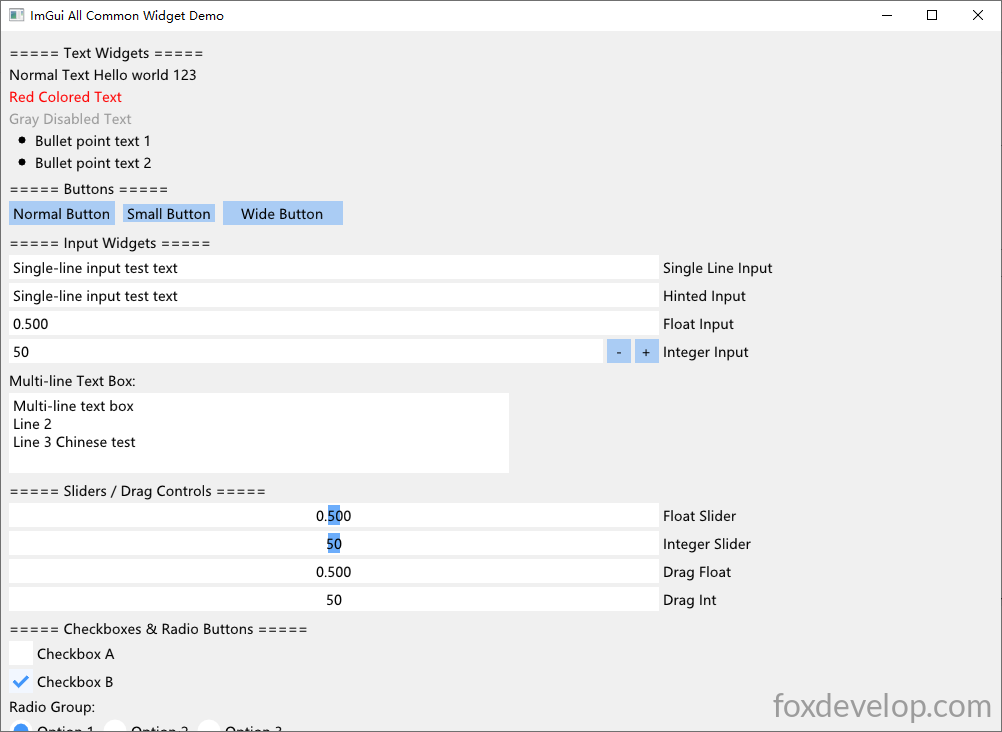
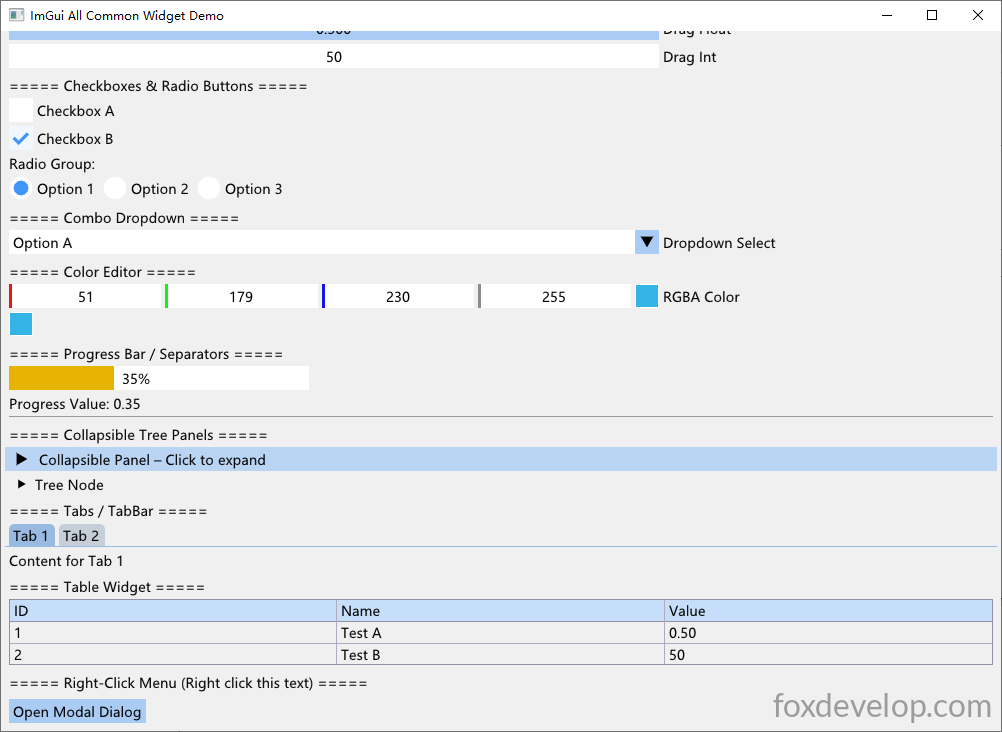
La librería de controles es muy completa y cubre totalmente las necesidades de desarrollo de herramientas simples. Incluye árboles colapsables, pestañas, todos los controles de formulario: cuadros de texto una/múltiples líneas, botones de radio, casillas, desplegables, barras de progreso, paneles colapsables, tablas, menús contextuales, selectores de color y mucho más. Te animo a probarlos tú mismo.