まず前回のレッスンで使用したウィジェットをすべて削除し、内部にコントロールが一切ない簡素な空ウィンドウを作成します。
#pragma comment(linker, "/SUBSYSTEM:windows /ENTRY:mainCRTStartup")
#pragma execution_character_set("utf-8")

#include <GLFW/glfw3.h>
#include "imgui.h"
#include "backends/imgui_impl_glfw.h"
#include "backends/imgui_impl_opengl3.h"
#include <cstdio>
#include <string>
#include <fstream>
#include <windows.h>
#include <io.h>
#include <commdlg.h>  // ファイルダイアログに必要なヘッダー

#include <iostream>
using namespace std;

// 文字化け「??」を直すためのフォント設定
// お使いのOS環境に合わせたフォントパスを記述するか、システム標準のフォントパスを利用してください
void SetupFont(ImGuiIO& io)
{
    // Windowsで一般的な中国語フォントパス
    const char* font_path = "C:/Windows/Fonts/msyh.ttc"; // マイクロソフト雅黒
    float font_size = 18.0f;

    // よく使われる簡体字の文字範囲を読み込む
    ImVector<ImWchar> ranges;
    ImFontGlyphRangesBuilder builder;
    builder.AddRanges(io.Fonts->GetGlyphRangesChineseSimplifiedCommon());
    builder.BuildRanges(&ranges);

    // カスタムフォントを読み込み
    io.Fonts->AddFontFromFileTTF(font_path, font_size, nullptr, ranges.Data);

    // 多言語対応が必要な場合は下記のフォント範囲を追加可能:
    // io.Fonts->AddFontFromFileTTF(font_path, font_size, nullptr, io.Fonts->GetGlyphRangesJapanese());
    // io.Fonts->AddFontFromFileTTF(font_path, font_size, nullptr, io.Fonts->GetGlyphRangesKorean());
}


int main()
{

    if (!glfwInit())
    {
        printf("GLFW 初期化に失敗しました\n");
        return -1;
    }

    const char* glsl_version = "#version 330";
    glfwWindowHint(GLFW_CONTEXT_VERSION_MAJOR, 3);
    glfwWindowHint(GLFW_CONTEXT_VERSION_MINOR, 3);
    glfwWindowHint(GLFW_OPENGL_PROFILE, GLFW_OPENGL_CORE_PROFILE);

    GLFWwindow* window = glfwCreateWindow(800, 600, "Title", nullptr, nullptr);
    if (!window)
    {
        glfwTerminate();
        return -1;
    }
    glfwMakeContextCurrent(window);
    glfwSwapInterval(1);

    IMGUI_CHECKVERSION();
    ImGui::CreateContext();
    ImGuiIO& io = ImGui::GetIO();
    ImGui::StyleColorsLight();

    SetupFont(io); // 文字化け解消用フォントを読み込む

    ImGui_ImplGlfw_InitForOpenGL(window, true);
    ImGui_ImplOpenGL3_Init(glsl_version);

    while (!glfwWindowShouldClose(window))
    {
        glfwPollEvents();

        ImGui_ImplOpenGL3_NewFrame();
        ImGui_ImplGlfw_NewFrame();
        ImGui::NewFrame();

        ImGui::SetNextWindowPos(ImVec2(0, 0));
        ImGui::SetNextWindowSize(io.DisplaySize);

        ImGuiWindowFlags window_flags = ImGuiWindowFlags_NoDecoration
            | ImGuiWindowFlags_NoMove
            | ImGuiWindowFlags_NoResize
            | ImGuiWindowFlags_NoSavedSettings;

        ImGui::PushStyleVar(ImGuiStyleVar_WindowRounding, 0.0f);
        ImGui::PushStyleVar(ImGuiStyleVar_WindowBorderSize, 0.0f);

        ImGui::Begin("Title", nullptr, window_flags);

        // ウィジェット描画エリア開始

        // ウィジェットエリア終了

        ImGui::End();
        ImGui::PopStyleVar(2);

        ImGui::Render();
        int width, height;
        glfwGetFramebufferSize(window, &width, &height);
        glViewport(0, 0, width, height);
        glClearColor(0.12f, 0.12f, 0.12f, 1.f);
        glClear(GL_COLOR_BUFFER_BIT);
        ImGui_ImplOpenGL3_RenderDrawData(ImGui::GetDrawData());

        glfwSwapBuffers(window);
    }

    ImGui_ImplOpenGL3_Shutdown();
    ImGui_ImplGlfw_Shutdown();
    ImGui::DestroyContext();
    glfwDestroyWindow(window);
    glfwTerminate();
    return 0;
}Code language: C++ (cpp)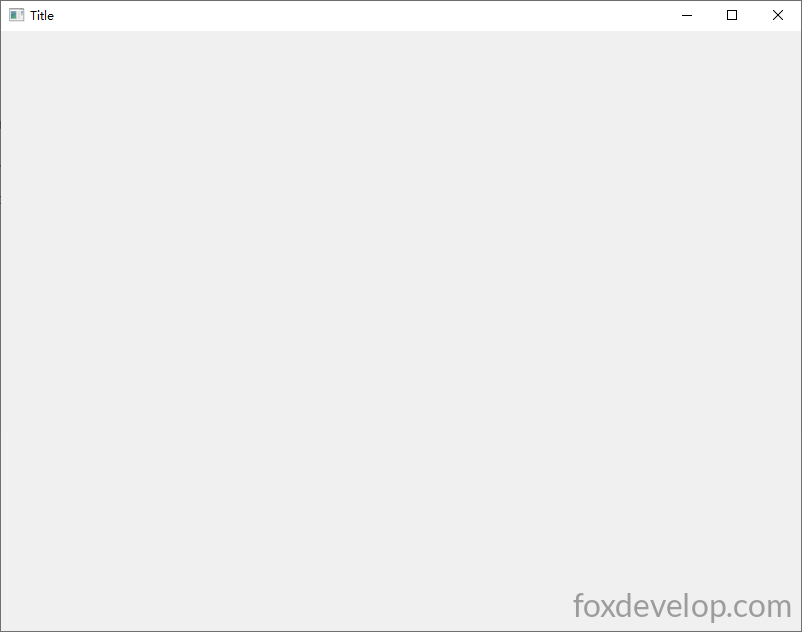
次にImGuiの各種ウィジェットを一つずつ作成していきます。
テキストウィジェット
ImGui::Text("こんにちは、世界 %d", 123);Code language: plaintext (plaintext)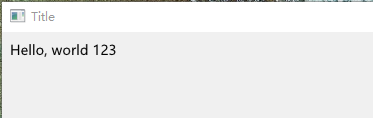
テキストはウィンドウ左上を起点に左から右へ描画されます。
ボタン
        // ボタンを描画。クリック時に内部のコードが実行される
        if (ImGui::Button("保存"))
        {
            // クリック後に実行する処理をここに記述
        }Code language: plaintext (plaintext)
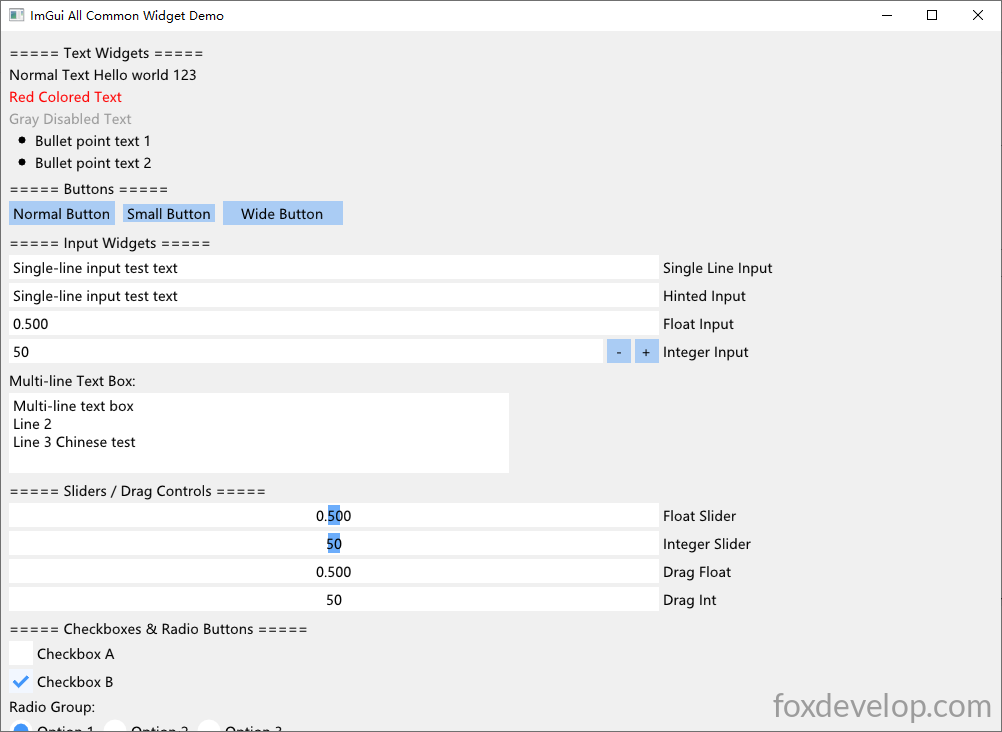
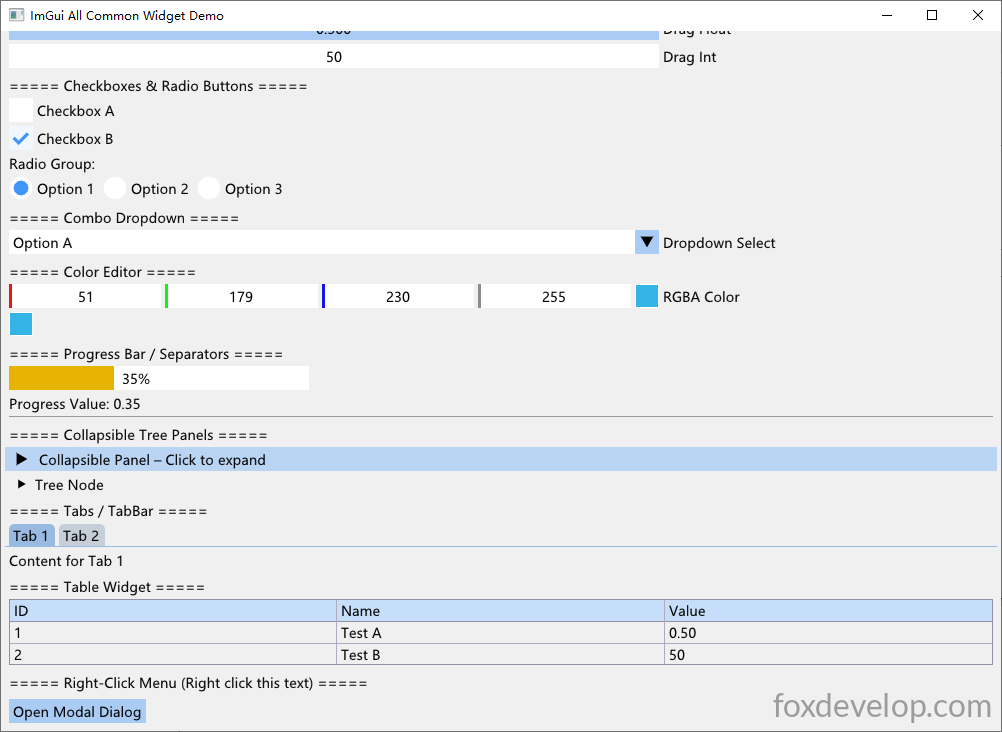
利用可能なウィジェットは数十種類あります。下記の完全なデモコードで、よく使われる全ウィジェットを一気に確認してみましょう。
#pragma comment(linker, "/SUBSYSTEM:windows /ENTRY:mainCRTStartup")
#pragma execution_character_set("utf-8")

#include <GLFW/glfw3.h>
#include "imgui.h"
#include "backends/imgui_impl_glfw.h"
#include "backends/imgui_impl_opengl3.h"
#include <cstdio>
#include <string>
#include <cstring>
#include <windows.h>
#include <io.h>
#include <iostream>
using namespace std;

// 文字化け「??」を直すためのフォント設定
// お使いのOS環境に合わせたフォントパスを記述するか、システム標準のフォントパスを利用してください
void SetupFont(ImGuiIO& io)
{
    // Windowsで一般的な中国語フォントパス
    const char* font_path = "C:/Windows/Fonts/msyh.ttc"; // マイクロソフト雅黒
    float font_size = 18.0f;

    // よく使われる簡体字の文字範囲を読み込む
    ImVector<ImWchar> ranges;
    ImFontGlyphRangesBuilder builder;
    builder.AddRanges(io.Fonts->GetGlyphRangesChineseSimplifiedCommon());
    builder.BuildRanges(&ranges);

    // カスタムフォントを読み込み
    io.Fonts->AddFontFromFileTTF(font_path, font_size, nullptr, ranges.Data);

    // 多言語対応が必要な場合は下記のフォント範囲を追加可能:
    // io.Fonts->AddFontFromFileTTF(font_path, font_size, nullptr, io.Fonts->GetGlyphRangesJapanese());
    // io.Fonts->AddFontFromFileTTF(font_path, font_size, nullptr, io.Fonts->GetGlyphRangesKorean());
}

// ===================== 各ウィジェットと連携するグローバル変数 =====================
char buf[256] = "1行入力テスト文章";
char bufMulti[1024] = "複数行テキストボックス\n2行目\n3行目 漢字テスト";
float fVal = 0.5f;
int iVal = 50;
bool checkBox1 = false;
bool checkBox2 = true;
int radioIdx = 0;
int comboSel = 0;
ImVec4 color = ImVec4(0.2f, 0.7f, 0.9f, 1.0f);
bool showPopupWin = false;
bool showModal = false;
int tabIndex = 0;
float progress = 0.35f;

int main()
{
    SetConsoleOutputCP(65001);
    if (!glfwInit())
    {
        printf("GLFW 初期化に失敗しました\n");
        return -1;
    }

    const char* glsl_version = "#version 330";
    glfwWindowHint(GLFW_CONTEXT_VERSION_MAJOR, 3);
    glfwWindowHint(GLFW_CONTEXT_VERSION_MINOR, 3);
    glfwWindowHint(GLFW_OPENGL_PROFILE, GLFW_OPENGL_CORE_PROFILE);

    GLFWwindow* window = glfwCreateWindow(1000, 700, "ImGui 汎用ウィジェット全種デモ", nullptr, nullptr);
    if (!window)
    {
        glfwTerminate();
        return -1;
    }
    glfwMakeContextCurrent(window);
    glfwSwapInterval(1);

    IMGUI_CHECKVERSION();
    ImGui::CreateContext();
    ImGuiIO& io = ImGui::GetIO();
    ImGui::StyleColorsLight();

    SetupFont(io);

    ImGui_ImplGlfw_InitForOpenGL(window, true);
    ImGui_ImplOpenGL3_Init(glsl_version);

    while (!glfwWindowShouldClose(window))
    {
        glfwPollEvents();

        ImGui_ImplOpenGL3_NewFrame();
        ImGui_ImplGlfw_NewFrame();
        ImGui::NewFrame();

        ImGui::SetNextWindowPos(ImVec2(0, 0));
        ImGui::SetNextWindowSize(io.DisplaySize);

        ImGuiWindowFlags window_flags = ImGuiWindowFlags_NoDecoration
            | ImGuiWindowFlags_NoMove
            | ImGuiWindowFlags_NoResize
            | ImGuiWindowFlags_NoSavedSettings;

        ImGui::PushStyleVar(ImGuiStyleVar_WindowRounding, 0.0f);
        ImGui::PushStyleVar(ImGuiStyleVar_WindowBorderSize, 0.0f);

        ImGui::Begin("メインウィンドウ", nullptr, window_flags);

        // ========== 1. 上部メニューバー ==========
        if (ImGui::BeginMenuBar())
        {
            if (ImGui::BeginMenu("ファイル"))
            {
                if (ImGui::MenuItem("新規作成", "Ctrl+N")) {}
                if (ImGui::MenuItem("保存", "Ctrl+S")) {}
                ImGui::Separator();
                if (ImGui::MenuItem("終了"))
                    glfwSetWindowShouldClose(window, true);
                ImGui::EndMenu();
            }
            if (ImGui::BeginMenu("ツール"))
            {
                if (ImGui::MenuItem("ポップアップデモを開く"))
                    showPopupWin = true;
                ImGui::EndMenu();
            }
            ImGui::EndMenuBar();
        }
        ImGui::Spacing();

        // ========== 2. 基本テキストウィジェット ==========
        ImGui::Text("===== テキスト系ウィジェット =====");
        ImGui::Text("通常テキスト こんにちは世界 %d", 123);
        ImGui::TextColored(ImVec4(1, 0, 0, 1), "赤色テキスト");
        ImGui::TextDisabled("グレーの無効テキスト");
        ImGui::BulletText("箇条書きテキスト1");
        ImGui::BulletText("箇条書きテキスト2");
        ImGui::Spacing();

        // ========== 3. ボタン各種 ==========
        ImGui::Text("===== ボタン =====");
        if (ImGui::Button("通常ボタン"))
            cout << "通常ボタンがクリックされました" << endl;
        ImGui::SameLine();
        if (ImGui::SmallButton("小さいボタン"))
            cout << "小ボタンがクリックされました" << endl;
        ImGui::SameLine();
        if (ImGui::Button("幅広ボタン", ImVec2(120, 0)))
            cout << "カスタム幅ボタンがクリックされました" << endl;
        ImGui::Spacing();

        // ========== 4. 入力フィールド ==========
        ImGui::Text("===== 入力系ウィジェット =====");
        ImGui::InputText("1行入力", buf, IM_ARRAYSIZE(buf));
        ImGui::InputTextWithHint("ヒント付き入力", "ここに文字を入力...", buf, IM_ARRAYSIZE(buf));
        ImGui::InputFloat("浮動小数入力", &fVal);
        ImGui::InputInt("整数入力", &iVal);
        ImGui::Spacing();
        ImGui::Text("複数行テキストボックス:");
        ImVec2 multiSize = ImVec2(500, 80);
        ImGui::InputTextMultiline("##multi", bufMulti, IM_ARRAYSIZE(bufMulti), multiSize);
        ImGui::Spacing();

        // ========== 5. スライダー / ドラッグバー ==========
        ImGui::Text("===== スライダー・ドラッグコントロール =====");
        ImGui::SliderFloat("浮動小数スライダー", &fVal, 0.0f, 1.0f);
        ImGui::SliderInt("整数スライダー", &iVal, 0, 100);
        ImGui::DragFloat("ドラッグ浮動小数", &fVal, 0.01f);
        ImGui::DragInt("ドラッグ整数", &iVal, 1.0f);
        ImGui::Spacing();

        // ========== 6. チェックボックス・ラジオボタン ==========
        ImGui::Text("===== チェックボックス・ラジオボタン =====");
        ImGui::Checkbox("チェックA", &checkBox1);
        ImGui::Checkbox("チェックB", &checkBox2);
        ImGui::Text("ラジオグループ:");
        ImGui::RadioButton("選択肢1", &radioIdx, 0); ImGui::SameLine();
        ImGui::RadioButton("選択肢2", &radioIdx, 1); ImGui::SameLine();
        ImGui::RadioButton("選択肢3", &radioIdx, 2);
        ImGui::Spacing();

        // ========== 7. コンボドロップダウン ==========
        ImGui::Text("===== コンボドロップダウン =====");
        const char* items[] = { "選択A", "選択B", "選択C", "選択D" };
        ImGui::Combo("ドロップダウン選択", &comboSel, items, IM_ARRAYSIZE(items));
        ImGui::Spacing();

        // ========== 8. カラーピッカー ==========
        ImGui::Text("===== カラーエディタ =====");
        ImGui::ColorEdit4("RGBAカラー", (float*)&color);
        ImGui::ColorButton("カラープレビュー", color);
        ImGui::Spacing();

        // ========== 9. プログレスバー・区切り線 ==========
        ImGui::Text("===== プログレスバー / 区切り線 =====");
        ImGui::ProgressBar(progress, ImVec2(300, 0));
        ImGui::Text("進捗値:%.2f", progress);
        ImGui::Separator(); // 水平区切り線
        ImGui::Spacing();

        // ========== 10. 折りたたみツリーノード ==========
        ImGui::Text("===== 折りたたみパネル =====");
        if (ImGui::CollapsingHeader("折りたたみパネル — クリックで展開"))
        {
            ImGui::Text("パネル内部のコンテンツ");
            ImGui::Button("パネル内ボタン");
        }
        if (ImGui::TreeNode("ツリーノード"))
        {
            ImGui::BulletText("サブ項目1");
            ImGui::BulletText("サブ項目2");
            ImGui::TreePop();
        }
        ImGui::Spacing();

        // ========== 11. タブバー ==========
        ImGui::Text("===== タブ / タブバー =====");
        ImGui::BeginTabBar("TabBar");
        if (ImGui::BeginTabItem("タブ1"))
        {
            ImGui::Text("タブ1の内容");
            ImGui::EndTabItem();
        }
        if (ImGui::BeginTabItem("タブ2"))
        {
            ImGui::Text("タブ2の内容");
            ImGui::EndTabItem();
        }
        ImGui::EndTabBar();
        ImGui::Spacing();

        // ========== 12. テーブルウィジェット ==========
        ImGui::Text("===== テーブルウィジェット =====");
        if (ImGui::BeginTable("table1", 3, ImGuiTableFlags_Borders))
        {
            ImGui::TableSetupColumn("ID");
            ImGui::TableSetupColumn("名前");
            ImGui::TableSetupColumn("値");
            ImGui::TableHeadersRow();

            // 1行目
            ImGui::TableNextRow();
            ImGui::TableNextColumn(); ImGui::Text("1");
            ImGui::TableNextColumn(); ImGui::Text("テストA");
            ImGui::TableNextColumn(); ImGui::Text("%.2f", fVal);
            // 2行目
            ImGui::TableNextRow();
            ImGui::TableNextColumn(); ImGui::Text("2");
            ImGui::TableNextColumn(); ImGui::Text("テストB");
            ImGui::TableNextColumn(); ImGui::Text("%d", iVal);
            ImGui::EndTable();
        }
        ImGui::Spacing();

        // ========== 13. 右クリックコンテキストメニュー ==========
        ImGui::Text("===== 右クリックメニュー(この文字を右クリック) =====");
        if (ImGui::IsItemClicked(ImGuiMouseButton_Right))
            ImGui::OpenPopup("RightMenu");
        if (ImGui::BeginPopup("RightMenu"))
        {
            ImGui::MenuItem("コンテキスト項目1");
            ImGui::MenuItem("コンテキスト項目2");
            ImGui::Separator();
            ImGui::MenuItem("メニューを閉じる");
            ImGui::EndPopup();
        }
        ImGui::Spacing();

        // ========== 14. 非モーダルポップアップウィンドウ ==========
        if (showPopupWin)
        {
            ImGui::OpenPopup("PopupWindow");
            showPopupWin = false;
        }
        if (ImGui::BeginPopup("PopupWindow"))
        {
            ImGui::Text("非モーダルポップアップ。メインウィンドウも操作可能");
            if (ImGui::Button("ポップアップを閉じる"))
                ImGui::CloseCurrentPopup();
            ImGui::EndPopup();
        }

        // ========== 15. モーダルダイアログ ==========
        if (ImGui::Button("モーダルダイアログを開く"))
            showModal = true;
        if (showModal)
        {
            ImGui::OpenPopup("ModalDialog");
            showModal = false;
        }
        if (ImGui::BeginPopupModal("モーダルダイアログ", nullptr, ImGuiWindowFlags_AlwaysAutoResize))
        {
            ImGui::Text("モーダルはメインウィンドウをロック。先にこちらを閉じる必要があります");
            if (ImGui::Button("OK", ImVec2(120, 0)))
            {
                ImGui::CloseCurrentPopup();
            }
            ImGui::EndPopup();
        }

        ImGui::End();
        ImGui::PopStyleVar(2);

        ImGui::Render();
        int width, height;
        glfwGetFramebufferSize(window, &width, &height);
        glViewport(0, 0, width, height);
        glClearColor(0.12f, 0.12f, 0.12f, 1.f);
        glClear(GL_COLOR_BUFFER_BIT);
        ImGui_ImplOpenGL3_RenderDrawData(ImGui::GetDrawData());

        glfwSwapBuffers(window);
    }

    ImGui_ImplOpenGL3_Shutdown();
    ImGui_ImplGlfw_Shutdown();
    ImGui::DestroyContext();
    glfwDestroyWindow(window);
    glfwTerminate();
    return 0;
}Code language: plaintext (plaintext)
一つずつ試しながら各ウィジェットの使い方を学んでいけます。
ウィジェットライブラリは非常に充実しており、簡易ユーティリティソフトの開発に必要な機能をすべてカバーしています。折りたたみツリー、タブページ、各種フォームコントロール(1/複数行テキストボックス、ラジオボタン、チェックボックス、ドロップダウンコンボ)、プログレスバー、折りたたみパネル、テーブル、右クリックメニュー、カラーピッカーなどが揃っているので、自由に動作確認してみてください。
Previous: ImGuiでメニュー・保存ダイアログを実装 – TXTメモ帳サンプルを作成