前回の授業でFPC(Free Pascal Compiler)をインストールしました。次にインストールが正常に完了したか確認しましょう。CMDターミナルを開くには、スタートメニューでCMDと検索して起動します。
インストール完了の確認
次にfpcコマンドを入力し、以下の内容が出力されればインストール成功です。
C:\Users\Jack>fpc
Free Pascal Compiler version 3.2.2 [2021/05/15] for i386
Copyright (c) 1993-2021 by Florian Klaempfl and others
C:\FPC\3.2.2\bin\i386-Win32\fpc.exe [options] <inputfile> [options]
 Only options valid for the default or selected platform are listed.
 Put + after a boolean switch option to enable it, - to disable it.
  @<x>   Read compiler options from <x> in addition to the default fpc.cfg
  -a     The compiler does not delete the generated assembler file
      -a5        Don't generate Big Obj COFF files for GNU Binutils older than 2.25 (Windows, NativeNT)
      -al        List sourcecode lines in assembler file
      -an        List node info in assembler file (-dEXTDEBUG compiler)
      -ao        Add an extra option to external assembler call (ignored for internal)
      -ar        List register allocation/release info in assembler file
      -at        List temp allocation/release info in assembler file
  -A<x>  Output format:
      -Adefault  Use default assembler
      -Aas       Assemble using GNU AS
      -Amacho    Mach-O (Darwin, Intel 32 bit) using internal writer
      -Anasm     Assemble using Nasm
      -Anasmcoff COFF (Go32v2) file using Nasm
*** press enter ***Code language: HTML, XML (xml)
コードを記述する
ここで初めてのFree Pascalサンプルを作成します。CドライブまたはDドライブにフォルダを作成し、Free Pascalのソースコードを保存する場所とします。
D:\fpcdemo
上記は筆者が作成したフォルダパスです。
作成したフォルダ内にテキストファイルを新規作成し、ファイル名を mydemo.dpr に変更します。
メモ帳でファイルを開き、下記のコードを記述します。
program <strong>mydemo</strong>;
begin
  WriteLn('Hello foxDevelop.com!');
end.Code language: HTML, XML (xml)
コンパイルと実行
ターミナルでcdコマンドを使用し D:\fpcdemo ディレクトリに移動します。
次にこのコマンドを実行します:fpc mydemo.dpr
コマンド実行後、フォルダ内でコンパイル・リンク処理が行われ、mydemo.exe 実行ファイルが生成されます。
実行する際は拡張子.exeを省略し、ファイル名のmydemoだけ入力すればプログラムが起動します。
実行結果として Hello foxDevelop.com! が出力されます。
D:\fpcdemo>fpc mydemo.dpr
Free Pascal Compiler version 3.2.2 [2021/05/15] for i386
Copyright (c) 1993-2021 by Florian Klaempfl and others
Target OS: Win32 for i386
Compiling mydemo.dpr
Linking mydemo.exe
3 lines compiled, 0.1 sec, 28224 bytes code, 1316 bytes data

D:\fpcdemo>mydemo
Hello foxDevelop.com!Code language: CSS (css)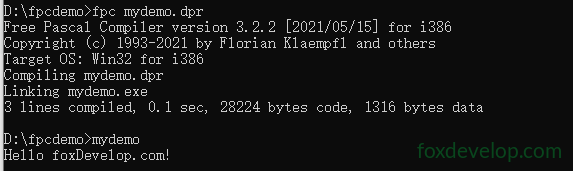
最初のコマンド fpc xxxxx.dpr は.dprソースコードをコンパイルし、続いてリンク処理を実行し mydemo.exe を作成します。
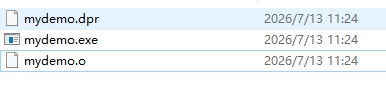
コンパイル時、ソースコードは拡張子.oの機械オブジェクトファイルに変換されます。
フォルダ内に.oファイルが生成されているのを確認できます。
リンクとは、プログラム実行に必要なOSライブラリを読み込み、複数のコードユニットを統合する処理のことで、具体的な作業は以下の通りです。
複数ユニット・ライブラリ間の関数/変数のメモリアドレスを補完する;
コンパイルで生成された全オブジェクトファイルを結合する;
システムライブラリとFPCランタイムライブラリを紐付ける;
メモリアドレスの再配置を実行する;
exeやelfなどの実行ファイルにパッケージングする。
簡単に言うと:分割されたコンパイル結果と各種ライブラリを統合し、完全に動作する単一プログラムにまとめる処理です。