Hinweis
import 'dart:io';Code-Sprache: JavaScript (javascript)Achtung
dart:io kann nicht auf der Web-Plattform verwendet werden!
Unterstützt: Dart-Befehlszeilenprogramme, Server, Nicht-Web-Flutter-Anwendungen (Android/iOS/Windows/macOS/Linux).
Datei- und Verzeichnisoperationen
FileSystemEntity ist die Oberklasse; File (Datei) und Directory (Verzeichnis) erben von dieser Klasse.
1. Datei einlesen
Komplettes Einlesen (geeignet für kleine Dateien)
void main() async {
  var file = File("config.txt");
  try {
    // Gesamten Text als Zeichenkette einlesen (UTF-8)
    String content = await file.readAsString();
    // Komplett einlesen und zeilenweise in ein String-Array aufteilen
    List<String> lines = await file.readAsLines();
    // Binärdaten als Byte-Array einlesen List<int>
    List<int> bytes = await file.readAsBytes();
  } catch (e) {
    print("Einlesen fehlgeschlagen: $e");
  }
}Code-Sprache: Dart (dart)
Vollständiges Beispiel
Erstellen Sie zuerst eine TXT-Datei und passen Sie den folgenden Pfad an: D:/dartdemo/firstdart/bin/config.txt
import 'dart:io';

void main() async {
  var file = File("D:/dartdemo/firstdart/bin/config.txt");
  try {
    // Gesamten Text als Zeichenkette einlesen (UTF-8)
    String content = await file.readAsString();
    print("===== readAsString Gesamter Text =====");
    print(content);

    // Komplett einlesen und zeilenweise in ein String-Array aufteilen
    List<String> lines = await file.readAsLines();
    print("\n===== readAsLines Zeilenweises Einlesen =====");
    for (var line in lines) {
      print(line);
    }

    // Binärdaten als Byte-Array einlesen List<int>
    List<int> bytes = await file.readAsBytes();
    print("\n===== readAsBytes Byte-Array (erste 30 Werte) =====");
    print(bytes.take(30).toList());
    print("Gesamtgröße der Datei in Bytes: ${bytes.length}");
  } catch (e) {
    print("Einlesen fehlgeschlagen: $e");
  }
}Code-Sprache: Dart (dart)
Ausgabeergebnis
D:\dartdemo\firstdart>dart run
Building package executable...
Built firstdart:firstdart.
===== readAsString Gesamter Text =====
The minimal requirements for a library are:

pubspec file
The pubspec.yaml file for a library is the same as for an application package
—there is no special designation to indicate that the package is a library.

lib directory
As you might expect, the library code lives under the lib directory and is public to other packages. You can create any hierarchy under lib, as needed. By convention, implementation code is placed under lib/src. Code under lib/src is considered private; other packages should never need to import src/.... To make APIs under lib/src public, you can export lib/src files from a file that's directly under lib.

===== readAsLines Zeilenweises Einlesen =====
The minimal requirements for a library are:

pubspec file
The pubspec.yaml file for a library is the same as for an application package
—there is no special designation to indicate that the package is a library.

lib directory
As you might expect, the library code lives under the lib directory and is public to other packages. You can create any hierarchy under lib, as needed. By convention, implementation code is placed under lib/src. Code under lib/src is considered private; other packages should never need to import src/.... To make APIs under lib/src public, you can export lib/src files from a file that's directly under lib.

===== readAsBytes Byte-Array (erste 30 Werte) =====
[84, 104, 101, 32, 109, 105, 110, 105, 109, 97, 108, 32, 114, 101, 113, 117, 105, 114, 101, 109, 101, 110, 116, 115, 32, 102, 111, 114, 32, 97]
Gesamtgröße der Datei in Bytes: 644Code-Sprache: PHP (php)
Strombasiertes Einlesen
Empfohlen für große Dateien: Verarbeitung während des Einlesevorgangs
Kombinierbar mit Decodern aus dart:convert, gibt einen Stream<List<int>> zurück
import 'dart:io';
import 'dart:convert';

void main() async {
  var file = File("D:/dartdemo/firstdart/bin/config.txt");
  Stream<List<int>> stream = file.openRead();

  var lineStream = stream
      .transform(utf8.decoder)          // Bytestrom → Zeichenkettenstrom
      .transform(const LineSplitter());  // Zeichenkette → Aufteilung in Zeilen

  try {
    await for (var line in lineStream) {
      print(line);
    }
    print("Einlesevorgang abgeschlossen");
  } catch (e) {
    print(e);
  }
}Code-Sprache: Dart (dart)
Ausgabeergebnis
D:\dartdemo\firstdart>dart run
Building package executable...
Built firstdart:firstdart.
The minimal requirements for a library are:

pubspec file
The pubspec.yaml file for a library is the same as for an application package
—there is no special designation to indicate that the package is a library.

lib directory
As you might expect, the library code lives under the lib directory and is public to other packages.
You can create any hierarchy under lib, as needed. By convention, implementation code is placed under lib/src.
 Code under lib/src is considered private; other packages should never need to import src/.... To make APIs under lib/src public,
 you can export lib/src files from a file that's directly under lib.
Einlesevorgang abgeschlossenCode-Sprache: PHP (php)
2. Datei schreiben (IOSink)
import 'dart:io';

void main() async {
  var logFile = File("log.txt");
  // FileMode.write: Vorhandenen Inhalt überschreiben (Standardwert)
  var sink = logFile.openWrite(mode: FileMode.write);

  sink.write("Log-Inhalt\n");
  sink.add([48,49]); // Binärbytes schreiben

  await sink.flush(); // Puffer leeren
  await sink.close(); // Muss unbedingt aufgerufen werden

  // Anhängemodus
  // var sink = logFile.openWrite(mode: FileMode.append);
}Code-Sprache: Dart (dart)
Nach der Ausführung
Im Projektordner D:\dartdemo\firstdart wird eine Datei log.txt erstellt
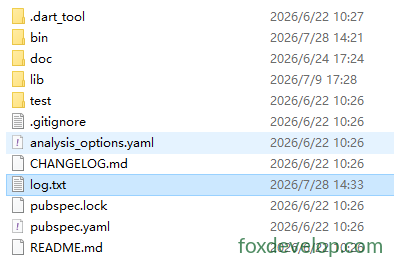
Verfügbare Modi:
FileMode.write: Erstellen mit ÜberschreibenFileMode.append: Anhängen am DateiendeFileMode.writeOnly/readWriteLese-Schreibmodi
3. Verzeichnis durchlaufen
Directory.list() liefert einen Stream, um alle Dateien und Ordner im Verzeichnis aufzulisten
void main() async {
  var dir = Directory("./tmp");
  try {
    var entityStream = dir.list();
    await for (FileSystemEntity entity in entityStream) {
      if (entity is File) {
        print("Datei: ${entity.path}");
      } else if (entity is Directory) {
        print("Verzeichnis: ${entity.path}");
      }
    }
  } catch (e) {
    print(e);
  }
}Code-Sprache: Dart (dart)
4. Häufige Datei-/Verzeichnisoperationen
var f = File("test.txt");
await f.create();          // Datei erstellen
await f.delete();          // Datei löschen
await f.length();          // Dateigröße abrufen

var d = Directory("data");
await d.create(recursive: true); // Mehrere Ebenen rekursiv erstellen
await d.delete(recursive: true);  // Verzeichnis rekursiv löschenCode-Sprache: JavaScript (javascript)
HTTP-Server HttpServer
Dient zum Erstellen eines Dart-Webservers, Lauschen auf einem Port und Verarbeiten von Anfragen.
void main() async {
  // Adresse und Port binden
  HttpServer server = await HttpServer.bind("localhost", 8888);
  print("Server gestartet http://localhost:8888");

  await for (HttpRequest request in server) {
    handleRequest(request);
  }
}

void handleRequest(HttpRequest req) {
  HttpResponse res = req.response;
  if (req.uri.path == "/dart") {
    res.headers.contentType = ContentType.text;
    res.write("Hello Dart HttpServer");
  } else {
    res.statusCode = HttpStatus.notFound;
  }
  res.close(); // Antwort unbedingt schließen, um Daten zu senden
}Code-Sprache: JavaScript (javascript)
Konkretes Beispiel
import 'dart:io';

void main() async {
  // Adresse und Port binden
  HttpServer server = await HttpServer.bind("localhost", 8888);
  print("Server gestartet http://localhost:8888");
  print("Zugriffsadresse: http://localhost:8888/dart");

  await for (HttpRequest request in server) {
    handleRequest(request);
  }
}

void handleRequest(HttpRequest req) {
  HttpResponse res = req.response;
  // Anfragepfad prüfen
  if (req.uri.path == "/dart") {
    res.headers.contentType = ContentType.text;
    res.write("Hello Dart HttpServer");
  } else if (req.uri.path == "/") {
    res.headers.contentType = ContentType.text;
    res.write("Startseite! Rufen Sie /dart auf");
  } else {
    res.statusCode = HttpStatus.notFound;
    res.write("404 Not Found");
  }
  res.close(); // Antwort unbedingt schließen, um Daten zu senden
}Code-Sprache: Dart (dart)
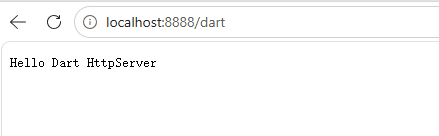
Rufen Sie im Browser auf: localhost:8888/dart
HTTP-Client HttpClient
Wichtige offizielle Empfehlung: Vermeiden Sie die direkte Nutzung von HttpClient!
HttpClientbasiert intern auf dart:io und hat eine schlechte plattformübergreifende Kompatibilität. Nutzen Sie bevorzugt das Drittpaketpackage:httpfür Anwendungen.
Einfaches Beispiel nur zum Verständnis:
void main() async {
  var client = HttpClient();
  try {
    var req = await client.getUrl(Uri.parse("https://foxdevelop.com"));
    var res = await req.close();
    await for(var chunk in res) {
      // Empfang des Antwort-Bytestreams
    }
  } finally {
    client.close();
  }
}Code-Sprache: Dart (dart)
Nachfolgend ein ausführbares Beispiel
import 'dart:io';
import 'dart:convert';

void main() async {
  var client = HttpClient();
  try {
    var req = await client.getUrl(Uri.parse("https://foxdevelop.com"));
    var res = await req.close();

    // Alle binären Segmente sammeln
    List<int> allBytes = [];
    await for (var chunk in res) {
      allBytes.addAll(chunk);
    }
    // Byte-Array zu UTF8-HTML umwandeln
    String html = utf8.decode(allBytes);
    print(html);
  } finally {
    client.close();
  }
}Code-Sprache: Dart (dart)
dart:io