Referencia
import 'dart:io';Lenguaje del código: JavaScript (javascript)Aviso importante
dart:io no funciona en la plataforma Web.
Compatibilidad: programas de consola Dart, servidores, aplicaciones Flutter que no sean Web (Android/iOS/Windows/macOS/Linux).
Operaciones con archivos y directorios
FileSystemEntity es la clase padre; File (archivo) y Directory (directorio) heredan de ella.
1. Lectura de archivos
Lectura completa (ideal para archivos pequeños)
void main() async {
  var file = File("config.txt");
  try {
    // Leer todo el contenido como cadena UTF-8
    String content = await file.readAsString();
    // Leer todo y dividir el contenido en líneas
    List<String> lines = await file.readAsLines();
    // Leer datos binarios como array de bytes List<int>
    List<int> bytes = await file.readAsBytes();
  } catch (e) {
    print("Error al leer el archivo: $e");
  }
}Lenguaje del código: Dart (dart)
Ejemplo completo funcional
Crea primero el archivo txt y ajusta la ruta: D:/dartdemo/firstdart/bin/config.txt
import 'dart:io';

void main() async {
  var file = File("D:/dartdemo/firstdart/bin/config.txt");
  try {
    String content = await file.readAsString();
    print("===== readAsString Texto completo =====");
    print(content);

    List<String> lines = await file.readAsLines();
    print("\n===== readAsLines Lectura por líneas =====");
    for (var line in lines) {
      print(line);
    }

    List<int> bytes = await file.readAsBytes();
    print("\n===== readAsBytes Array de bytes (primeros 30) =====");
    print(bytes.take(30).toList());
    print("Tamaño total del archivo en bytes: ${bytes.length}");
  } catch (e) {
    print("Error al leer el archivo: $e");
  }
}Lenguaje del código: Dart (dart)
Resultado de ejecución
D:\dartdemo\firstdart>dart run
Building package executable...
Built firstdart:firstdart.
===== readAsString Texto completo =====
The minimal requirements for a library are:

pubspec file
The pubspec.yaml file for a library is the same as for an application package
—there is no special designation to indicate that the package is a library.

lib directory
As you might expect, the library code lives under the lib directory and is public to other packages. You can create any hierarchy under lib, as needed. By convention, implementation code is placed under lib/src. Code under lib/src is considered private; other packages should never need to import src/.... To make APIs under lib/src public, you can export lib/src files from a file that's directly under lib.

===== readAsLines Lectura por líneas =====
The minimal requirements for a library are:

pubspec file
The pubspec.yaml file for a library is the same as for an application package
—there is no special designation to indicate that the package is a library.

lib directory
As you might expect, the library code lives under the lib directory and is public to other packages. You can create any hierarchy under lib, as needed. By convention, implementation code is placed under lib/src. Code under lib/src is considered private; other packages should never need to import src/.... To make APIs under lib/src public, you can export lib/src files from a file that's directly under lib.

===== readAsBytes Array de bytes (primeros 30) =====
[84, 104, 101, 32, 109, 105, 110, 105, 109, 97, 108, 32, 114, 101, 113, 117, 105, 114, 101, 109, 101, 110, 116, 115, 32, 102, 111, 114, 32, 97]
Tamaño total del archivo en bytes: 644Lenguaje del código: PHP (php)
Lectura mediante flujos (Stream)
Recomendado para archivos grandes: procesar datos mientras se leen
Se combina con decodificadores de dart:convert, devuelve un Stream<List<int>>
import 'dart:io';
import 'dart:convert';

void main() async {
  var file = File("D:/dartdemo/firstdart/bin/config.txt");
  Stream<List<int>> stream = file.openRead();

  var lineStream = stream
      .transform(utf8.decoder)
      .transform(const LineSplitter());

  try {
    await for (var line in lineStream) {
      print(line);
    }
    print("Lectura finalizada");
  } catch (e) {
    print(e);
  }
}Lenguaje del código: Dart (dart)
Resultado de ejecución
D:\dartdemo\firstdart>dart run
Building package executable...
Built firstdart:firstdart.
The minimal requirements for a library are:

pubspec file
The pubspec.yaml file for a library is the same as for an application package
—there is no special designation to indicate that the package is a library.

lib directory
As you might expect, the library code lives under the lib directory and is public to other packages.
You can create any hierarchy under lib, as needed. By convention, implementation code is placed under lib/src.
 Code under lib/src is considered private; other packages should never need to import src/.... To make APIs under lib/src public,
 you can export lib/src files from a file that's directly under lib.
Lectura finalizadaLenguaje del código: PHP (php)
2. Escritura de archivos (IOSink)
import 'dart:io';

void main() async {
  var logFile = File("log.txt");
  // FileMode.write: sobrescribe el contenido existente (valor por defecto)
  var sink = logFile.openWrite(mode: FileMode.write);

  sink.write("Contenido del registro\n");
  sink.add([48,49]); // Escribir bytes binarios

  await sink.flush(); // Vaciar búfer
  await sink.close(); // Es obligatorio cerrar

  // Modo para añadir contenido
  // var sink = logFile.openWrite(mode: FileMode.append);
}Lenguaje del código: Dart (dart)
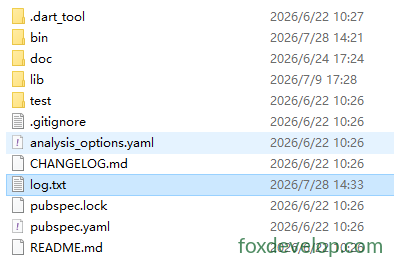
Tras ejecutar el código
Se crea el archivo log.txt en la carpeta del proyecto D:\dartdemo\firstdart
Modos disponibles:
FileMode.write: crear y sobrescribirFileMode.append: añadir al final del archivoFileMode.writeOnly/readWritemodos lectura y escritura
3. Recorrer directorios
Directory.list() devuelve un Stream para enumerar todos los archivos y carpetas del directorio
void main() async {
  var dir = Directory("./tmp");
  try {
    var entityStream = dir.list();
    await for (FileSystemEntity entity in entityStream) {
      if (entity is File) {
        print("Archivo: ${entity.path}");
      } else if (entity is Directory) {
        print("Directorio: ${entity.path}");
      }
    }
  } catch (e) {
    print(e);
  }
}Lenguaje del código: Dart (dart)
4. Operaciones habituales con archivos y directorios
var f = File("test.txt");
await f.create();          // Crear archivo
await f.delete();          // Eliminar archivo
await f.length();          // Obtener tamaño en bytes

var d = Directory("data");
await d.create(recursive: true); // Crear directorios anidados
await d.delete(recursive: true);  // Eliminar directorio con todo su contenidoLenguaje del código: JavaScript (javascript)
Servidor HTTP HttpServer
Permite crear un servidor web Dart, escuchar en un puerto y gestionar peticiones.
void main() async {
  // Enlazar dirección y puerto
  HttpServer server = await HttpServer.bind("localhost", 8888);
  print("Servidor iniciado http://localhost:8888");

  await for (HttpRequest request in server) {
    handleRequest(request);
  }
}

void handleRequest(HttpRequest req) {
  HttpResponse res = req.response;
  if (req.uri.path == "/dart") {
    res.headers.contentType = ContentType.text;
    res.write("Hello Dart HttpServer");
  } else {
    res.statusCode = HttpStatus.notFound;
  }
  res.close(); // Es necesario cerrar la respuesta para enviar datos
}Lenguaje del código: JavaScript (javascript)
Ejemplo práctico completo
import 'dart:io';

void main() async {
  HttpServer server = await HttpServer.bind("localhost", 8888);
  print("Servidor iniciado http://localhost:8888");
  print("Accede a: http://localhost:8888/dart");

  await for (HttpRequest request in server) {
    handleRequest(request);
  }
}

void handleRequest(HttpRequest req) {
  HttpResponse res = req.response;
  if (req.uri.path == "/dart") {
    res.headers.contentType = ContentType.text;
    res.write("Hello Dart HttpServer");
  } else if (req.uri.path == "/") {
    res.headers.contentType = ContentType.text;
    res.write("Página principal. Visita /dart");
  } else {
    res.statusCode = HttpStatus.notFound;
    res.write("404 Not Found");
  }
  res.close();
}Lenguaje del código: Dart (dart)
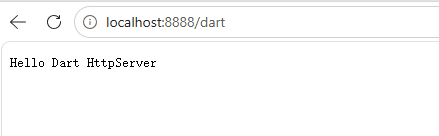
Abre en el navegador: localhost:8888/dart
Cliente HTTP HttpClient
Consejo oficial importante: evita usar HttpClient directamente.
HttpClientdepende internamente de dart:io y su compatibilidad multiplataforma es limitada. Para proyectos reales usa el paquete externopackage:http.
Ejemplo simplificado solo para referencia:
void main() async {
  var client = HttpClient();
  try {
    var req = await client.getUrl(Uri.parse("https://foxdevelop.com"));
    var res = await req.close();
    await for(var chunk in res) {
      // Recibir flujo binario de respuesta
    }
  } finally {
    client.close();
  }
}Lenguaje del código: Dart (dart)
Ejemplo ejecutable completo
import 'dart:io';
import 'dart:convert';

void main() async {
  var client = HttpClient();
  try {
    var req = await client.getUrl(Uri.parse("https://foxdevelop.com"));
    var res = await req.close();

    List<int> allBytes = [];
    await for (var chunk in res) {
      allBytes.addAll(chunk);
    }
    String html = utf8.decode(allBytes);
    print(html);
  } finally {
    client.close();
  }
}Lenguaje del código: Dart (dart)
dart:io