Referência
import 'dart:io';Code language: JavaScript (javascript)Aviso
dart:io não funciona na plataforma Web!
Suportado: programas de terminal Dart, servidores, aplicativos Flutter que não são Web (Android/iOS/Windows/macOS/Linux).
Operações de arquivos e diretórios
FileSystemEntity é a classe base; File (arquivo) e Directory (diretório) herdam dela.
1. Leitura de arquivos
Leitura completa (indicado para arquivos pequenos)
void main() async {
  var file = File("config.txt");
  try {
    // Ler todo conteúdo como string UTF-8
    String content = await file.readAsString();
    // Ler todo conteúdo e separar por linhas
    List<String> lines = await file.readAsLines();
    // Ler dados binários como lista de bytes List<int>
    List<int> bytes = await file.readAsBytes();
  } catch (e) {
    print("Falha ao ler o arquivo: $e");
  }
}Code language: Dart (dart)
Exemplo completo
Crie um arquivo txt antes e ajuste o caminho: D:/dartdemo/firstdart/bin/config.txt
import 'dart:io';

void main() async {
  var file = File("D:/dartdemo/firstdart/bin/config.txt");
  try {
    String content = await file.readAsString();
    print("===== readAsString Texto completo =====");
    print(content);

    List<String> lines = await file.readAsLines();
    print("\n===== readAsLines Leitura linha por linha =====");
    for (var line in lines) {
      print(line);
    }

    List<int> bytes = await file.readAsBytes();
    print("\n===== readAsBytes Lista de bytes (30 primeiros) =====");
    print(bytes.take(30).toList());
    print("Tamanho total do arquivo em bytes: ${bytes.length}");
  } catch (e) {
    print("Falha ao ler o arquivo: $e");
  }
}Code language: Dart (dart)
Resultado da execução
D:\dartdemo\firstdart>dart run
Building package executable...
Built firstdart:firstdart.
===== readAsString Texto completo =====
The minimal requirements for a library are:

pubspec file
The pubspec.yaml file for a library is the same as for an application package
—there is no special designation to indicate that the package is a library.

lib directory
As you might expect, the library code lives under the lib directory and is public to other packages. You can create any hierarchy under lib, as needed. By convention, implementation code is placed under lib/src. Code under lib/src is considered private; other packages should never need to import src/.... To make APIs under lib/src public, you can export lib/src files from a file that's directly under lib.

===== readAsLines Leitura linha por linha =====
The minimal requirements for a library are:

pubspec file
The pubspec.yaml file for a library is the same as for an application package
—there is no special designation to indicate that the package is a library.

lib directory
As you might expect, the library code lives under the lib directory and is public to other packages. You can create any hierarchy under lib, as needed. By convention, implementation code is placed under lib/src. Code under lib/src is considered private; other packages should never need to import src/.... To make APIs under lib/src public, you can export lib/src files from a file that's directly under lib.

===== readAsBytes Lista de bytes (30 primeiros) =====
[84, 104, 101, 32, 109, 105, 110, 105, 109, 97, 108, 32, 114, 101, 113, 117, 105, 114, 101, 109, 101, 110, 116, 115, 32, 102, 111, 114, 32, 97]
Tamanho total do arquivo em bytes: 644Code language: PHP (php)
Leitura por fluxo (Stream)
Recomendado para arquivos grandes: processar dados gradualmente
Combine com decodificadores do dart:convert, retorna Stream<List<int>>
import 'dart:io';
import 'dart:convert';

void main() async {
  var file = File("D:/dartdemo/firstdart/bin/config.txt");
  Stream<List<int>> stream = file.openRead();

  var lineStream = stream
      .transform(utf8.decoder)
      .transform(const LineSplitter());

  try {
    await for (var line in lineStream) {
      print(line);
    }
    print("Leitura concluída");
  } catch (e) {
    print(e);
  }
}Code language: Dart (dart)
Resultado da execução
D:\dartdemo\firstdart>dart run
Building package executable...
Built firstdart:firstdart.
The minimal requirements for a library are:

pubspec file
The pubspec.yaml file for a library is the same as for an application package
—there is no special designation to indicate that the package is a library.

lib directory
As you might expect, the library code lives under the lib directory and is public to other packages.
You can create any hierarchy under lib, as needed. By convention, implementation code is placed under lib/src.
 Code under lib/src is considered private; other packages should never need to import src/.... To make APIs under lib/src public,
 you can export lib/src files from a file that's directly under lib.
Leitura concluídaCode language: PHP (php)
2. Gravação de arquivos (IOSink)
import 'dart:io';

void main() async {
  var logFile = File("log.txt");
  // FileMode.write: sobrescreve conteúdo existente (padrão)
  var sink = logFile.openWrite(mode: FileMode.write);

  sink.write("Conteúdo do log\n");
  sink.add([48,49]); // Gravar bytes binários

  await sink.flush(); // Limpar buffer
  await sink.close(); // Obrigatório fechar

  // Modo de anexar texto
  // var sink = logFile.openWrite(mode: FileMode.append);
}Code language: Dart (dart)
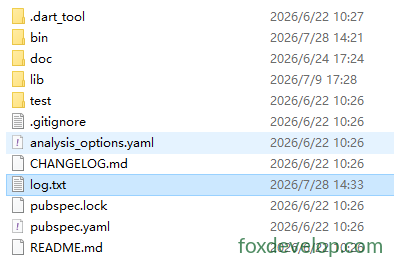
Após execução
Um arquivo log.txt será criado na pasta D:\dartdemo\firstdart
Modos disponíveis:
FileMode.write: criar e sobrescreverFileMode.append: adicionar no final do arquivoFileMode.writeOnly/readWritemodos leitura e gravação
3. Iterar diretório
Directory.list() retorna um Stream para listar todos arquivos e pastas
void main() async {
  var dir = Directory("./tmp");
  try {
    var entityStream = dir.list();
    await for (FileSystemEntity entity in entityStream) {
      if (entity is File) {
        print("Arquivo: ${entity.path}");
      } else if (entity is Directory) {
        print("Diretório: ${entity.path}");
      }
    }
  } catch (e) {
    print(e);
  }
}Code language: Dart (dart)
4. Operações comuns em arquivos/diretórios
var f = File("test.txt");
await f.create();          // Criar arquivo
await f.delete();          // Remover arquivo
await f.length();          // Obter tamanho em bytes

var d = Directory("data");
await d.create(recursive: true); // Criar pastas aninhadas
await d.delete(recursive: true);  // Remover diretório recursivamenteCode language: JavaScript (javascript)
Servidor HTTP HttpServer
Cria um servidor web Dart, escuta uma porta e processa requisições.
void main() async {
  // Associar endereço e porta
  HttpServer server = await HttpServer.bind("localhost", 8888);
  print("Servidor iniciado http://localhost:8888");

  await for (HttpRequest request in server) {
    handleRequest(request);
  }
}

void handleRequest(HttpRequest req) {
  HttpResponse res = req.response;
  if (req.uri.path == "/dart") {
    res.headers.contentType = ContentType.text;
    res.write("Hello Dart HttpServer");
  } else {
    res.statusCode = HttpStatus.notFound;
  }
  res.close(); // Fechar resposta obrigatoriamente
}Code language: JavaScript (javascript)
Exemplo prático
import 'dart:io';

void main() async {
  HttpServer server = await HttpServer.bind("localhost", 8888);
  print("Servidor iniciado http://localhost:8888");
  print("Acesse: http://localhost:8888/dart");

  await for (HttpRequest request in server) {
    handleRequest(request);
  }
}

void handleRequest(HttpRequest req) {
  HttpResponse res = req.response;
  if (req.uri.path == "/dart") {
    res.headers.contentType = ContentType.text;
    res.write("Hello Dart HttpServer");
  } else if (req.uri.path == "/") {
    res.headers.contentType = ContentType.text;
    res.write("Página inicial. Acesse /dart");
  } else {
    res.statusCode = HttpStatus.notFound;
    res.write("404 Not Found");
  }
  res.close();
}Code language: Dart (dart)
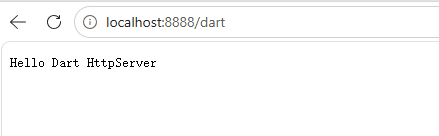
Acesse no navegador: localhost:8888/dart
Cliente HTTP HttpClient
Dica oficial importante: evite usar HttpClient diretamente!
HttpClientdepende internamente do dart:io, com compatibilidade multiplataforma limitada. Use o pacote externopackage:httpem projetos reais.
Exemplo simplificado apenas para estudo:
void main() async {
  var client = HttpClient();
  try {
    var req = await client.getUrl(Uri.parse("https://foxdevelop.com"));
    var res = await req.close();
    await for(var chunk in res) {
      // Receber fluxo de bytes da resposta
    }
  } finally {
    client.close();
  }
}Code language: Dart (dart)
Exemplo funcional completo
import 'dart:io';
import 'dart:convert';

void main() async {
  var client = HttpClient();
  try {
    var req = await client.getUrl(Uri.parse("https://foxdevelop.com"));
    var res = await req.close();

    List<int> allBytes = [];
    await for (var chunk in res) {
      allBytes.addAll(chunk);
    }
    String html = utf8.decode(allBytes);
    print(html);
  } finally {
    client.close();
  }
}Code language: Dart (dart)
dart:io