引用
import 'dart:io';Code language: JavaScript (javascript)注意
dart:io 無法在 Web 平台使用!
支援目標:Dart 命令列程式、伺服器端、非Web Flutter 應用(Android/iOS/Windows/macOS/Linux)。
檔案與目錄操作
FileSystemEntity 為父類別,File(檔案)、Directory(目錄)繼承自它。
1. 讀取檔案
一次性讀取(適合小型檔案)
void main() async {
  var file = File("config.txt");
  try {
    // 一次性讀取完整字串(UTF-8)
    String content = await file.readAsString();
    // 一次性讀取,依換行分割成字串陣列
    List<String> lines = await file.readAsLines();
    // 一次性讀取二進位位元組 List<int>
    List<int> bytes = await file.readAsBytes();
  } catch (e) {
    print("讀取失敗:$e");
  }
}Code language: Dart (dart)
完整範例
請事先建立一個 txt 檔案,將下方檔案路徑修改為你建立的檔案位置:D:/dartdemo/firstdart/bin/config.txt
import 'dart:io';

void main() async {
  var file = File("D:/dartdemo/firstdart/bin/config.txt");
  try {
    // 一次性讀取完整字串(UTF-8)
    String content = await file.readAsString();
    print("===== readAsString 完整文字 =====");
    print(content);

    // 一次性讀取,依換行分割成字串陣列
    List<String> lines = await file.readAsLines();
    print("\n===== readAsLines 逐行讀取 =====");
    for (var line in lines) {
      print(line);
    }

    // 一次性讀取二進位位元組 List<int>
    List<int> bytes = await file.readAsBytes();
    print("\n===== readAsBytes 位元組陣列(前30筆) =====");
    print(bytes.take(30).toList());
    print("檔案總位元組數:${bytes.length}");
  } catch (e) {
    print("讀取失敗:$e");
  }
}Code language: Dart (dart)
執行結果
D:\dartdemo\firstdart>dart run
Building package executable...
Built firstdart:firstdart.
===== readAsString 完整文字 =====
The minimal requirements for a library are:

pubspec file
The pubspec.yaml file for a library is the same as for an application package
—there is no special designation to indicate that the package is a library.

lib directory
As you might expect, the library code lives under the lib directory and is public to other packages. You can create any hierarchy under lib, as needed. By convention, implementation code is placed under lib/src. Code under lib/src is considered private; other packages should never need to import src/.... To make APIs under lib/src public, you can export lib/src files from a file that's directly under lib.

===== readAsLines 逐行讀取 =====
The minimal requirements for a library are:

pubspec file
The pubspec.yaml file for a library is the same as for an application package
—there is no special designation to indicate that the package is a library.

lib directory
As you might expect, the library code lives under the lib directory and is public to other packages. You can create any hierarchy under lib, as needed. By convention, implementation code is placed under lib/src. Code under lib/src is considered private; other packages should never need to import src/.... To make APIs under lib/src public, you can export lib/src files from a file that's directly under lib.

===== readAsBytes 位元組陣列(前30筆) =====
[84, 104, 101, 32, 109, 105, 110, 105, 109, 97, 108, 32, 114, 101, 113, 117, 105, 114, 101, 109, 101, 110, 116, 115, 32, 102, 111, 114, 32, 97]
檔案總位元組數:644Code language: PHP (php)
串流讀取
建議用於大型檔案,邊讀取邊處理資料
搭配 dart:convert 解碼器,回傳 Stream<List<int>>
import 'dart:io';
import 'dart:convert';

void main() async {
  var file = File("D:/dartdemo/firstdart/bin/config.txt");
  Stream<List<int>> stream = file.openRead();

  var lineStream = stream
      .transform(utf8.decoder)          // 位元組串流 → 文字串流
      .transform(const LineSplitter());  // 文字 → 分割成逐行

  try {
    await for (var line in lineStream) {
      print(line);
    }
    print("讀取完成");
  } catch (e) {
    print(e);
  }
}Code language: Dart (dart)
執行結果
D:\dartdemo\firstdart>dart run
Building package executable...
Built firstdart:firstdart.
The minimal requirements for a library are:

pubspec file
The pubspec.yaml file for a library is the same as for an application package
—there is no special designation to indicate that the package is a library.

lib directory
As you might expect, the library code lives under the lib directory and is public to other packages.
You can create any hierarchy under lib, as needed. By convention, implementation code is placed under lib/src.
 Code under lib/src is considered private; other packages should never need to import src/.... To make APIs under lib/src public,
 you can export lib/src files from a file that's directly under lib.
讀取完成Code language: PHP (php)
2. 寫入檔案(IOSink)
import 'dart:io';

void main() async {
  var logFile = File("log.txt");
  // FileMode.write:覆蓋原有內容(預設模式)
  var sink = logFile.openWrite(mode: FileMode.write);

  sink.write("日誌內容\n");
  sink.add([48,49]); // 寫入二進位位元組

  await sink.flush(); // 清空緩衝區
  await sink.close(); // 必須關閉

  // 追加寫入模式
  // var sink = logFile.openWrite(mode: FileMode.append);
}Code language: Dart (dart)
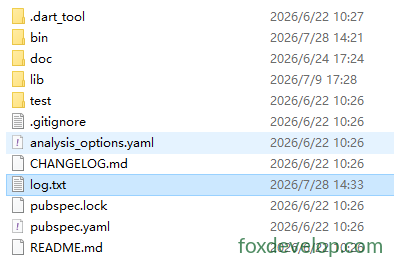
執行後
專案目錄 D:\dartdemo\firstdart 內會新增 log.txt 檔案
可用模式:
FileMode.write:建立並覆蓋FileMode.append:檔案尾端追加FileMode.writeOnly/readWrite讀寫模式
3. 遍歷目錄
Directory.list() 回傳 Stream,走訪目錄內所有檔案與資料夾
void main() async {
  var dir = Directory("./tmp");
  try {
    var entityStream = dir.list();
    await for (FileSystemEntity entity in entityStream) {
      if (entity is File) {
        print("檔案:${entity.path}");
      } else if (entity is Directory) {
        print("目錄:${entity.path}");
      }
    }
  } catch (e) {
    print(e);
  }
}Code language: Dart (dart)
4. 檔案/目錄常用操作
var f = File("test.txt");
await f.create();          // 建立檔案
await f.delete();          // 刪除檔案
await f.length();          // 取得檔案位元組大小

var d = Directory("data");
await d.create(recursive: true); // 遞迴建立多層目錄
await d.delete(recursive: true);  // 遞迴刪除目錄Code language: JavaScript (javascript)
HTTP 伺服器 HttpServer
用於建置 Dart Web 服務,監聽連接埠並處理請求。
void main() async {
  // 綁定位址與連接埠
  HttpServer server = await HttpServer.bind("localhost", 8888);
  print("服務已啟動 http://localhost:8888");

  await for (HttpRequest request in server) {
    handleRequest(request);
  }
}

void handleRequest(HttpRequest req) {
  HttpResponse res = req.response;
  if (req.uri.path == "/dart") {
    res.headers.contentType = ContentType.text;
    res.write("Hello Dart HttpServer");
  } else {
    res.statusCode = HttpStatus.notFound;
  }
  res.close(); // 必須關閉回應以送出資料
}Code language: JavaScript (javascript)
實際範例
import 'dart:io';

void main() async {
  // 綁定位址與連接埠
  HttpServer server = await HttpServer.bind("localhost", 8888);
  print("服務已啟動 http://localhost:8888");
  print("存取位址:http://localhost:8888/dart");

  await for (HttpRequest request in server) {
    handleRequest(request);
  }
}

void handleRequest(HttpRequest req) {
  HttpResponse res = req.response;
  // 判斷請求路徑
  if (req.uri.path == "/dart") {
    res.headers.contentType = ContentType.text;
    res.write("Hello Dart HttpServer");
  } else if (req.uri.path == "/") {
    res.headers.contentType = ContentType.text;
    res.write("首頁!請前往 /dart");
  } else {
    res.statusCode = HttpStatus.notFound;
    res.write("404 Not Found");
  }
  res.close(); // 必須關閉回應送出資料
}Code language: Dart (dart)
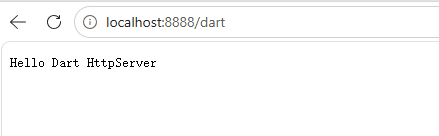
瀏覽器開啟 localhost:8888/dart
HTTP 用戶端 HttpClient
官方重要提醒:盡量不要直接使用 HttpClient!
HttpClient底層依賴 dart:io,跨平台相容性不佳。正式開發優先使用第三方套件package:http。
簡易範例僅供參考學習:
void main() async {
  var client = HttpClient();
  try {
    var req = await client.getUrl(Uri.parse("https://foxdevelop.com"));
    var res = await req.close();
    await for(var chunk in res) {
      // 接收回應位元組片段
    }
  } finally {
    client.close();
  }
}Code language: Dart (dart)
下方為可直接執行的完整範例
import 'dart:io';
import 'dart:convert';

void main() async {
  var client = HttpClient();
  try {
    var req = await client.getUrl(Uri.parse("https://foxdevelop.com"));
    var res = await req.close();

    // 收集所有二進位片段
    List<int> allBytes = [];
    await for (var chunk in res) {
      allBytes.addAll(chunk);
    }
    // 位元組陣列轉 UTF8 網頁HTML
    String html = utf8.decode(allBytes);
    print(html);
  } finally {
    client.close();
  }
}Code language: Dart (dart)
dart:io
Previous: dart:core 核心函式庫
Next: dart:async 程式庫