참고
import 'dart:io';Code language: JavaScript (javascript)주의
dart:io는 웹 플랫폼에서 사용할 수 없습니다!
지원 환경: Dart 명령줄 프로그램, 서버, 비웹 Flutter 앱(Android/iOS/Windows/macOS/Linux).
파일 및 디렉터리 작업
FileSystemEntity는 부모 클래스이며 File(파일), Directory(디렉터리)가 이를 상속받습니다.
1. 파일 읽기
한 번에 읽기(작은 파일에 적합)
void main() async {
  var file = File("config.txt");
  try {
    // 전체 문자열 한 번에 읽기(UTF-8)
    String content = await file.readAsString();
    // 한 번에 읽고 줄 단위 문자열 배열로 분리
    List<String> lines = await file.readAsLines();
    // 바이너리 바이트 일괄 수신 List<int>
    List<int> bytes = await file.readAsBytes();
  } catch (e) {
    print("읽기 실패:$e");
  }
}Code language: Dart (dart)
전체 예제
미리 텍스트 파일을 생성한 뒤 아래 경로를 본인의 파일 경로로 수정하세요 D:/dartdemo/firstdart/bin/config.txt
import 'dart:io';

void main() async {
  var file = File("D:/dartdemo/firstdart/bin/config.txt");
  try {
    // 전체 문자열 한 번에 읽기(UTF-8)
    String content = await file.readAsString();
    print("===== readAsString 전체 텍스트 =====");
    print(content);

    // 한 번에 읽고 줄 단위 문자열 배열로 분리
    List<String> lines = await file.readAsLines();
    print("\n===== readAsLines 줄 단위 읽기 =====");
    for (var line in lines) {
      print(line);
    }

    // 바이너리 바이트 일괄 수신 List<int>
    List<int> bytes = await file.readAsBytes();
    print("\n===== readAsBytes 바이트 배열(앞 30개) =====");
    print(bytes.take(30).toList());
    print("파일 총 바이트 수:${bytes.length}");
  } catch (e) {
    print("읽기 실패:$e");
  }
}Code language: Dart (dart)
실행 결과
D:\dartdemo\firstdart>dart run
Building package executable...
Built firstdart:firstdart.
===== readAsString 전체 텍스트 =====
The minimal requirements for a library are:

pubspec file
The pubspec.yaml file for a library is the same as for an application package
—there is no special designation to indicate that the package is a library.

lib directory
As you might expect, the library code lives under the lib directory and is public to other packages. You can create any hierarchy under lib, as needed. By convention, implementation code is placed under lib/src. Code under lib/src is considered private; other packages should never need to import src/.... To make APIs under lib/src public, you can export lib/src files from a file that's directly under lib.

===== readAsLines 줄 단위 읽기 =====
The minimal requirements for a library are:

pubspec file
The pubspec.yaml file for a library is the same as for an application package
—there is no special designation to indicate that the package is a library.

lib directory
As you might expect, the library code lives under the lib directory and is public to other packages. You can create any hierarchy under lib, as needed. By convention, implementation code is placed under lib/src. Code under lib/src is considered private; other packages should never need to import src/.... To make APIs under lib/src public, you can export lib/src files from a file that's directly under lib.

===== readAsBytes 바이트 배열(앞 30개) =====
[84, 104, 101, 32, 109, 105, 110, 105, 109, 97, 108, 32, 114, 101, 113, 117, 105, 114, 101, 109, 101, 110, 116, 115, 32, 102, 111, 114, 32, 97]
파일 총 바이트 수:644Code language: PHP (php)
스트리밍 읽기
대용량 파일에 권장하며 읽는 동시에 처리 진행
dart:convert 디코더와 함께 사용하며 Stream<List<int>>를 반환합니다
import 'dart:io';
import 'dart:convert';

void main() async {
  var file = File("D:/dartdemo/firstdart/bin/config.txt");
  Stream<List<int>> stream = file.openRead();

  var lineStream = stream
      .transform(utf8.decoder)          // 바이트 스트림 → 문자열 스트림
      .transform(const LineSplitter());  // 문자열 → 줄 단위 분리

  try {
    await for (var line in lineStream) {
      print(line);
    }
    print("읽기 완료");
  } catch (e) {
    print(e);
  }
}Code language: Dart (dart)
실행 결과
D:\dartdemo\firstdart>dart run
Building package executable...
Built firstdart:firstdart.
The minimal requirements for a library are:

pubspec file
The pubspec.yaml file for a library is the same as for an application package
—there is no special designation to indicate that the package is a library.

lib directory
As you might expect, the library code lives under the lib directory and is public to other packages.
You can create any hierarchy under lib, as needed. By convention, implementation code is placed under lib/src.
 Code under lib/src is considered private; other packages should never need to import src/.... To make APIs under lib/src public,
 you can export lib/src files from a file that's directly under lib.
읽기 완료Code language: PHP (php)
2. 파일 쓰기(IOSink)
import 'dart:io';

void main() async {
  var logFile = File("log.txt");
  // FileMode.write: 기존 내용 덮어쓰기(기본값)
  var sink = logFile.openWrite(mode: FileMode.write);

  sink.write("로그 내용\n");
  sink.add([48,49]); // 바이너리 바이트 기록

  await sink.flush(); // 버퍼 비우기
  await sink.close(); // 반드시 닫아야 함

  // 추가 쓰기 모드
  // var sink = logFile.openWrite(mode: FileMode.append);
}Code language: Dart (dart)
실행 후
프로젝트 폴더 D:\dartdemo\firstdart 안에 log.txt 파일이 생성됩니다
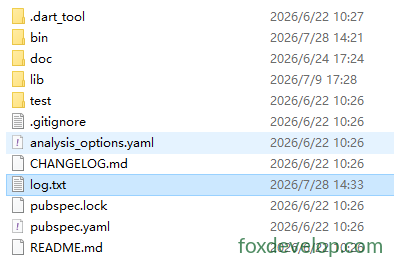
사용 가능 모드:
FileMode.write:덮어쓰기 생성FileMode.append:파일 끝에 추가FileMode.writeOnly/readWrite읽기 쓰기 모드
3. 디렉터리 순회
Directory.list()는 Stream을 반환하며 디렉터리 내 모든 파일/폴더를 순회합니다
void main() async {
  var dir = Directory("./tmp");
  try {
    var entityStream = dir.list();
    await for (FileSystemEntity entity in entityStream) {
      if (entity is File) {
        print("파일:${entity.path}");
      } else if (entity is Directory) {
        print("디렉터리:${entity.path}");
      }
    }
  } catch (e) {
    print(e);
  }
}Code language: Dart (dart)
4. 파일/디렉터리 자주 사용하는 작업
var f = File("test.txt");
await f.create();          // 파일 생성
await f.delete();          // 파일 삭제
await f.length();          // 파일 크기 바이트 단위로 가져오기

var d = Directory("data");
await d.create(recursive: true); // 다단계 디렉터리 재귀 생성
await d.delete(recursive: true);  // 디렉터리 재귀 삭제Code language: JavaScript (javascript)
HTTP 서버 HttpServer
Dart 웹 서버를 구축하고 포트를 감시하여 요청을 처리합니다.
void main() async {
  // 주소와 포트 바인딩
  HttpServer server = await HttpServer.bind("localhost", 8888);
  print("서버 실행 http://localhost:8888");

  await for (HttpRequest request in server) {
    handleRequest(request);
  }
}

void handleRequest(HttpRequest req) {
  HttpResponse res = req.response;
  if (req.uri.path == "/dart") {
    res.headers.contentType = ContentType.text;
    res.write("Hello Dart HttpServer");
  } else {
    res.statusCode = HttpStatus.notFound;
  }
  res.close(); // 응답을 반드시 닫아 데이터 전송
}Code language: JavaScript (javascript)
구체적인 예제
import 'dart:io';

void main() async {
  // 주소와 포트 바인딩
  HttpServer server = await HttpServer.bind("localhost", 8888);
  print("서버 실행 http://localhost:8888");
  print("접속 주소:http://localhost:8888/dart");

  await for (HttpRequest request in server) {
    handleRequest(request);
  }
}

void handleRequest(HttpRequest req) {
  HttpResponse res = req.response;
  // 요청 경로 판단
  if (req.uri.path == "/dart") {
    res.headers.contentType = ContentType.text;
    res.write("Hello Dart HttpServer");
  } else if (req.uri.path == "/") {
    res.headers.contentType = ContentType.text;
    res.write("메인 페이지! /dart로 접속하세요");
  } else {
    res.statusCode = HttpStatus.notFound;
    res.write("404 Not Found");
  }
  res.close(); // 응답을 반드시 닫아 데이터 전송
}Code language: Dart (dart)
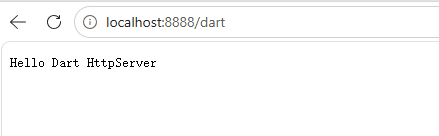
브라우저에서 localhost:8888/dart 접속
HTTP 클라이언트 HttpClient
공식 중요 권장 사항:HttpClient를 직접 사용하지 마십시오!
HttpClient내부 구현이 dart:io에 종속되어 크로스플랫폼 호환성이 낮습니다. 서비스 개발 시 서드파티 패키지package:http사용을 우선 고려하세요.
이해용 간단 예시:
void main() async {
  var client = HttpClient();
  try {
    var req = await client.getUrl(Uri.parse("https://foxdevelop.com"));
    var res = await req.close();
    await for(var chunk in res) {
      // 응답 바이트 스트림 수신
    }
  } finally {
    client.close();
  }
}Code language: Dart (dart)
아래는 실행 가능한 예제
import 'dart:io';
import 'dart:convert';

void main() async {
  var client = HttpClient();
  try {
    var req = await client.getUrl(Uri.parse("https://foxdevelop.com"));
    var res = await req.close();

    // 모든 바이너리 조각 수집
    List<int> allBytes = [];
    await for (var chunk in res) {
      allBytes.addAll(chunk);
    }
    // 바이트 배열을 UTF8 HTML 문자열로 변환
    String html = utf8.decode(allBytes);
    print(html);
  } finally {
    client.close();
  }
}Code language: Dart (dart)
dart:io
Previous: dart:core 핵심 라이브러리
Next: dart:async 라이브러리