引用
import 'dart:io';Code language: JavaScript (javascript)注意
dart:io 不能在 Web 平台使用!
仅支持:Dart命令行程序、服务端、非Web Flutter应用(Android/iOS/Windows/macOS/Linux)。
文件与目录操作
FileSystemEntity 是父类,File(文件)、Directory(目录)继承它。
1. 读取文件
一次性读取(适合小文件)
void main() async {
  var file = File("config.txt");
  try {
    // 一次性读取完整字符串(UTF-8)
    String content = await file.readAsString();
    // 一次性读取,按行分割为字符串数组
    List<String> lines = await file.readAsLines();
    // 一次性读取二进制字节 List<int>
    List<int> bytes = await file.readAsBytes();
  } catch (e) {
    print("读取失败:$e");
  }
}Code language: Dart (dart)
完整例子
请提前创建一个txt文件,修改下面的txt文件路径为你创建的文件路径D:/dartdemo/firstdart/bin/config.txt
import 'dart:io';

void main() async {
  var file = File("D:/dartdemo/firstdart/bin/config.txt");
  try {
    // 一次性读取完整字符串(UTF-8)
    String content = await file.readAsString();
    print("===== readAsString 完整文本 =====");
    print(content);

    // 一次性读取,按行分割为字符串数组
    List<String> lines = await file.readAsLines();
    print("\n===== readAsLines 按行读取 =====");
    for (var line in lines) {
      print(line);
    }

    // 一次性读取二进制字节 List<int>
    List<int> bytes = await file.readAsBytes();
    print("\n===== readAsBytes 字节数组(前30个) =====");
    print(bytes.take(30).toList());
    print("文件总字节数:${bytes.length}");
  } catch (e) {
    print("读取失败:$e");
  }
}Code language: Dart (dart)
执行结果
D:\dartdemo\firstdart>dart run
Building package executable...
Built firstdart:firstdart.
===== readAsString 完整文本 =====
The minimal requirements for a library are:

pubspec file
The pubspec.yaml file for a library is the same as for an application package
—there is no special designation to indicate that the package is a library.

lib directory
As you might expect, the library code lives under the lib directory and is public to other packages. You can create any hierarchy under lib, as needed. By convention, implementation code is placed under lib/src. Code under lib/src is considered private; other packages should never need to import src/.... To make APIs under lib/src public, you can export lib/src files from a file that's directly under lib.

===== readAsLines 按行读取 =====
The minimal requirements for a library are:

pubspec file
The pubspec.yaml file for a library is the same as for an application package
—there is no special designation to indicate that the package is a library.

lib directory
As you might expect, the library code lives under the lib directory and is public to other packages. You can create any hierarchy under lib, as needed. By convention, implementation code is placed under lib/src. Code under lib/src is considered private; other packages should never need to import src/.... To make APIs under lib/src public, you can export lib/src files from a file that's directly under lib.

===== readAsBytes 字节数组(前30个) =====
[84, 104, 101, 32, 109, 105, 110, 105, 109, 97, 108, 32, 114, 101, 113, 117, 105, 114, 101, 109, 101, 110, 116, 115, 32, 102, 111, 114, 32, 97]
文件总字节数:644Code language: PHP (php)
流式读取
大文件推荐,边读边处理
搭配 dart:convert 的解码器,返回 Stream<List<int>>
import 'dart:io';
import 'dart:convert';

void main() async {
  var file = File("D:/dartdemo/firstdart/bin/config.txt");
  Stream<List<int>> stream = file.openRead();

  var lineStream = stream
      .transform(utf8.decoder)          // 字节流 → 字符串流
      .transform(const LineSplitter());  // 字符串 → 逐行

  try {
    await for (var line in lineStream) {
      print(line);
    }
    print("读取完成");
  } catch (e) {
    print(e);
  }
}Code language: Dart (dart)
执行结果
D:\dartdemo\firstdart>dart run
Building package executable...
Built firstdart:firstdart.
The minimal requirements for a library are:

pubspec file
The pubspec.yaml file for a library is the same as for an application package
—there is no special designation to indicate that the package is a library.

lib directory
As you might expect, the library code lives under the lib directory and is public to other packages.
You can create any hierarchy under lib, as needed. By convention, implementation code is placed under lib/src.
 Code under lib/src is considered private; other packages should never need to import src/.... To make APIs under lib/src public,
 you can export lib/src files from a file that's directly under lib.
读取完成Code language: PHP (php)
2. 写入文件(IOSink)
import 'dart:io';

void main() async {
  var logFile = File("log.txt");
  // FileMode.write:覆盖原有内容(默认)
  var sink = logFile.openWrite(mode: FileMode.write);

  sink.write("日志内容\n");
  sink.add([48,49]); // 写入二进制字节

  await sink.flush(); // 刷新缓冲区
  await sink.close(); // 必须关闭

  // 追加写入模式
  // var sink = logFile.openWrite(mode: FileMode.append);
}Code language: Dart (dart)
执行后
项目目录下面 D:\dartdemo\firstdart 多了一个log.txt
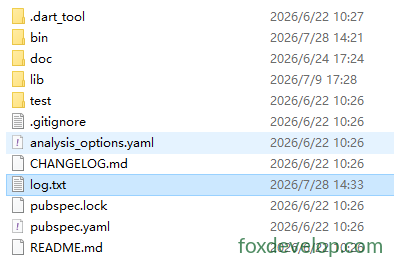
模式可选:
FileMode.write:覆盖创建FileMode.append:尾部追加FileMode.writeOnly/readWrite读写模式
3. 遍历目录
Directory.list() 返回 Stream,遍历目录内所有文件/文件夹
void main() async {
  var dir = Directory("./tmp");
  try {
    var entityStream = dir.list();
    await for (FileSystemEntity entity in entityStream) {
      if (entity is File) {
        print("文件:${entity.path}");
      } else if (entity is Directory) {
        print("目录:${entity.path}");
      }
    }
  } catch (e) {
    print(e);
  }
}Code language: Dart (dart)
4. 文件/目录常用操作
var f = File("test.txt");
await f.create();          // 创建文件
await f.delete();          // 删除文件
await f.length();          // 获取文件字节大小

var d = Directory("data");
await d.create(recursive: true); // 递归创建多级目录
await d.delete(recursive: true);  // 递归删除目录Code language: JavaScript (javascript)
HTTP 服务端 HttpServer
用来搭建 Dart Web服务,监听端口,处理请求。
void main() async {
  // 绑定地址与端口
  HttpServer server = await HttpServer.bind("localhost", 8888);
  print("服务启动 http://localhost:8888");

  await for (HttpRequest request in server) {
    handleRequest(request);
  }
}

void handleRequest(HttpRequest req) {
  HttpResponse res = req.response;
  if (req.uri.path == "/dart") {
    res.headers.contentType = ContentType.text;
    res.write("Hello Dart HttpServer");
  } else {
    res.statusCode = HttpStatus.notFound;
  }
  res.close(); // 必须关闭响应,发送数据
}Code language: JavaScript (javascript)
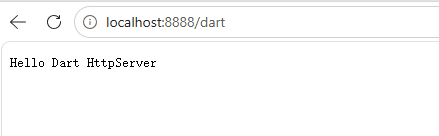
具体例子
import 'dart:io';

void main() async {
  // 绑定地址与端口
  HttpServer server = await HttpServer.bind("localhost", 8888);
  print("服务启动 http://localhost:8888");
  print("访问地址:http://localhost:8888/dart");

  await for (HttpRequest request in server) {
    handleRequest(request);
  }
}

void handleRequest(HttpRequest req) {
  HttpResponse res = req.response;
  // 判断请求路径
  if (req.uri.path == "/dart") {
    res.headers.contentType = ContentType.text;
    res.write("Hello Dart HttpServer");
  } else if (req.uri.path == "/") {
    res.headers.contentType = ContentType.text;
    res.write("首页!请访问 /dart");
  } else {
    res.statusCode = HttpStatus.notFound;
    res.write("404 Not Found");
  }
  res.close(); // 必须关闭响应发送数据
}Code language: Dart (dart)
浏览器访问 localhost:8888/dart
HTTP 客户端 HttpClient
官方重要建议:尽量不要直接使用 HttpClient!
HttpClient底层实现绑定dart:io,跨平台兼容性差。业务优先使用第三方包package:http。
简单示例仅作了解:
void main() async {
  var client = HttpClient();
  try {
    var req = await client.getUrl(Uri.parse("https://foxdevelop.com"));
    var res = await req.close();
    await for(var chunk in res) {
      // 接收响应字节流
    }
  } finally {
    client.close();
  }
}Code language: Dart (dart)
下面是可以执行的例子
import 'dart:io';
import 'dart:convert';

void main() async {
  var client = HttpClient();
  try {
    var req = await client.getUrl(Uri.parse("https://foxdevelop.com"));
    var res = await req.close();

    // 收集所有二进制片段
    List<int> allBytes = [];
    await for (var chunk in res) {
      allBytes.addAll(chunk);
    }
    // 字节数组转UTF8网页HTML
    String html = utf8.decode(allBytes);
    print(html);
  } finally {
    client.close();
  }
}Code language: Dart (dart)
Previous: dart:core 核心库
Next: dart:async 库