前回のレッスンではXAMLにボタンを追加し、クリックイベントを作成しました。最初に実装した機能は、ボタンをクリックするとボタン内のテキストを変更するというものです。
まずXAMLファイルに戻り、ボタンに x:Name="btnAdd" と名前を付けます。これにより、C++のバックエンドコードからボタンオブジェクトを操作できるようになります。
<Grid>
    <Button x:Name="btnAdd" Content="Click Me" HorizontalAlignment="Center" VerticalAlignment="Center" Click="OnButtonClick"/>
</Grid>Code language: HTML, XML (xml)
次にMainWindow.xaml.cpp内のOnButtonClick実装関数へ移動します。
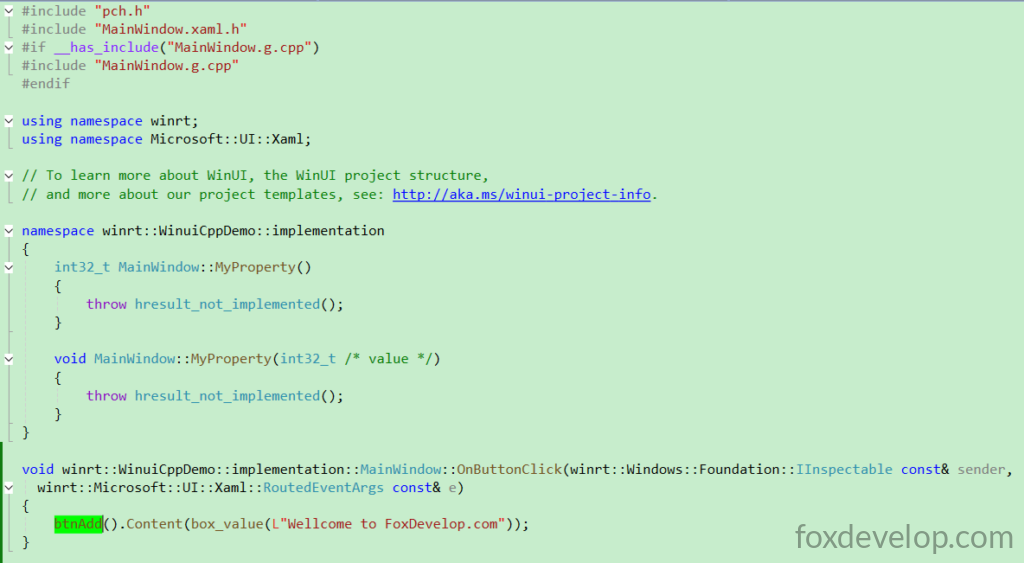
上記で定義したbtnAddを通じて、ボタンオブジェクトを直接取得可能です。
クリック時にContentプロパティを「Welcome to FoxDevelop.com」に書き換えます。
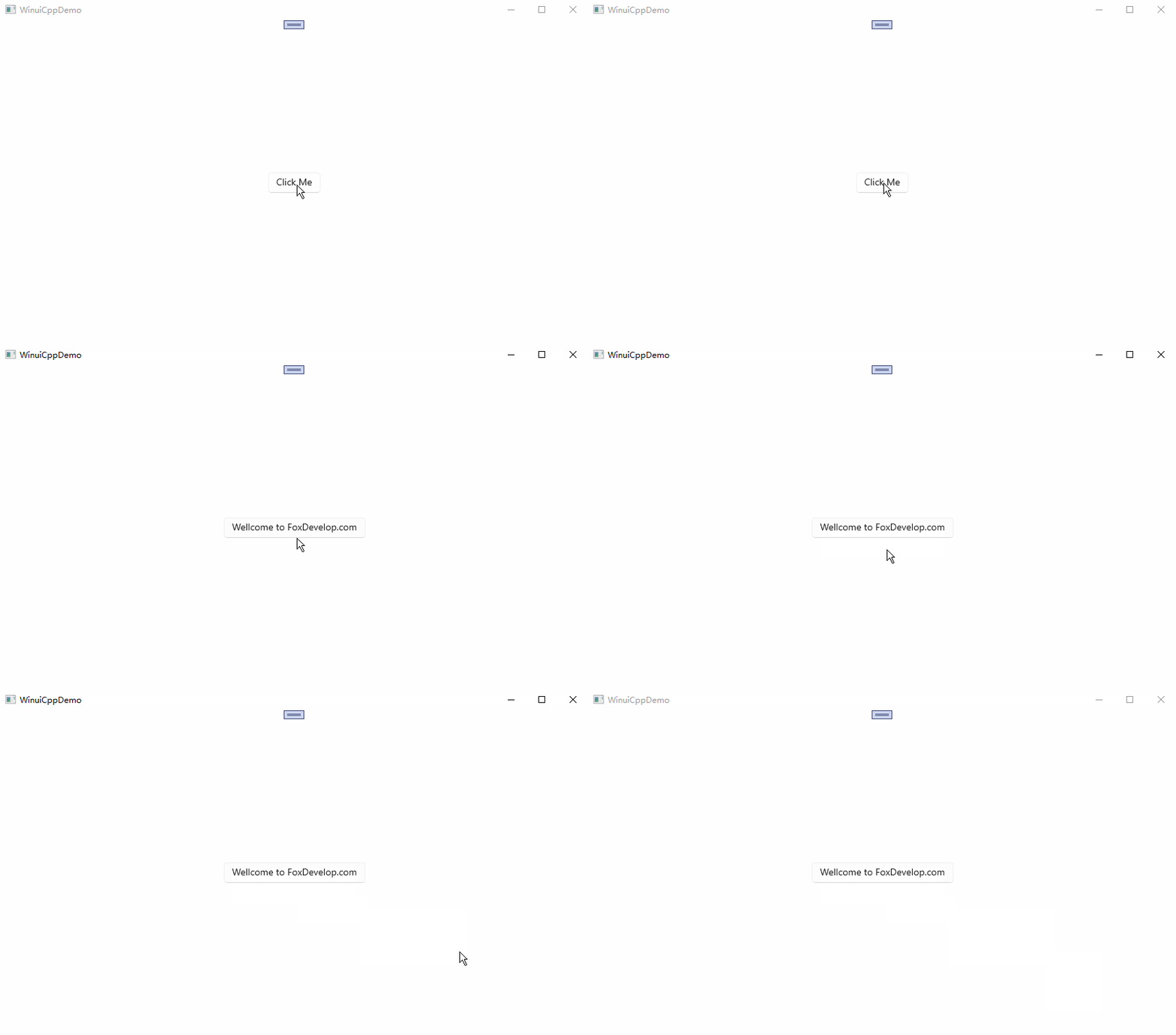
ここでプログラムを実行して動作を確認します。
void winrt::WinuiCppDemo::implementation::MainWindow::OnButtonClick(winrt::Windows::Foundation::IInspectable const& sender,
winrt::Microsoft::UI::Xaml::RoutedEventArgs const& e)
{
    btnAdd().Content(box_value(L"Welcome to FoxDevelop.com"));
}
Code language: C++ (cpp)
クリック操作でUIのプロパティを変更できることが確認できました。次に、クリック回数を記録する整数型プロパティを作成し、クリックするたびに値をインクリメントします。このプロパティをXAMLのテキストブロックにバインドすることで、UI側が自動的に最新の数値を表示するようにします。
プロパティバインディング
過去のサンプルコードが干渉するのを防ぐため、新規に空のプロジェクトを作成して練習することを推奨します。
以下の手順で作業を進めます。
XAMLを編集し、TextBlockを追加します。
<?xml version="1.0" encoding="utf-8"?>
<Window
    x:Class="WinuiDemo.MainWindow"
    xmlns="http://schemas.microsoft.com/winfx/2006/xaml/presentation"
    xmlns:x="http://schemas.microsoft.com/winfx/2006/xaml"
    xmlns:local="using:WinuiDemo"
    xmlns:d="http://schemas.microsoft.com/expression/blend/2008"
    xmlns:mc="http://schemas.openxmlformats.org/markup-compatibility/2006"
    mc:Ignorable="d"
    Title="WinuiDemo">

    <Grid>
        <TextBlock Text="{x:Bind MyProperty}" FontSize="24"/>
    </Grid>
</Window>
Code language: C++ (cpp)
次に.cppファイル内で、MyPropertyに数値を返す処理を記述します。
namespace winrt::WinuiDemo::implementation
{
    int32_t MainWindow::MyProperty()
    {
        return 100;
    }

    void MainWindow::MyProperty(int32_t /* value */)
    {
        throw hresult_not_implemented();
    }
}
Code language: C++ (cpp)
この状態でビルド・実行を行います。
開発環境によっては下記のエラーが発生し、ビルド処理が途中で止まってしまう場合があります。
Build started at 14:42...
1>------ Build started: Project: WinuiCppDemo, Configuration: Debug x64 ------
1>WindowsAppSDKMLDeploymentMode=Framework
1>MainWindow.xaml.cpp
表示されるエラーメッセージは以下の通りです。
#error directive: "C++/WinRT no longer supports pre-standardization coroutines.
If you use co_await, switch to /await:strict or upgrade to C++20. If you do not,
 remove /await from the compiler flags."Code language: PHP (php)
C++20へアップグレード
WinUI 3とC++/WinRTは標準規格に準拠したコルーチンを基盤としており、C++20に更新することで今後の保守作業が容易になります。
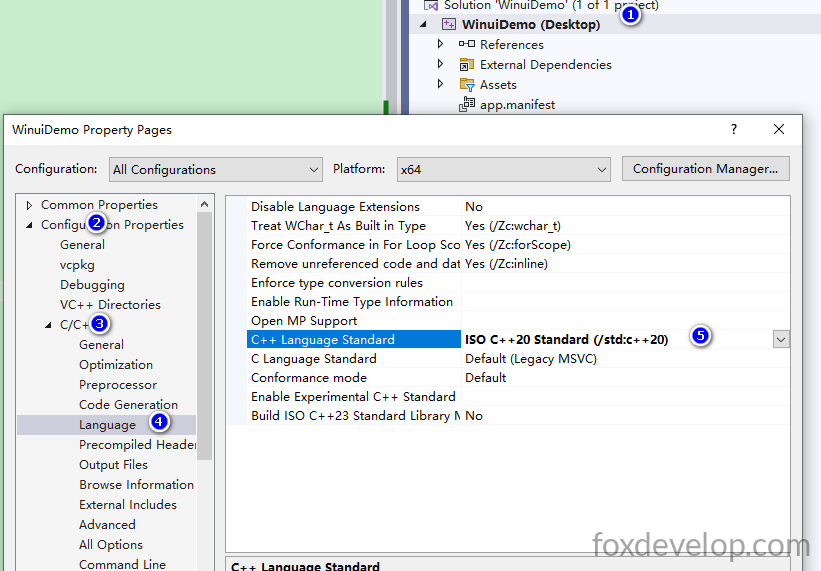
プロジェクトプロパティ → C/C++ → 言語 → C++言語標準 の項目を開き、C++20 を選択します。
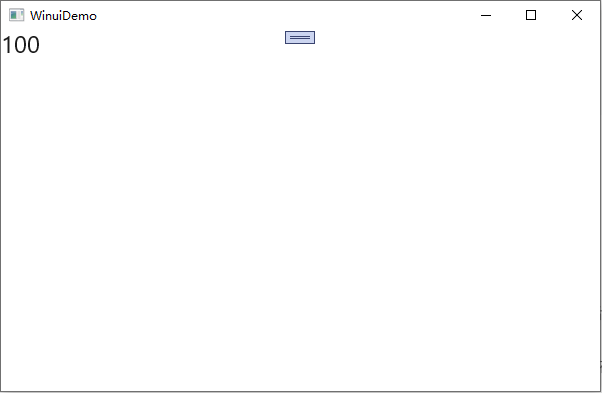
再度ビルドを実行します。処理に非常に長い時間を要し、D:\Demos\WinuiDemo\WinuiDemo\x64\Debug配下に1.3GBの中間ファイルが生成されるためビルドが遅くなります。所要時間はPCのスペックによって変動します。ビルド完了後アプリを起動すると、画面に数値100が表示されます。
int32_t MainWindow::MyProperty()
    {
        return 100;
    }Code language: C++ (cpp)
画面にはこのプロパティが返す値が出力されます。
ボタンクリックによるカウンター加算機能の実装
次にボタンを追加し、クリックイベントを紐付けます。
<?xml version="1.0" encoding="utf-8"?>
<Window
    x:Class="WinuiDemo.MainWindow"
    xmlns="http://schemas.microsoft.com/winfx/2006/xaml/presentation"
    xmlns:x="http://schemas.microsoft.com/winfx/2006/xaml"
    xmlns:local="using:WinuiDemo"
    xmlns:d="http://schemas.microsoft.com/expression/blend/2008"
    xmlns:mc="http://schemas.openxmlformats.org/markup-compatibility/2006"
    mc:Ignorable="d"
    Title="WinuiDemo">

    <StackPanel Orientation="Vertical">
        <TextBlock Text="{x:Bind MyProperty}" FontSize="24"/>
        <Button Content="Click Me" Click="Button_Click"/>
    </StackPanel>
</Window>
Code language: HTML, XML (xml)
Click=”Button_Click”内のButton_Clickにカーソルを合わせ、キーボードのF12キーを押すと、.hファイルと.cppファイルにイベント関数が自動生成されます。
void Button_Click(winrt::Windows::Foundation::IInspectable const& sender, winrt::Microsoft::UI::Xaml::RoutedEventArgs const& e);
記述方法は前述のサンプルと同じです。次に、クリック回数を保存するためのint32_t型のプライベートメンバ変数を定義します。
まずMainWindow.xaml.hヘッダーファイルに、カウント値を保持する整数プロパティを追加します。
.idlファイルに記述するプロパティは外部からアクセスするためのインターフェースに過ぎず、実際のデータを保管する変数は自身で定義する必要があります。
IDLに
Int32 MyPropertyと記述すると、クラス外部に読み書き可能なInt32プロパティが公開されます。コンパイラが自動的にGet/Set仮想関数とプロパティ変更イベント
MyPropertyChangedを生成します。
int32_t m_myPropValue = 0; // プライベート変数、クリック回数を保存!Code language: C++ (cpp)#pragma once
#include "MainWindow.g.h"
namespace winrt::WinuiDemo::implementation
{
struct MainWindow : MainWindowT<MainWindow>
{
private:
int32_t m_myPropValue = 0; // MyPropertyの値を保持
public:
MainWindow()
{
// Xamlオブジェクトはコンストラクタ内でInitializeComponentを呼び出してはいけません。
// 詳細:https://github.com/microsoft/cppwinrt/tree/master/nuget#initializecomponent
}
//getter・setter関数
int32_t MyProperty();
void MyProperty(int32_t value);
//クリックイベント関数
void Button_Click(winrt::Windows::Foundation::IInspectable const& sender, winrt::Microsoft::UI::Xaml::RoutedEventArgs const& e);
};
}
namespace winrt::WinuiDemo::factory_implementation
{
struct MainWindow : MainWindowT<MainWindow, implementation::MainWindow>
{
};
}
Code language: C++ (cpp)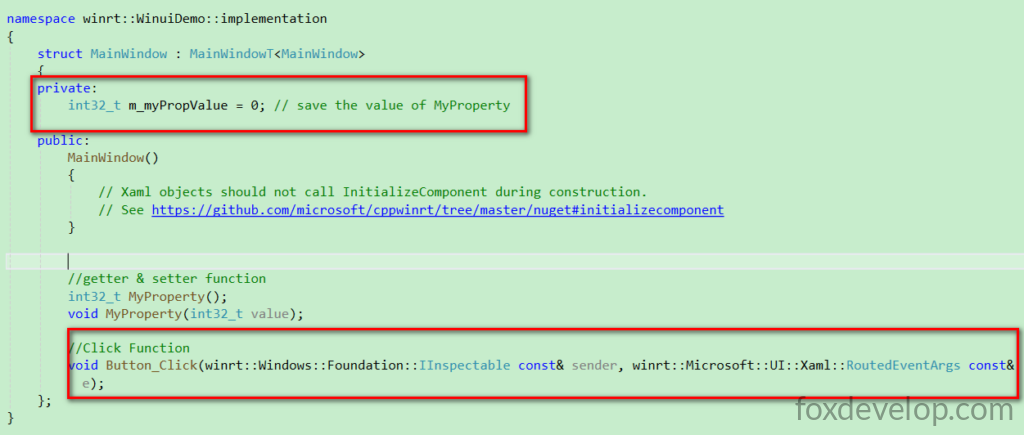
次に.cppファイル内のプロパティ読み書き関数を修正します。クリックイベント内でMyProperty()から現在の値を取得して+1し、再度代入します。ここで最も重要な点が一つあります。
this->Bindings->Update(); この一行は絶対に省略してはいけません。このコードがバインド先のすべてのUI要素に再描画を通知する役割を持ち、記述しないと画面の数値が更新されません。
#include "pch.h"
#include "MainWindow.xaml.h"
#if __has_include("MainWindow.g.cpp")
#include "MainWindow.g.cpp"
#endif

using namespace winrt;
using namespace Microsoft::UI::Xaml;

// WinUI、WinUIプロジェクト構成、テンプレートに関する詳細はこちら:http://aka.ms/winui-project-info.

namespace winrt::WinuiDemo::implementation
{
    int32_t MainWindow::MyProperty()
    {
        return m_myPropValue; // m_myPropValueの値を取得
    }

    void MainWindow::MyProperty(int32_t  value)
    {
        m_myPropValue = value; // m_myPropValueに値を代入
        this->Bindings->Update(); // ページ内のすべてのx:Bindバインディングを強制更新、UI表示を反映
    }
}

void winrt::WinuiDemo::implementation::MainWindow::Button_Click(winrt::Windows::Foundation::IInspectable const& sender,
 winrt::Microsoft::UI::Xaml::RoutedEventArgs const& e)
{
    MyProperty(MyProperty() + 1);//m_myPropValueの値を更新、1加算
}
Code language: C++ (cpp)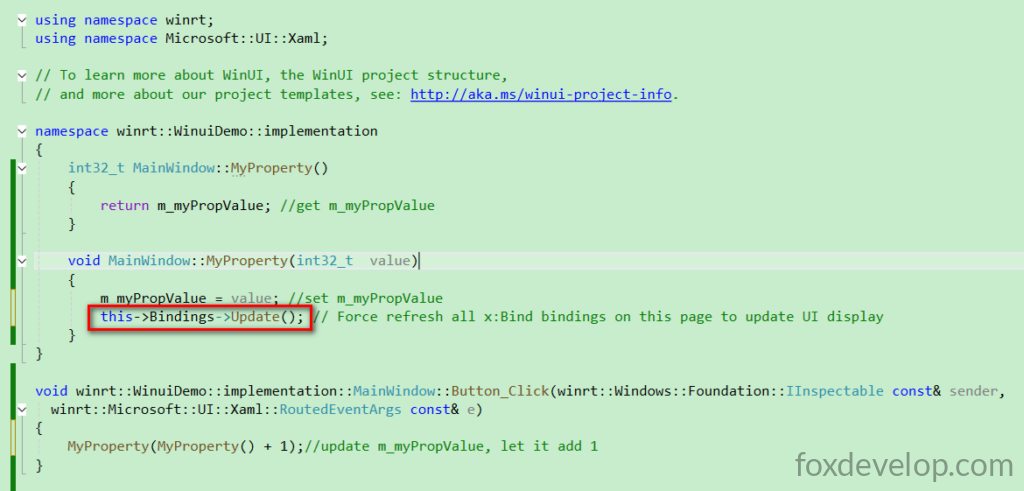
ここで再度ビルド・実行を行います。
筆者の環境ではビルドに非常に長い時間を要しました。PCのスペックによって所要時間は変わります。
Build started at 15:29...
1>------ Build started: Project: WinuiDemo, Configuration: Debug x64 ------
1>WindowsAppSDKMLDeploymentMode=Framework
1>App.xaml.cpp
1>MainWindow.xaml.cpp
C++のビルド処理では膨大な中間ファイルが生成され、筆者の環境では10分以上ビルドが完了しませんでした。
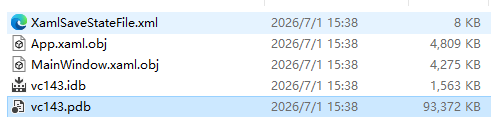
ローカル時刻15:40にようやくビルドが完了しアプリウィンドウが起動しました。全体で11分もかかり、途中で処理がフリーズしたと思いVisual Studioを閉じそうになりました。
最終的な実行結果
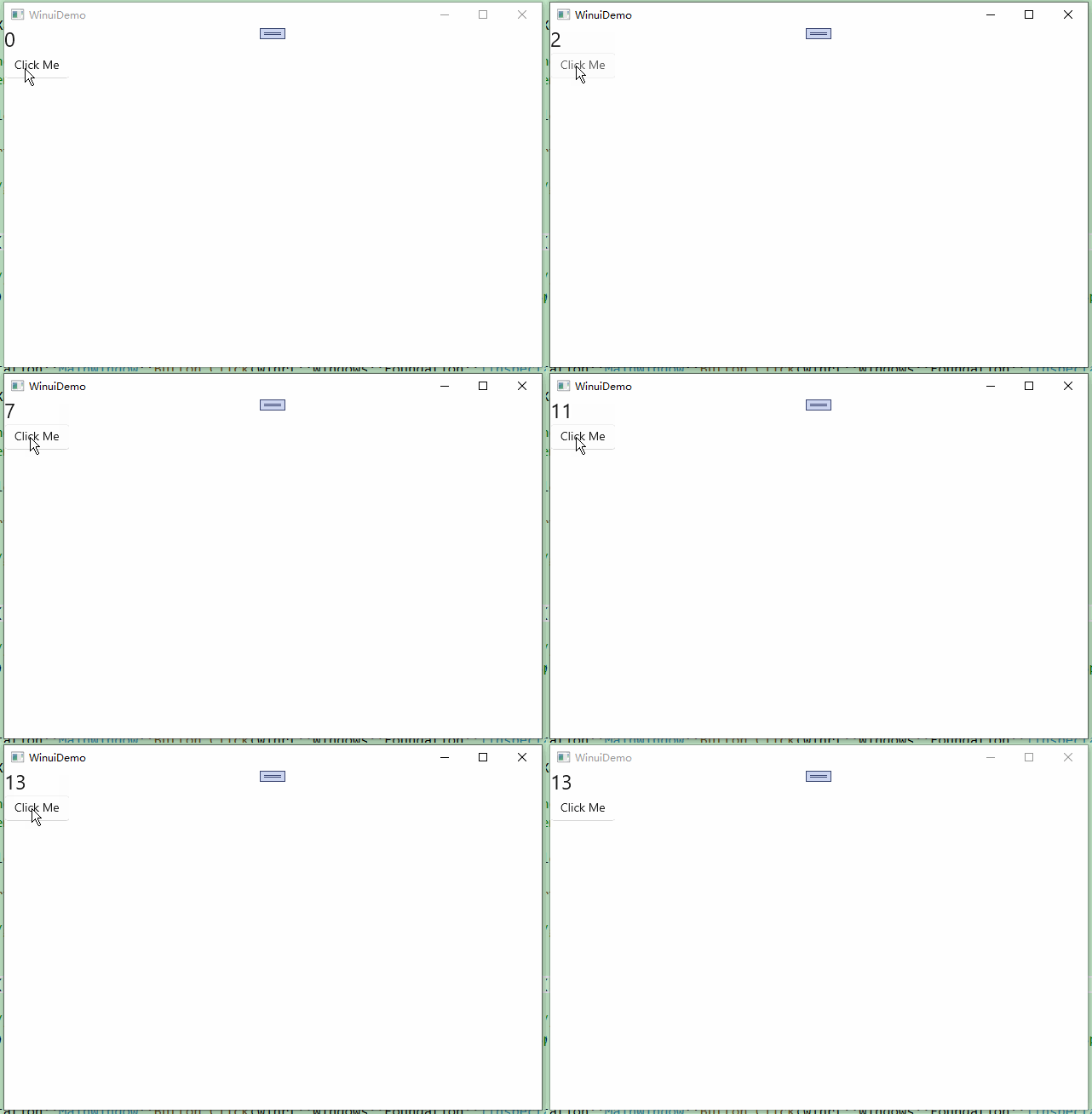
今回のレッスンはここまでです。今回学んだ内容は2点です。1つ目はボタンクリック後にバックエンドロジックを実行し画面内容を変更する方法、2つ目はバックエンドのプロパティを変更するとUIが自動的に最新の値に更新されるプロパティバインディングの仕組みです。