Literally, NativePHP stands for native PHP, meaning PHP applications that run locally. Traditionally, PHP has long been tied to web development, with all its code executing on remote servers. NativePHP flips this setup entirely. Developers can now use it to build native desktop software as well as mobile apps for both Android and iOS.
You can check out its official website here:Baking Delicious Native Apps – NativePHP
So how does NativePHP work?
It’s not all that complicated, and the core idea is common across many apps. Regular PHP relies on an interpreter hosted on a remote server. NativePHP bundles this PHP runtime directly inside your final EXE or app installation file. The team behind the project has also fine-tuned the included runtime for better performance.
Below is the official diagram:
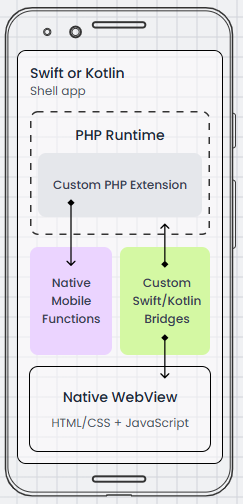
NativePHP packs the full PHP runtime together with your app. It wraps the whole setup with Swift or Kotlin for mobile apps, or Electron for desktop software. The platform uses dedicated bridge connections to access hardware features and displays your app’s interface through a built-in native web view. You can keep coding in regular PHP; just add a few extensions to connect with native device functions. The idea is really simple: all your PHP code runs locally right on the user’s device.
Looking at the diagram on the left, every NativePHP app is wrapped in either Swift or Kotlin shell code, with a full PHP runtime and custom PHP extensions stored inside.
The Custom PHP Extension marked on the chart is the key piece that lets PHP tap into native system features, basically a custom-made PHP plugin built exclusively for NativePHP. It takes requests sent from PHP and passes them to underlying Swift or Kotlin bridge code, which runs the actual system commands. Any data sent back by the system then gets returned to PHP through this same extension.
This custom extension is essential. Without it, NativePHP wouldn’t exist, and we couldn’t build local applications using PHP at all.
Users view all content via Native WebView, a lightweight built-in browser engine embedded inside your app to load PHP and HTML pages. It’s not full Chrome, just a browser component packaged into the finished application.
Alright, you should have a basic understanding of NativePHP now. We’ll kick things off by learning how to build mobile apps, then move on to desktop development later on.