Cascade notation comes in two forms: .. and ?..
It lets you chain multiple property assignments and method calls on the same object consecutively. This eliminates the need for temporary variables and produces cleaner, more readable code.
Cascade notation is not an operator — it is Dart-specific syntactic sugar.
1. Basic Cascade ..
Use this only when you are certain the object is never null
Every operation after .. targets the original root object at the start of the chain, ignoring any return value from intermediate methods.
Official Flutter Example
import 'dart:ui';

void main() {
  // Cascade syntax version
  var paint = Paint()
    ..color = Colors.black
    ..strokeCap = StrokeCap.round
    ..strokeWidth = 5.0;

  // Equivalent expanded code (no cascades, repeated variable name)
  var paint2 = Paint();
  paint2.color = Colors.black;
  paint2.strokeCap = StrokeCap.round;
  paint2.strokeWidth = 5.0;
}Code language: JavaScript (javascript)
This example imports the dart:ui library, which belongs to Flutter and will only run inside a Flutter project. Since we’re covering pure Dart fundamentals here, focus only on understanding the cascade syntax itself. Below is a demo using the built-in pure Dart class StringBuffer instead:
StringBuffer is a built-in utility class for constructing and manipulating strings.
void main() {
  // Cascade syntax
  var sb = StringBuffer()
    ..write("Hello ")
    ..write("FoxDevelop.com ")
    ..writeln("Cascade");

  print(sb.toString());

  // Equivalent code without cascades
  var sb2 = StringBuffer();
  sb2.write("Hello ");
  sb2.write("FoxDevelop.com ");
  sb2.writeln("Cascade");
  print(sb2.toString());
}Code language: PHP (php)
Program Output
D:\dartdemo\firstdart>dart run
Building package executable...
Built firstdart:firstdart.
Hello FoxDevelop.com Cascade

Hello FoxDevelop.com CascadeCode language: CSS (css)
The .. syntax works perfectly for objects like paint, sb, and sb2 that you guarantee will never be null — it lets you set properties without repeating the object variable name. However, if the object is null, this syntax will throw a runtime error immediately.
void main() {
  var sb = null
    ..write("Hello ")
    ..write("FoxDevelop.com ")
    ..writeln("Cascade");

  print(sb.toString());
}Code language: JavaScript (javascript)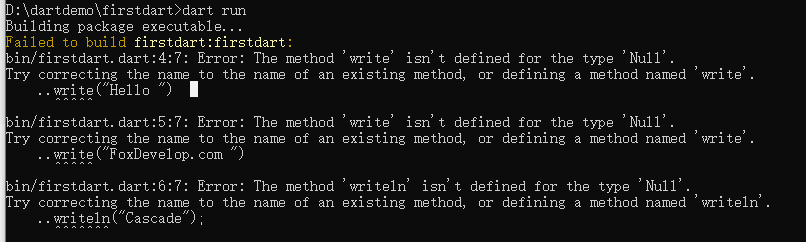
This is where the second cascade variant comes in to solve the null safety issue.
2. Null-Safe Cascade ?..
If the object is null, the entire cascade chain will be skipped entirely to avoid null reference exceptions. You only write ?.. at the very start of the chain; all subsequent chain segments use regular ...
void main() {
  var sb = null
    ?..write("Hello ")
    ..write("FoxDevelop.com ")
    ..writeln("Cascade");

  print(sb.toString());
}Code language: Dart (dart)
Notice the leading question mark in ?..write("Hello ")
This code compiles and runs without any errors.
D:\dartdemo\firstdart>dart run
Building package executable...
Built firstdart:firstdart.
nullCode language: CSS (css)
No runtime crash occurs.
Below is an official web-based example to demonstrate standard syntax formatting:
// Start chain with ?.., continue regular .. afterward
document.querySelector('#confirm')
  ?..textContent = 'Confirm'
  ..classList.add('important')
  ..onClick.listen((e) => window.alert('Confirmed!'))
  ..scrollIntoView();

// Equivalent expanded null-safe implementation
final button = document.querySelector('#confirm');
button?.textContent = 'Confirm';
button?.classList.add('important');
button?.onClick.listen((e) => window.alert('Confirmed!'));
button?.scrollIntoView();Code language: JavaScript (javascript)
Nested Cascades
final addressBook = (AddressBookBuilder()
      ..name = 'jenny'
      ..email = 'jenny@example.com'
      // Independent inner cascade for PhoneNumberBuilder instance
      ..phone = (PhoneNumberBuilder()
            ..number = '415-555-0100'
            ..label = 'home')
          .build())
    .build();Code language: PHP (php)
The phone field accepts a new PhoneNumberBuilder instance built with its own separate cascade chain.
Key Restrictions & Notes
Cascade notation can only be applied to object instances. You cannot chain after a method that returns void — this will trigger a compile error.
var sb = StringBuffer();
sb.write('foo') // write() returns void
  ..write('bar'); // Error: void type has no write() methodCode language: Dart (dart)
In this snippet, we initialize a standalone StringBuffer variable named sb.
The line ends with a semicolon after calling
sb.write(). Sincewrite()returnsvoid, you cannot attach another cascade..write()afterward — cascades only work when the preceding expression evaluates to a valid object instance.
Correct implementation:
var sb = StringBuffer()
  ..write('foo')
  ..write('bar');Code language: Dart (dart)
Summary of Cascade Rules
..always targets the root object at the start of the chain, ignoring all intermediate method return values. This pattern matches method chaining seen in other languages such as JavaScript.?..is the null-safe cascade variant to avoid null reference errors. Only place?..at the very start of a chain: once the first link executes successfully, the object is guaranteed non-null, so subsequent segments use plain...- Nested cascades are fully supported.
- You cannot append cascade syntax after any function that returns
void. ..is not a formal operator — it is exclusive Dart syntactic sugar.
What Is Syntactic Sugar?
Syntactic sugar refers to lightweight shorthand syntax provided by a programming language for identical underlying logic. It does not add new core functionality to the language; the compiler or interpreter automatically desugars these shorthand forms into equivalent standard base code before generating intermediate executable code.