What the Dart SDK Does
The Dart SDK ships standard libraries and a full suite of command-line utilities for building web apps, CLI tools and server-side Dart applications. Official support only covers the latest stable SDK release; you can check the official support policy to learn about version lifecycles.
Wondering why Windows, Android and other platforms aren’t listed here? Those targets require the Flutter framework. If you’re interested, head over to our Flutter tutorials for more details.
Note: If you already have the Flutter SDK installed, you don’t need a separate Dart installation — Flutter comes bundled with a complete Dart SDK out of the box.
System Compatibility Requirements
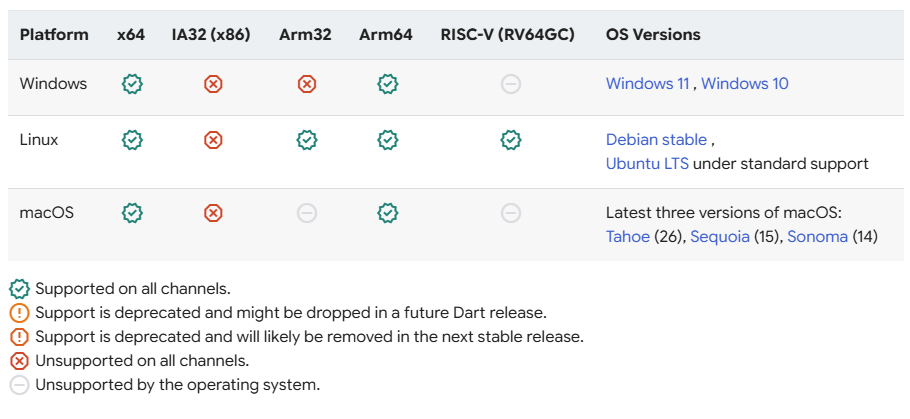
Dart works across Windows, Linux and macOS, with support for hardware architectures including x64 and Arm64. Every OS has a defined minimum supported release, and several older architectures and operating systems are being phased out over time.
The architectures and platform versions below let you write and run Dart code.
SDK Download & Installation Options
The official project offers multiple installation approaches:
- System package managers — see the official guide at Get the Dart SDK
- Official Dart Docker images
- Install Flutter (includes Dart built-in) — follow our dedicated guide: Flutter Install – FoxDevelop
- Manual setup via archive zip files from the archive page (this is the method we’ll use in this guide)
- Build Dart from source code
Dart Release Channel Differences
Breakdown of the Four Release Channels (Windows Example)
1. Stable Channel
- Purpose: Fully tested builds intended exclusively for production environments
- Current version: 3.12.2, released June 9, 2026
- Windows x64 / ARM64 installers available, paired with verification hashes and matching API documentation
2. Beta Channel
- Purpose: Preview builds ahead of stable releases, used for early feature adoption and compatibility testing. Not approved for live production workloads
- Current version: 3.13.0-167.1.beta, released June 4, 2026
- Windows installers for both architectures are provided alongside official docs
3. Dev Channel
- Purpose: Early access to the newest features, though these builds contain numerous bugs. Not suitable for production use
- Current version: 3.13.0-215.0.dev, released June 18, 2026 (newest updates)
- Windows x64 and ARM64 packages with corresponding API docs are offered
4. Main Channel
- Purpose: Raw builds compiled straight from the repo’s main branch. They carry the latest code but the highest bug risk; only for experimental development — never deploy to production.
- Critical note: Installers from this channel lack official digital signatures. Downloads are only accessible via fixed direct URLs, with no dedicated download buttons on the archive page.
Manual SDK Installation Walkthrough
Head to the Get the Dart SDK download page. Here you can grab any specific Dart SDK version from all four channels: Stable, Beta, Dev preview and Main. Refer to the section above for an explanation of each channel.
Privacy Notice
Dart tooling sends usage metrics and crash logs to Google. By downloading the SDK, you agree to Google’s Terms of Service.
You can toggle anonymous analytics collection via CLI flags:
- Enable analytics:
dart --enable-analytics - Disable analytics:
dart --disable-analytics
We’ll use the Stable channel as our example throughout this guide.
Navigate to the official Dart SDK archive page to download your preferred platform and release version.
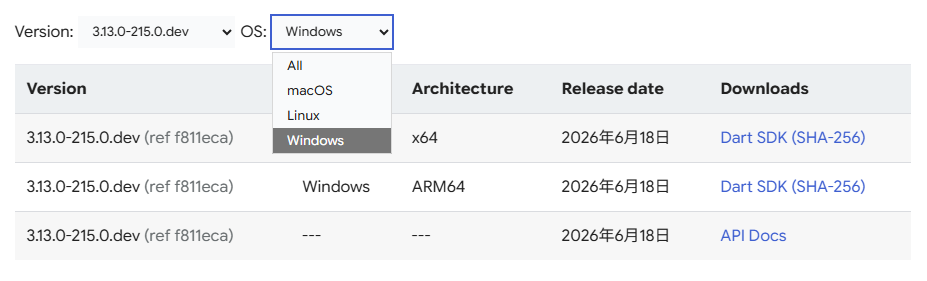
You may also manually modify the channel and version number within the template URL below:
https://storage.googleapis.com/dart-archive/channels/<stable|beta|dev>/release/<version>/sdk/dartsdk-<platform>-<architecture>-release.zipCode language: HTML, XML (xml)Replace <stable|beta|dev> with your target channel. For a stable release, use this format as shown below:
https://storage.googleapis.com/dart-archive/channels/<strong>stable</strong>/release/<strong>3.13.0-215.0.dev</strong>/sdk/dartsdk-<strong>windows</strong>-x64-release.zipCode language: HTML, XML (xml)Click here to open the archive page if you’re targeting the version listed above: Dart SDK archive
Google enforces hotlink protection on these file servers, so copying the direct URL into your browser may fail to initiate a download. If you encounter this issue, go directly to the official archive page: Dart SDK archive
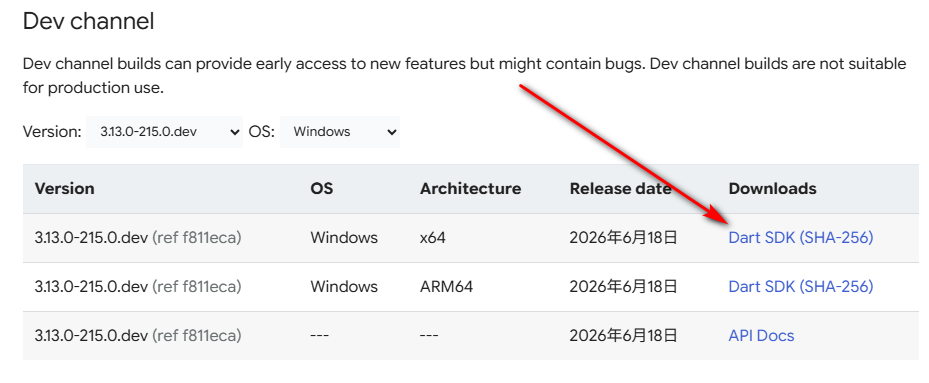
The file you’ll receive after downloading is named: dartsdk-windows-x64-release.zip
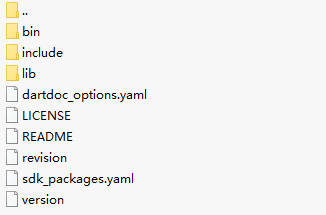
The screenshot on the left shows the root directory after extraction, while the right shows contents inside the bin folder. You’ll spot dart.exe here — this is Dart’s core compiler executable we’ll work with later.
Extract the archive to a folder of your choosing, for example:
D:\dev\dartsdkNext, add the nested bin directory path:
D:\dev\dartsdk\binAppend this path to your system PATH environment variable.
I already have Flutter installed on my machine, but the setup logic remains identical regardless.
Verify Your Dart Installation
Fully close all open CMD and PowerShell windows, launch a fresh terminal session, then run this command:
dart --version
If your terminal outputs a version number matching the screenshot above, your Dart SDK installation is complete and functional.
Optional: Disable Google Anonymous Analytics (Privacy Setting)
dart --disable-analytics