Variables
Let’s go over variables in Dart. Below is a sample showing how to create and initialize a variable:
var name = 'Jack';Code language: JavaScript (javascript)Variables hold references. The variable named name stores a reference pointing to a string object with the value “Jack”.
A reference is just a memory address. Every section of memory gets a unique address to make data storage easier—think of it like a house’s street number.
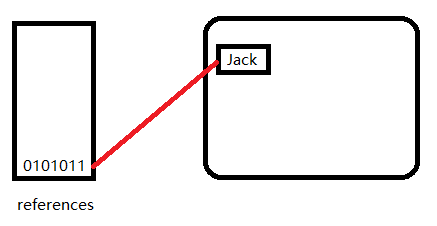
The compiler infers that name has a type of String automatically, but you can manually specify a type to override this inference. If a variable needs to hold objects of multiple different types, mark its type as Object (or use dynamic when necessary).
Object name = 'Jack';Code language: JavaScript (javascript)You can also explicitly state the type. For example, we know a person’s name is plain text, so we can directly set its type to String:
String name = 'Jack';Code language: JavaScript (javascript)Null Safety
Null safety prevents errors caused by accidentally accessing variables with a value of null—these issues are known as null dereference errors. A null dereference error triggers when you access a property or call a method on an expression that evaluates to null.
There’s one exception: no error will occur if null natively supports that property or method (such as toString() and hashCode). Thanks to null safety, the Dart compiler catches these potential bugs at compile time.
Developers with programming experience know null reference errors are extremely common. If we can eliminate these issues during compilation, program stability and robustness improve drastically.
Take this example: say you want to get the absolute value of an int variable called i. If i holds null, running i.abs() will throw a null dereference error. In many other languages, this code only crashes once the program runs; Dart’s compiler blocks this invalid call upfront to stop issues early.
Three core changes brought by null safety:
1. Nullable types: When declaring a type, you control whether it allows null values by adding a single question mark at the end of the type name.
String? name  // Nullable type: can hold null or a string value
String name   // Non-nullable type: cannot be null, only stores stringsCode language: JavaScript (javascript)
In many other programming languages, a string variable like string name can store null values. Dart does not allow this—you must use the String? type if you need to assign null.
2. Variables must be initialized before use. Nullable variables default to null, meaning they come pre-initialized automatically. Non-nullable types have no default value, forcing you to assign a value manually. Dart blocks access to uninitialized variables to avoid a whole class of bugs.
void main() {
  int year;        // Error: uninitialized non-nullable variable
  print(year);     // Compile error: year has not been assigned a value
}
Code language: Dart (dart)
The above snippet will fail to compile.
C:\dartdemo\firstdart>dart run
Building package executable...
Failed to build firstdart:firstdart:
bin/firstdart.dart:7:9: Error: Non-nullable variable 'year' must be assigned before it can be used.
  print(year);     // Compile error: year has not been assigned
        ^^^^Code language: JavaScript (javascript)
Nullable variables work differently, as shown here:
void main() {
  int? age;        // Nullable variable, defaults to null
  print(age);      // Prints null with no compile error

  //age = 18;        // Manual value assignment
  //print(age);      // Outputs 18
}Code language: JavaScript (javascript)
3. You cannot directly access properties or call methods on nullable expressions. Again, there’s an exception: you may invoke properties and methods built into the null type itself, like hashCode and toString().
void main() {
  String? name; // Nullable type, defaults to null

  // Error: Directly accessing length will trigger a compile error
  // print(name.length);

  // Allowed: Calling native null methods
  print(name.toString());  // Outputs "null"
  print(name.hashCode);    // Outputs an integer value

  // Valid: Use null safety operator
  print(name?.length);     // Outputs null, no error thrown
}Code language: PHP (php)
Default Values
Nullable variables with no manual assignment default to null. This applies even to numeric types.
This is because numbers, like every other piece of data in Dart, are objects under the hood.
void main() {
  int? lineCount;
  assert(lineCount == null);
}Code language: JavaScript (javascript)
Note:
assert()checks are ignored in production builds. During development, if the condition insideassert()fails, the program throws an exception.
With null safety enabled, non-nullable variables require initialization before use:
int lineCount = 0;Local variables don’t need to be assigned on the same line they’re declared, but they must receive a value before being read. The following code is valid, since Dart’s flow analysis confirms lineCount will always hold a non-null value when print() runs:
int lineCount;

if (weLikeToCount) {
  lineCount = countLines();
} else {
  lineCount = 0;
}

print(lineCount);

Code language: Dart (dart)
Important distinction: lineCount = countLines(); and lineCount = 0; are assignments, not usages. “Using” a variable means reading its stored value. The snippet below will throw a compile error:
void main() {
	int lineCount;

	print(lineCount);
}
Code language: Dart (dart)
This produces a compile-time error.

Top-level variables and class instance variables use lazy initialization: their assignment logic only runs the first time the variable gets accessed.
Late Modifier
The late modifier serves two primary use cases:
- Declare non-nullable variables and assign their value later in the code;
- Implement lazy variable initialization.
In most cases, Dart’s flow analysis can verify a non-nullable variable has been assigned a non-null value before it’s used. However, analysis fails for two common cases: top-level variables and class instance variables. The compiler cannot reliably confirm they receive a value, so it will reject the code by default.
If you are certain a variable will definitely be assigned before you read it, but the compiler cannot detect this, mark the variable with the late modifier to suppress the error:
In the example below, description is a top-level variable. The compiler may not detect its assignment, but if you guarantee it will always be set, use the late modifier:
late String description;

void main() {
  description = 'Feijoada!';
  print(description);
}
Code language: Dart (dart)
Warning
If you declare a
latevariable and never assign a value to it, accessing the variable will throw a runtime exception.
If you assign an initial value alongside a late declaration, that initialization logic only executes the first time the variable is accessed. This lazy initialization pattern is extremely useful in two scenarios:
- The variable might never be accessed at all, and its initialization carries heavy performance overhead;
- You need to reference
thiswhile initializing an instance variable.
In the example below, the expensive readThermometer() function never runs if temperature is never referenced anywhere in the program:
// readThermometer() only runs when temperature is first accessed
late String temperature = readThermometer(); // Lazy initialization
Code language: JavaScript (javascript)
final vs const
Use final or const if you want to lock a variable’s value against modification. You can use either keyword alone, or pair them with an explicit type annotation in place of var.
- A
finalvariable can only receive one single assignment; - A
constvariable is a compile-time constant (all const variables implicitly behave like final variables).
Important Note
Instance class fields may use
final, but cannot useconst. For class-level constants, usestatic const.
Here are examples declaring final variables:
final name = 'Jack'; // No explicit type annotation
final String nickname = 'Jason';
Code language: PHP (php)
You cannot reassign a value to a final variable; the compiler will throw an error immediately:
void main() {
	final name = 'Jack'; // No explicit type
	final String nickname = 'Jason';

	name = 'Alice'; // Error: final variables can only be assigned once
}Code language: JavaScript (javascript)
C:\dartdemo\firstdart>dart run
Building package executable...
Failed to build firstdart:firstdart:
bin/firstdart.dart:6:2: Error: Can't assign to the final variable 'name'.
name = 'Alice'; // Error: final variables can only be assigned onceCode language: PHP (php)const defines compile-time constants. If declaring a constant inside a class, add the static modifier to make it static const. Values assigned to const variables must be fully resolvable at compile time: numeric literals, string literals, other const constants, or arithmetic operations combining constant numbers.
const bar = 1000000; // Unit of pressure (dynes per square centimeter)
const double atm = 1.01325 * bar; // Standard atmospheric pressure
Code language: JavaScript (javascript)
The const keyword isn’t limited to constant variables. You can also use it to create constant objects, or define constructors that produce constant instances. Any variable can store a constant object as its value.
var foo = const [];
final bar = const [];
const baz = []; // Equivalent to const []
Code language: PHP (php)
You can omit the const keyword when assigning values to const variables, as seen in the baz example above.
Even if a variable originally holds a constant object, you can re-point its reference as long as it is not marked final or const:
foo = [1, 2, 3]; // foo originally referenced an empty constant array; we can change its reference
Code language: JavaScript (javascript)
Const variables cannot be reassigned, and the compiler will reject such attempts:
// Static analysis: Code error
baz = [42]; // Error: Constant variables cannot be reassigned
Code language: JavaScript (javascript)
Constants can be defined alongside type checks, type casts (is, as), collection if statements, and spread operators (..., ...?):
void main() {
	const Object i = 3; // i is an Object constant holding an int value
	const list = [i as int]; // Use type casting
	const map = {if (i is int) i: 'int'}; // Use is type check + collection if
	const set = {if (list is List<int>) ...list}; // Combine with spread operator
}Code language: JavaScript (javascript)
Key Difference
A
finalvariable’s reference cannot be changed, but mutable fields inside the referenced object can still be modified. By contrast, aconstobject and all its nested data are fully immutable, with no modifiable values whatsoever.
For more details on creating constant collections with const, refer to the documentation covering lists, maps, and classes.
* Wildcard Variables
Version note: Wildcard variables require Dart 3.7 or newer language versions.
Wildcard variables named _ are unbound local variables or parameters—they act purely as placeholders. If you supply an initialization expression, the expression still executes, but you cannot read the value stored in the wildcard. Multiple variables named _ can coexist within the same scope without naming conflicts.
What Is a Wildcard Variable
In Dart, a standalone single underscore _ serves as a wildcard variable:
- It accepts values you don’t intend to use, signaling to the compiler “I will never read or access this value”;
- The compiler suppresses “unused variable” warnings for underscore placeholders;
- You cannot read the value of
_(this will trigger a compile error); it only exists to discard unwanted data.
// Grab only the first and third values, discard the second with _
final [a, _, c] = [10, 20, 30];
print(a); // 10
print(c); // 30
// print(_); // Compile error: cannot read wildcard variableCode language: PHP (php)
Wildcard variables are forbidden for top-level declarations and class members that affect library private visibility. They are only allowed for declarations inside block scopes, as shown below:
- Local variable declarations
void main() {
  var _ = 1;
  int _ = 2;
}
Code language: JavaScript (javascript)- For-loop iteration variables
for (var _ in list) {}
Code language: PHP (php)- Catch clause error parameters
try {
  throw '!';
} catch (_) {
  print('oops');
}
Code language: PHP (php)- Generic type parameters, function generic parameters
class T<_> {}
void genericFunction<_>() {}

takeGenericCallback(<_>() => true);
Code language: JavaScript (javascript)- Function parameters
Foo(_, this._, super._, void _()) {}

list.where((_) => true);

void f(void g(int _, bool _)) {}

typedef T = void Function(String _, String _);Code language: JavaScript (javascript)