Dart supports three types of comments in total: single-line comments, multi-line comments, and documentation comments. The compiler ignores regular text inside comments, and only documentation comments can be used to generate code documentation.
Comments help developers read through code and understand its features and logic. You can also use comments to temporarily mask sections of code for debugging, testing, and troubleshooting issues.
Documentation comments work with dedicated tools to generate API reference docs for your code. This makes it simple to look up code functionality for yourself and other developers using your codebase.
If you’ve coded in other languages before, you’ll pick up Dart comments quickly — they work nearly identically to C, C++, Java, C# and other C-style languages.
1. Single-line comments //
- Starts with the marker
//; - Everything from
//to the end of the current line is ignored by the Dart compiler; - Only applies to one line and cannot span multiple lines.
Example
void main() {
  // TODO: Refactor into abstract llama greeting factory class?
  print('Welcome to my llama farm!');
}
Code language: JavaScript (javascript)
2. Multi-line block comments /* */
- Bounded by an opening marker
/*and closing marker*/; - All content between
/*and*/gets skipped by the compiler (documentation comments are an exception, covered below); - Nested block comments are supported.
Example
void main() {
  /*
   * Raising llamas is a ton of work — maybe switch to chickens instead.

  Llama larry = Llama();
  larry.feed();
  larry.exercise();
  larry.clean();
   */
}Code language: Dart (dart)
In the snippet above, all code inside the curly braces is wrapped in a block comment and will not compile; the compiler ignores this entire section.
3. Documentation Comments
These comments generate official API reference documentation. When other developers import your library, they can pull up usage guides for your classes, functions, parameters and more via this auto-generated documentation — it acts like an official user manual.
1. Two Supported Formats
- Single-line doc comments: consecutive lines starting with
///. They behave the same as multi-line doc comments, differentiated by three forward slashes. - Multi-line doc comments: opens with
/**and closes with*/. Note the extra asterisk in the opening tag:/**
2. Core Syntax Rules
- Regular plain text inside doc comments is ignored by Dart’s code analyzer;
- Identifiers wrapped in square brackets
[]are special syntax: you can reference classes, methods, fields, top-level variables, functions and parameters; - Names inside square brackets resolve against the lexical scope of the code block being documented;
- Once documentation is generated, every
[identifier]automatically becomes a hyperlink jumping to its matching reference page.
Sample Code
// Standard single-line comment: Defines feed item class
class Food {
  String type;
  // Single-line comment: Feed quantity, measured in bales
  int baleCount;

  Food(this.type, this.baleCount);
}

/*
Standard multi-line block comment:
Enum listing llama workout activities, used by the llama exercise method
Demonstrates nested comment support
/* Inner nested comment block */
*/
enum Activity {
  walk,
  run,
  graze
}

/// Domesticated South American camelid (llama, scientific name Lama glama)
///
/// Andean civilizations raised llamas for meat and pack animals long before European contact.
///
/// Like all livestock, llamas need regular feeding. Pass a [Food] feed object and call the [feed] method to give them their rations.
class Llama {
  String? name;

  /// Feeds this llama the specified [food] supply
  ///
  /// A single llama typically eats one hay bale per week.
  void feed(Food food) {
    // Single-line comment: Print feeding log output
    print("${name} ate ${food.baleCount} bales of ${food.type}");
  }

  /// Schedules a [activity] session for the llama, lasting [timeLimit] minutes
  void exercise(Activity activity, int timeLimit) {
    print("${name} completed ${activity.name} training for ${timeLimit} minutes");
  }
}

void main() {
  // TODO: Expand logic to manage multiple llama instances later
  Llama larry = Llama();
  larry.name = "Larry";

  // Create a hay feed supply
  Food hay = Food("hay", 1);
  larry.feed(hay);

  // Take llama on a 20-minute walk
  larry.exercise(Activity.walk, 20);
}
Code language: PHP (php)
After documentation generation: [feed] links to the feed method’s docs on this Llama class, while [Food] links directly to the Food class reference page.
D:\dartdemo\firstdart>dart run
Building package executable...
Built firstdart:firstdart.
Larry ate 1 bales of hay
Larry completed walk training for 20 minutes

D:\dartdemo\firstdart>dart doc
Documenting firstdart...
Discovering libraries...
Linking elements...
Precaching local docs for 136851 elements...
Initialized dartdoc with 50 libraries
Generating docs for library firstdart.dart from package:firstdart/firstdart.dart...
Found 0 warnings and 0 errors.
Documented 1 public library in 10.3 seconds
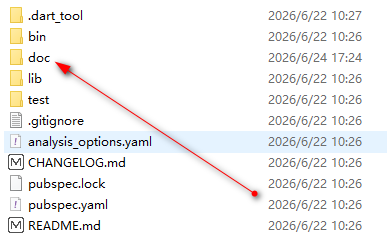
Success! Docs generated into d:\dartdemo\firstdart\doc\apiCode language: JavaScript (javascript)
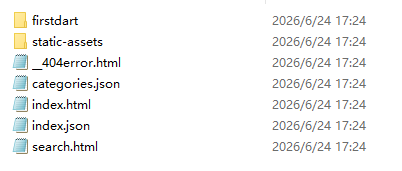
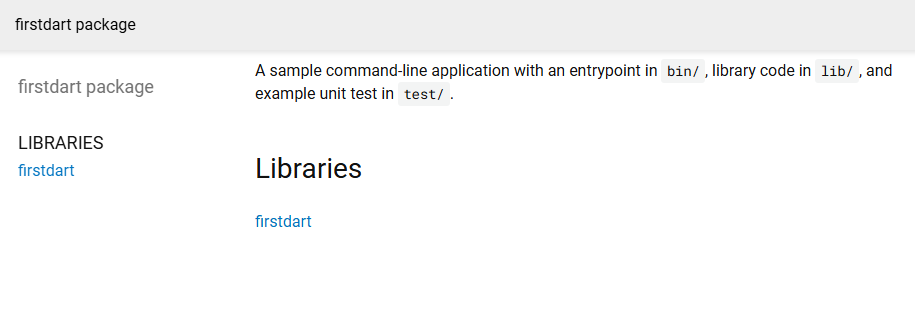
A new folder named doc will appear in your project root once the command finishes; opening it reveals the generated documentation pages shown below
Official Tooling
- Documentation Generator: The
dart doccommand parses Dart source files and auto-generates complete HTML API reference documentation for your project. Dart’s official website documentation is built using this exact tool. - Comment Style Guide Reference: The official guide Effective Dart: Documentation, which outlines standard formatting and best practices for writing consistent doc comments.
Summary Comparison
Comparison Table
| Comment Type | Opening Syntax | Multi-line Support | Nested Comments | Primary Use Cases |
|---|---|---|---|---|
| Single-line Comment | // | No, limited to one line | Not supported | Quick inline notes, code TODO markers |
| Standard Multi-line Block Comment | /* */ | Unlimited multi-line span | Supported | Commenting out large code blocks, long explanatory notes |
| Documentation Comment | /// / /** */ | Multi-line compatible | Not recommended | Write API descriptions for classes/methods/variables, generate formal reference docs, supports clickable [] identifier links |