In Dart, functions are also objects, which differs slightly from other programming languages.
Functions are first-class objects
Dart is a fully object-oriented language, and functions themselves are objects with the type Function.
They can be assigned to variables and passed as arguments to other functions;
Class instances can be invoked directly like functions
1 Standard Function Definition
// Full declaration with return type and parameter type annotations
bool isNoble(int atomicNumber) {
  return _nobleGases[atomicNumber] != null;
}
Code language: Dart (dart)
Full Example
// Mapping table of noble gas atomic numbers
final Map<int, String> _nobleGases = {
  2: 'He',
  10: 'Ne',
  18: 'Ar',
  36: 'Kr',
  54: 'Xe',
  86: 'Rn',
};

// Full declaration with return type and parameter type annotations
// Type int is non-nullable; use int? to accept null values
bool isNoble(int? atomicNumber) {
  return _nobleGases[atomicNumber] != null;
}

void main() {
  print(isNoble(null));       // null is not a map key → false
  print(isNoble(2));          // Matches a noble gas → true
  print(isNoble(9));          // No match → false
  print(isNoble(86));         // Matches a noble gas → true
}
Code language: Dart (dart)
false
true
false
trueCode language: JavaScript (javascript)2 Omit Type Annotations
The Effective Dart style guide requires complete explicit type annotations for public external APIs.
You may omit type annotations for internal private functions
Example
final Map<int, String> _nobleGases = {
  2: 'He',
  10: 'Ne',
  18: 'Ar',
  36: 'Kr',
  54: 'Xe',
  86: 'Rn',
};


isNoble(atomicNumber) {
  return _nobleGases[atomicNumber] != null;
}

void main() {
  print(isNoble(null));       // null is not a map key → false
  print(isNoble(2));          // Matches a noble gas → true
  print(isNoble(9));          // No match → false
  print(isNoble(86));         // Matches a noble gas → true
}

Code language: Dart (dart)
In the example above, the isNoble function omits the bool return type and int? parameter type, yet it works normally.
When you skip type annotations, Dart performs automatic type inference:
- Parameter
atomicNumber: No explicit type → inferred asdynamic(dynamic type, accepts any value: numbers, strings, null) - Return value: No leading type annotation → Dart infers the return type as
boolfrom the expression afterreturn, without writing it explicitly in code
Why Must Public APIs Include Explicit Types?
Readability: Developers calling your function can immediately see input and return types without reading internal implementation code;
Type Safety: The dynamic type disables static type checking; passing incorrect types will not trigger compile errors and often causes runtime crashes;
IDE Intellisense: Annotated types enable autocompletion and parameter hints in editors; IDEs cannot provide accurate hints without type annotations.
When Can You Omit Type Annotations?
Only recommended for local private code — functions used exclusively within the current file and never invoked externally.
Arrow Shorthand Syntax (=>)
You can shorten a function to arrow syntax when its body (code inside {}) contains only a single return expression.
Example
bool isNoble(int atomicNumber) => _nobleGases[atomicNumber] != null;
Code language: Dart (dart)
=> expris equivalent to{ return expr; };- Only expressions can appear between the arrow and semicolon; statements such as
ifare forbidden (use ternary operators as alternatives).
// Mapping table of noble gas atomic numbers
final Map<int, String> _nobleGases = {
  2: 'Helium',
  10: 'Neon',
  18: 'Argon',
  36: 'Krypton',
  54: 'Xenon',
  86: 'Radon',
};

// Arrow shorthand function: single-line expression returns directly, equivalent to block functions with return
bool isNoble(int atomicNumber) => _nobleGases[atomicNumber] != null;

void main() {
  // Test existing noble gases
  print(isNoble(2));   // true
  print(isNoble(18));  // true

  // Test regular elements
  print(isNoble(6));   // false (Carbon)
  print(isNoble(99));  // false (No matching element)
}
Code language: Dart (dart)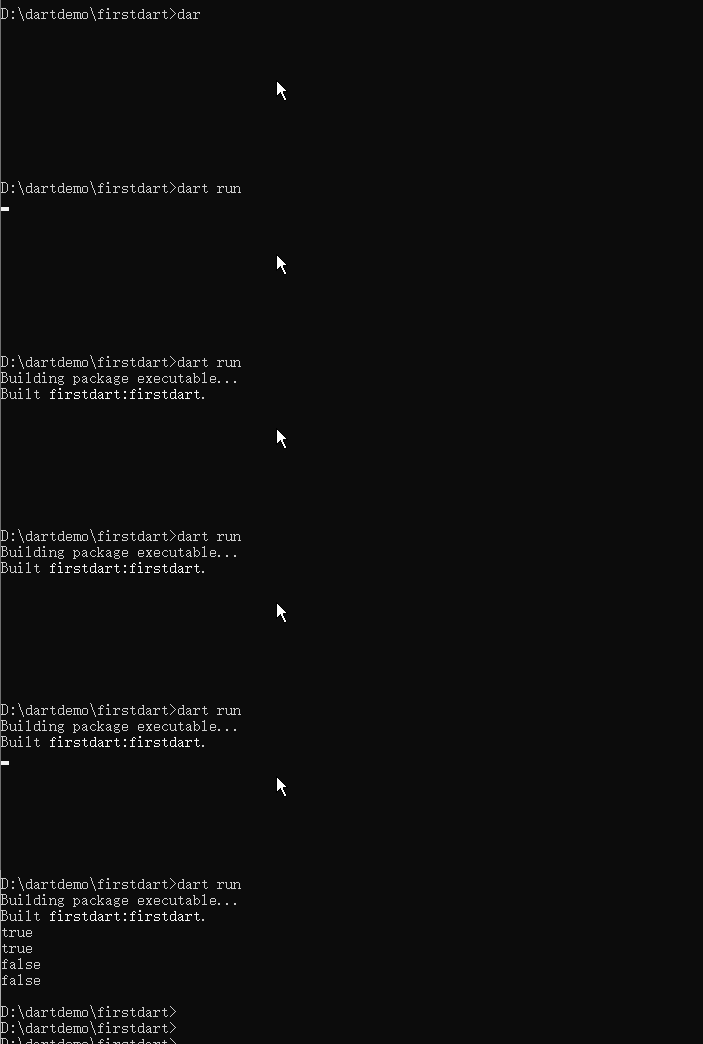
Parameters
Functions support required positional parameters, followed by exactly one of two options: named parameters or optional positional parameters — they cannot be mixed.
Trailing commas , are allowed when defining or calling parameters to improve code readability.
1. Named parameters
Wrapped in {}, optional by default; add required to enforce mandatory passing.
1) Basic nullable named parameters (no default value, defaults to null, type must be nullable with ?)
void enableFlags({bool? bold, bool? hidden}) {}
// Explicitly specify parameter names during invocation
enableFlags(bold: true, hidden: false);
Code language: Dart (dart)
Full Example
/// Enable text style flags: bold, hidden
void enableFlags({bool? bold, bool? hidden}) {
  print('Bold: $bold, Hidden: $hidden');
}

void main() {
  // Pass all named parameters
  enableFlags(bold: true, hidden: false);

  // Pass only one named parameter; the other becomes null
  enableFlags(bold: true);

  // Pass only hidden
  enableFlags(hidden: true);

  // Pass no parameters; both values are null
  enableFlags();
}
Code language: Dart (dart)
Output Result
D:\dartdemo\firstdart>dart run
Building package executable...
Built firstdart:firstdart.
Bold: true, Hidden: false
Bold: true, Hidden: null
Bold: null, Hidden: true
Bold: null, Hidden: nullCode language: JavaScript (javascript)
2) Set compile-time constant default values (nullable type mark ? is unnecessary, as a default value exists)
void enableFlags({bool bold = false, bool hidden = false}) {}
enableFlags(bold: true); // hidden automatically uses false

Code language: Dart (dart)
Example
/// Enable text style flags: bold, hidden
void enableFlags({bool bold = false, bool hidden = false}) {
  print('Bold: $bold, Hidden: $hidden');
}

void main() {
  enableFlags();//No parameters passed, both use default false → Bold: false, Hidden: false
}
Code language: Dart (dart)
3) Mandatory named parameters with required (Note: Frequently used in Flutter widget constructors). The example below is Flutter code; learn more in Flutter tutorials.
const Scrollbar({super.key, required Widget child});
// required parameters also accept nullable types
const Scrollbar({super.key, required Widget? child});

Code language: Dart (dart)
Dart does not force named parameters to be placed at the end; they can be inserted anywhere in the parameter list
repeat(times: 2, () {})Code language: CSS (css)2. Optional positional parameters
Wrapped in [], defaults to null when omitted; constant default values can be defined.
// No default value, type marked with ?
String say(String from, String msg, [String? device]) {
  var result = '$from says $msg';
  if (device != null) result = '$result with a $device';
  return result;
}
assert(say('Bob', 'Howdy') == 'Bob says Howdy');
assert(say('Bob', 'Howdy', 'smoke signal') == 'Bob says Howdy with a smoke signal');

Code language: Dart (dart)
Full Example
// [String? device] optional positional parameter with no default value; null if omitted
String say(String from, String msg, [String? device]) {
  var result = '$from says $msg';
  if (device != null) {
    result = '$result with a $device'; //Append device info to the message if device is not null
  }
  return result;
}

void main() {
  // Omit the third optional parameter
  String res1 = say('Bob', 'Howdy');
  print(res1);

  // Pass the third optional positional parameter
  String res2 = say('Bob', 'Howdy', 'smoke signal');
  print(res2);

  // Manually pass null to the optional parameter
  String res3 = say('Alice', 'Hi', null);
  print(res3);
}
Code language: Dart (dart)
Set default values:
String say(String from, String msg, [String device = 'carrier pigeon']) {
  return '$from says $msg with a $device';
}
assert(say('Bob', 'Howdy') == 'Bob says Howdy with a carrier pigeon');

Code language: Dart (dart)
Full Example
// Optional positional parameter with default value carrier pigeon
String say(String from, String msg, [String device = 'carrier pigeon']) {
  return '$from says $msg with a $device';
}

void main() {
  // Omit third optional parameter; default carrier pigeon is used automatically
  String res1 = say('Bob', 'Howdy');
  print(res1); //Bob says Howdy with a carrier pigeon

  // Pass custom device to override default value
  String res2 = say('Bob', 'Howdy', 'smoke signal');
  print(res2); //Bob says Howdy with a smoke signal

  String res3 = say('Alice', 'Hello', 'mobile phone');
  print(res3); // Alice says Hello with a mobile phone

  String res4 = say('Jack', 'Tom', 'website foxdevelop.com');
  print(res4); // Jack says Tom with a website foxdevelop.com
}
Code language: Dart (dart)
Output Result
Built firstdart:firstdart.
Bob says Howdy with a carrier pigeon
Bob says Howdy with a smoke signal
Alice says Hello with a mobile phone
Jack says Tom with a website foxdevelop.comCode language: JavaScript (javascript)
main () Entry Point Function
Every Dart program requires a top-level main() function, which acts as the sole program entry point.
- Basic no-argument version
void main() {
  print('Hello, welcome to foxdevelop.com!');
}

Code language: Dart (dart)Hello, welcome to foxdevelop.com!Code language: CSS (css)- Command-line program receiving launch arguments
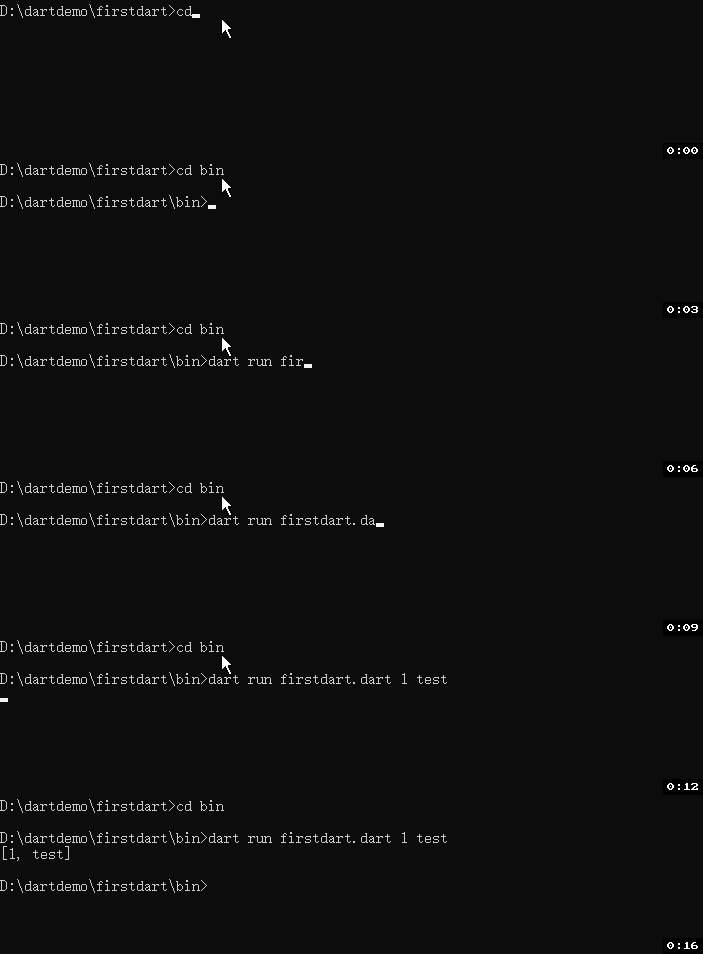
// Execution command: dart run firstdart.dart 1 test
void main(List<String> arguments) {
  print(arguments); // [1, test]
}

Code language: Dart (dart)
Use the official args library for complex command-line argument parsing.
Replace firstdart.dart above with your own Dart filename
Functions as First-class Objects
1. Pass Functions as Parameters
void printElement(int element) => print(element);
var list = [1, 2, 3];
list.forEach(printElement); // Directly pass the function

Code language: Dart (dart)
Full Example
void main() {
    void printElement(int element) => print(element);
	var list = [1, 2, 3];
	list.forEach(printElement); // Directly pass the function
}
Code language: Dart (dart)
Output
1
2
3
2. Assign Anonymous Functions to Variables
void main() {
    var loudify = (msg) => '!!! ${msg.toUpperCase()} !!!';
	print(loudify('hello')); //!!! HELLO !!!
}
Code language: Dart (dart)
Function Types
You may explicitly declare types for function variables
Format: ReturnType Function(ParameterList, {NamedParameters})
void greet(String name, {String greeting = 'Hello'}) => print('$greeting $name!');
// Declare function-type variable
void Function(String, {String greeting}) g = greet;
g('Dash', greeting: 'Howdy');

Code language: Dart (dart)
Use typedef to create aliases for function types for reusability and readability.
{String greeting}) → One named parameter greeting of type String
void main() {
    void greet(String name, {String greeting = 'Hello'}) => print('$greeting $name!');
	// Declare function-type variable
	void Function(String, {String greeting}) g = greet;
	g('Jack', greeting: 'Howdy');
}
Code language: Dart (dart)
Output
Howdy Jack!Anonymous Functions (Lambda / Closures)
Functions without a defined name, two writing styles:
- Block syntax (multi-line)
void main() {
    const list = ['apples', 'bananas'];
	var uppercaseList = list.map((item) {
	  return item.toUpperCase();
	}).toList();
	print(uppercaseList);
}
Code language: Dart (dart)
(item) { return item.toUpperCase(); } in the code above is an anonymous function (lambda)
Output: [APPLES, BANANAS]
- Arrow shorthand (single-line expression)
void main() {
    const list = ['fox', 'develop','foxdevelop.com'];
    var uppercaseList = list.map((item) => item.toUpperCase()).toList();
    uppercaseList.forEach((item) => print('$item: ${item.length}'));
}

Code language: Dart (dart)
Output
FOX: 3
DEVELOP: 7
FOXDEVELOP.COM: 14Code language: HTTP (http)
Lexical Scope
Dart uses static lexical scoping: variable scope is determined by brace hierarchy, and inner scopes can access all variables from outer scopes.
bool topLevel = true;
void main() {
  var insideMain = true;
  void myFunction() {
    var insideFunction = true;
    void nestedFunction() {
      var insideNestedFunction = true;
      // All variables are accessible
      assert(topLevel && insideMain && insideFunction && insideNestedFunction);
    }
  }
}

Code language: Dart (dart)
Lexical Closures
Closures: Function objects can capture and retain variables from outer scopes, and access them even after leaving the original scope.
Function makeAdder(int addBy) {
  // Capture outer variable addBy
  return (int i) => addBy + i;
}

void main() {
  var add2 = makeAdder(2);
  var add4 = makeAdder(4);
  assert(add2(3) == 5);
  assert(add4(3) == 7);
}

Code language: Dart (dart)
Step-by-step breakdown of execution flow above
Step 1: var add2 = makeAdder(2);
- Execute
makeAdder, passaddBy = 2 - Create anonymous function:
(int i) => 2 + i - Assign this function to variable
add2. At this point add2 is a function object whose body is(int i) => 2 + i; it accepts an int i and returns i+2 - The
makeAdderfunction finishes execution, yet the anonymous function permanently remembersaddBy=2
Step 2: var add4 = makeAdder(4);
- Execute
makeAdderagain, passaddBy = 4 - Create a completely separate new anonymous function:
(int i) => 4 + i - Assign to
add4, which stores its own independent copy ofaddBy=4without interfering with add2. The value addBy is stored separately inside the two function objects add2 and add4, one holding 2 and the other 4
- Calling
makeAdder(2)generates an independent closure with a unique bound value ofaddBy = 2, assigned toadd2; - Calling
makeAdder(4)generates a brand-new separate closure with a unique bound value ofaddBy = 4, assigned toadd4; add2andadd4are fully isolated function objects, each privately storing its capturedaddBywithout mutual interference.
Step 3: Invoke add2(3)
Execute inner function: 2 + 3 = 5, assertion passes
Step 4: Invoke add4(3)
Execute inner function: 4 + 3 = 7, assertion passes
Function Tear-offs
Omit parentheses when invoking functions/methods to create tear-offs (lightweight closures), replacing manually written anonymous lambdas for cleaner code.
This is the recommended syntax; simply pass the function directly.
var charCodes = [68, 97, 114, 116];
var buffer = StringBuffer();
charCodes.forEach(print); // Function tear-off
charCodes.forEach(buffer.write); // Method tear-off

Code language: Dart (dart)
Verbose equivalent syntax
charCodes.forEach((code) => print(code));
charCodes.forEach((code) => buffer.write(code));

Code language: Dart (dart)
Function Equality Checks
- Top-level functions and static methods:
==returns true if function names match exactly; - Instance methods: Only tear-offs bound to the same object instance evaluate as equal.
void foo() {}
class A {
  static void bar() {}
  void baz() {}
}
void main() {
  var x = foo;
  assert(foo == x);

  x = A.bar;
  assert(A.bar == x);

  var v = A(), w = A(), y = w;
  x = w.baz;
  assert(y.baz == x); // Same instance → equal
  assert(v.baz != w.baz); // Different instances → not equal
}

Code language: Dart (dart)
Return Values
- All functions have a return value: If no explicit
returnexists,return null;is implicitly appended at the end
foo() {}
assert(foo() == null);

Code language: Dart (dart)- Return multiple values: Use Record tuples
(String, int) foo() {
  return ('something', 42);
}

Code language: Dart (dart)
Getter & Setter Accessors
Reading or assigning any property fundamentally calls its getter or setter. Regular variables generate implicit accessors automatically; you may also define explicit ones manually.
Advantage: External code uses uniform .property access, while internal logic can be modified anytime without updating external calling code.
String _secret = 'Hello';

// Getter for read operations
String get secret {
  print('getter invoked');
  return _secret.toUpperCase();
}

// Setter for assignment operations
set secret(String newMsg) {
  print('setter invoked');
  if (newMsg.isNotEmpty) _secret = newMsg;
}

void main() {
  print(secret); // Read, triggers getter → HELLO
  secret = 'Dart is fun'; // Assign, triggers setter
  print(secret); // DART IS FUN
}

Code language: Dart (dart)
* Generators
Lazily generate sequences on demand; two variants: synchronous and asynchronous, using yield to emit values.
- Synchronous generator
sync*, returnsIterable
Iterable<int> naturalsTo(int n) sync* {
  int k = 0;
  while (k < n) yield k++;
}

Code language: Dart (dart)- Asynchronous generator
async*, returnsStream
Stream<int> asyncNaturalsTo(int n) async* {
  int k = 0;
  while (k < n) yield k++;
}

Code language: Dart (dart)- Recursive generator optimization with
yield*(delegates to another generator for better performance)
Iterable<int> naturalsDownFrom(int n) sync* {
  if (n > 0) {
    yield n;
    yield* naturalsDownFrom(n - 1);
  }
}

Code language: Dart (dart)