我們先清空上一堂課所有控制項,建立一個完全空白、不含任何元件的基礎視窗。
#pragma comment(linker, "/SUBSYSTEM:windows /ENTRY:mainCRTStartup")
#pragma execution_character_set("utf-8")

#include <GLFW/glfw3.h>
#include "imgui.h"
#include "backends/imgui_impl_glfw.h"
#include "backends/imgui_impl_opengl3.h"
#include <cstdio>
#include <string>
#include <fstream>
#include <windows.h>
#include <io.h>
#include <commdlg.h>  // 檔案對話視窗所需標頭檔

#include <iostream>
using namespace std;

// 設定字型,解決輸入文字出現??亂碼問題
// 依據作業系統環境替換字型路徑,也可使用系統預設字型
void SetupFont(ImGuiIO& io)
{
    // Windows常見中文字型路徑
    const char* font_path = "C:/Windows/Fonts/msyh.ttc"; // 微軟雅黑
    float font_size = 18.0f;

    // 載入簡體中文常用字元範圍
    ImVector<ImWchar> ranges;
    ImFontGlyphRangesBuilder builder;
    builder.AddRanges(io.Fonts->GetGlyphRangesChineseSimplifiedCommon());
    builder.BuildRanges(&ranges);

    // 載入自訂字型
    io.Fonts->AddFontFromFileTTF(font_path, font_size, nullptr, ranges.Data);

    // 多國語言支援可追加以下程式碼:
    // io.Fonts->AddFontFromFileTTF(font_path, font_size, nullptr, io.Fonts->GetGlyphRangesJapanese());
    // io.Fonts->AddFontFromFileTTF(font_path, font_size, nullptr, io.Fonts->GetGlyphRangesKorean());
}


int main()
{

    if (!glfwInit())
    {
        printf("GLFW 初始化失敗\n");
        return -1;
    }

    const char* glsl_version = "#version 330";
    glfwWindowHint(GLFW_CONTEXT_VERSION_MAJOR, 3);
    glfwWindowHint(GLFW_CONTEXT_VERSION_MINOR, 3);
    glfwWindowHint(GLFW_OPENGL_PROFILE, GLFW_OPENGL_CORE_PROFILE);

    GLFWwindow* window = glfwCreateWindow(800, 600, "視窗標題", nullptr, nullptr);
    if (!window)
    {
        glfwTerminate();
        return -1;
    }
    glfwMakeContextCurrent(window);
    glfwSwapInterval(1);

    IMGUI_CHECKVERSION();
    ImGui::CreateContext();
    ImGuiIO& io = ImGui::GetIO();
    ImGui::StyleColorsLight();

    SetupFont(io); // 載入字型,修復文字亂碼

    ImGui_ImplGlfw_InitForOpenGL(window, true);
    ImGui_ImplOpenGL3_Init(glsl_version);

    while (!glfwWindowShouldClose(window))
    {
        glfwPollEvents();

        ImGui_ImplOpenGL3_NewFrame();
        ImGui_ImplGlfw_NewFrame();
        ImGui::NewFrame();

        ImGui::SetNextWindowPos(ImVec2(0, 0));
        ImGui::SetNextWindowSize(io.DisplaySize);

        ImGuiWindowFlags window_flags = ImGuiWindowFlags_NoDecoration
            | ImGuiWindowFlags_NoMove
            | ImGuiWindowFlags_NoResize
            | ImGuiWindowFlags_NoSavedSettings;

        ImGui::PushStyleVar(ImGuiStyleVar_WindowRounding, 0.0f);
        ImGui::PushStyleVar(ImGuiStyleVar_WindowBorderSize, 0.0f);

        ImGui::Begin("視窗標題", nullptr, window_flags);

        // 介面控制項繪製區塊開頭

        // 控制項區塊結尾

        ImGui::End();
        ImGui::PopStyleVar(2);

        ImGui::Render();
        int width, height;
        glfwGetFramebufferSize(window, &width, &height);
        glViewport(0, 0, width, height);
        glClearColor(0.12f, 0.12f, 0.12f, 1.f);
        glClear(GL_COLOR_BUFFER_BIT);
        ImGui_ImplOpenGL3_RenderDrawData(ImGui::GetDrawData());

        glfwSwapBuffers(window);
    }

    ImGui_ImplOpenGL3_Shutdown();
    ImGui_ImplGlfw_Shutdown();
    ImGui::DestroyContext();
    glfwDestroyWindow(window);
    glfwTerminate();
    return 0;
}Code language: C++ (cpp)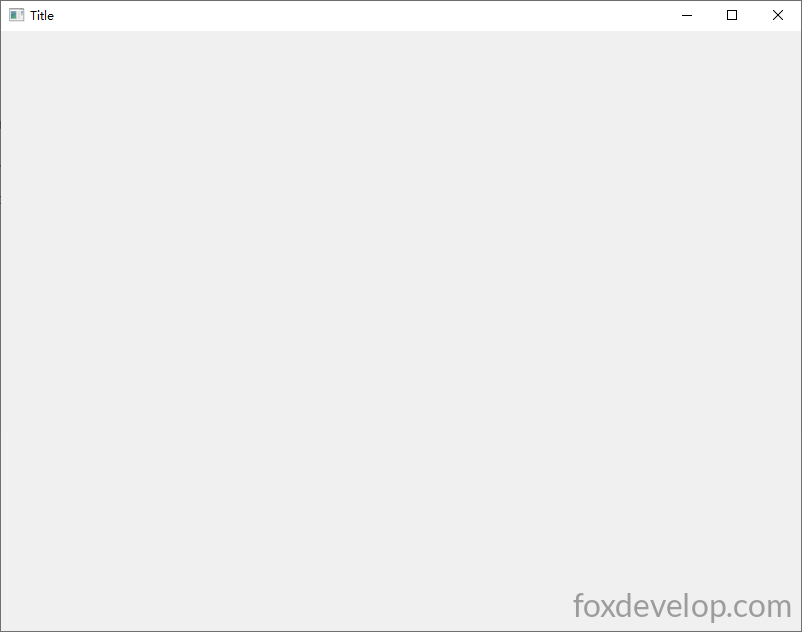
接下來我們逐一建立各種ImGui控制項。
文字元件
ImGui::Text("Hello, world %d", 123);Code language: PHP (php)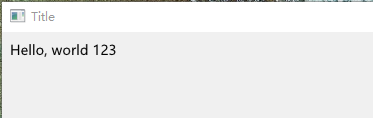
文字會從視窗左上角開始,由左向右輸出顯示。
按鈕元件
        // 建立按鈕,點擊後執行大括號內程式
        if (ImGui::Button("儲存"))
        {
            // 點擊按鈕後會執行這裡的程式邏輯
        }Code language: PHP (php)
可用的控制項種類眾多,直接看下方完整範例,一次載入所有常見元件。
#pragma comment(linker, "/SUBSYSTEM:windows /ENTRY:mainCRTStartup")
#pragma execution_character_set("utf-8")

#include <GLFW/glfw3.h>
#include "imgui.h"
#include "backends/imgui_impl_glfw.h"
#include "backends/imgui_impl_opengl3.h"
#include <cstdio>
#include <string>
#include <cstring>
#include <windows.h>
#include <io.h>
#include <iostream>
using namespace std;

// 設定字型,解決輸入文字出現??亂碼問題
// 依據作業系統環境替換字型路徑,也可使用系統預設字型
void SetupFont(ImGuiIO& io)
{
    // Windows常見中文字型路徑
    const char* font_path = "C:/Windows/Fonts/msyh.ttc"; // 微軟雅黑
    float font_size = 18.0f;

    // 載入簡體中文常用字元範圍
    ImVector<ImWchar> ranges;
    ImFontGlyphRangesBuilder builder;
    builder.AddRanges(io.Fonts->GetGlyphRangesChineseSimplifiedCommon());
    builder.BuildRanges(&ranges);

    // 載入自訂字型
    io.Fonts->AddFontFromFileTTF(font_path, font_size, nullptr, ranges.Data);

    // 多國語言支援可追加以下程式碼:
    // io.Fonts->AddFontFromFileTTF(font_path, font_size, nullptr, io.Fonts->GetGlyphRangesJapanese());
    // io.Fonts->AddFontFromFileTTF(font_path, font_size, nullptr, io.Fonts->GetGlyphRangesKorean());
}

// ===================== 全域控制項綁定變數 =====================
char buf[256] = "單行輸入框測試文字";
char bufMulti[1024] = "多行文字編輯框\n第二行\n第三行中文測試";
float fVal = 0.5f;
int iVal = 50;
bool checkBox1 = false;
bool checkBox2 = true;
int radioIdx = 0;
int comboSel = 0;
ImVec4 color = ImVec4(0.2f, 0.7f, 0.9f, 1.0f);
bool showPopupWin = false;
bool showModal = false;
int tabIndex = 0;
float progress = 0.35f;

int main()
{
    SetConsoleOutputCP(65001);
    if (!glfwInit())
    {
        printf("GLFW 初始化失敗\n");
        return -1;
    }

    const char* glsl_version = "#version 330";
    glfwWindowHint(GLFW_CONTEXT_VERSION_MAJOR, 3);
    glfwWindowHint(GLFW_CONTEXT_VERSION_MINOR, 3);
    glfwWindowHint(GLFW_OPENGL_PROFILE, GLFW_OPENGL_CORE_PROFILE);

    GLFWwindow* window = glfwCreateWindow(1000, 700, "ImGui 全部常用控制項範例", nullptr, nullptr);
    if (!window)
    {
        glfwTerminate();
        return -1;
    }
    glfwMakeContextCurrent(window);
    glfwSwapInterval(1);

    IMGUI_CHECKVERSION();
    ImGui::CreateContext();
    ImGuiIO& io = ImGui::GetIO();
    ImGui::StyleColorsLight();

    SetupFont(io);

    ImGui_ImplGlfw_InitForOpenGL(window, true);
    ImGui_ImplOpenGL3_Init(glsl_version);

    while (!glfwWindowShouldClose(window))
    {
        glfwPollEvents();

        ImGui_ImplOpenGL3_NewFrame();
        ImGui_ImplGlfw_NewFrame();
        ImGui::NewFrame();

        ImGui::SetNextWindowPos(ImVec2(0, 0));
        ImGui::SetNextWindowSize(io.DisplaySize);

        ImGuiWindowFlags window_flags = ImGuiWindowFlags_NoDecoration
            | ImGuiWindowFlags_NoMove
            | ImGuiWindowFlags_NoResize
            | ImGuiWindowFlags_NoSavedSettings;

        ImGui::PushStyleVar(ImGuiStyleVar_WindowRounding, 0.0f);
        ImGui::PushStyleVar(ImGuiStyleVar_WindowBorderSize, 0.0f);

        ImGui::Begin("主視窗", nullptr, window_flags);

        // ========== 1. 頂部選單列 ==========
        if (ImGui::BeginMenuBar())
        {
            if (ImGui::BeginMenu("檔案"))
            {
                if (ImGui::MenuItem("新增", "Ctrl+N")) {}
                if (ImGui::MenuItem("儲存", "Ctrl+S")) {}
                ImGui::Separator();
                if (ImGui::MenuItem("離開"))
                    glfwSetWindowShouldClose(window, true);
                ImGui::EndMenu();
            }
            if (ImGui::BeginMenu("工具"))
            {
                if (ImGui::MenuItem("開啟彈窗範例"))
                    showPopupWin = true;
                ImGui::EndMenu();
            }
            ImGui::EndMenuBar();
        }
        ImGui::Spacing();

        // ========== 2. 基礎文字元件 ==========
        ImGui::Text("===== 文字類元件 =====");
        ImGui::Text("一般文字 Hello world %d", 123);
        ImGui::TextColored(ImVec4(1, 0, 0, 1), "紅色彩色文字");
        ImGui::TextDisabled("灰色停用文字");
        ImGui::BulletText("項目符號文字1");
        ImGui::BulletText("項目符號文字2");
        ImGui::Spacing();

        // ========== 3. 按鈕系列 ==========
        ImGui::Text("===== 按鈕元件 =====");
        if (ImGui::Button("一般按鈕"))
            cout << "點擊一般按鈕" << endl;
        ImGui::SameLine();
        if (ImGui::SmallButton("小型按鈕"))
            cout << "點擊小型按鈕" << endl;
        ImGui::SameLine();
        if (ImGui::Button("寬按鈕", ImVec2(120, 0)))
            cout << "點擊自訂寬度按鈕" << endl;
        ImGui::Spacing();

        // ========== 4. 輸入框 ==========
        ImGui::Text("===== 輸入框元件 =====");
        ImGui::InputText("單行文字輸入", buf, IM_ARRAYSIZE(buf));
        ImGui::InputTextWithHint("提示輸入框", "請輸入內容...", buf, IM_ARRAYSIZE(buf));
        ImGui::InputFloat("浮點數輸入", &fVal);
        ImGui::InputInt("整數輸入", &iVal);
        ImGui::Spacing();
        ImGui::Text("多行文字編輯框:");
        ImVec2 multiSize = ImVec2(500, 80);
        ImGui::InputTextMultiline("##multi", bufMulti, IM_ARRAYSIZE(bufMulti), multiSize);
        ImGui::Spacing();

        // ========== 5. 滑桿、拖曳條 ==========
        ImGui::Text("===== 滑桿 / 拖曳控制條 =====");
        ImGui::SliderFloat("浮點滑桿", &fVal, 0.0f, 1.0f);
        ImGui::SliderInt("整數滑桿", &iVal, 0, 100);
        ImGui::DragFloat("拖曳浮點條", &fVal, 0.01f);
        ImGui::DragInt("拖曳整數條", &iVal, 1.0f);
        ImGui::Spacing();

        // ========== 6. 核取方塊、單選按鈕 ==========
        ImGui::Text("===== 核取方塊 & 單選按鈕 =====");
        ImGui::Checkbox("核取A", &checkBox1);
        ImGui::Checkbox("核取B", &checkBox2);
        ImGui::Text("單選群組:");
        ImGui::RadioButton("選項1", &radioIdx, 0); ImGui::SameLine();
        ImGui::RadioButton("選項2", &radioIdx, 1); ImGui::SameLine();
        ImGui::RadioButton("選項3", &radioIdx, 2);
        ImGui::Spacing();

        // ========== 7. 下拉選單 ==========
        ImGui::Text("===== 下拉選單 Combo =====");
        const char* items[] = { "選項A", "選項B", "選項C", "選項D" };
        ImGui::Combo("下拉選擇", &comboSel, items, IM_ARRAYSIZE(items));
        ImGui::Spacing();

        // ========== 8. 顏色選擇器 ==========
        ImGui::Text("===== 顏色拾取器 =====");
        ImGui::ColorEdit4("RGBA顏色", (float*)&color);
        ImGui::ColorButton("色塊預覽", color);
        ImGui::Spacing();

        // ========== 9. 進度條、分隔線 ==========
        ImGui::Text("===== 進度條 / 分隔線 =====");
        ImGui::ProgressBar(progress, ImVec2(300, 0));
        ImGui::Text("進度數值:%.2f", progress);
        ImGui::Separator(); // 水平分隔線
        ImGui::Spacing();

        // ========== 10. 可折疊樹節點 ==========
        ImGui::Text("===== 可折疊樹面板 =====");
        if (ImGui::CollapsingHeader("折疊面板 點擊展開"))
        {
            ImGui::Text("面板內文");
            ImGui::Button("面板內按鈕");
        }
        if (ImGui::TreeNode("樹節點"))
        {
            ImGui::BulletText("子項目1");
            ImGui::BulletText("子項目2");
            ImGui::TreePop();
        }
        ImGui::Spacing();

        // ========== 11. 分頁標籤 TabBar ==========
        ImGui::Text("===== 分頁標籤 Tab =====");
        ImGui::BeginTabBar("TabBar");
        if (ImGui::BeginTabItem("標籤1"))
        {
            ImGui::Text("標籤1頁面內容");
            ImGui::EndTabItem();
        }
        if (ImGui::BeginTabItem("標籤2"))
        {
            ImGui::Text("標籤2頁面內容");
            ImGui::EndTabItem();
        }
        ImGui::EndTabBar();
        ImGui::Spacing();

        // ========== 12. 表格 Table ==========
        ImGui::Text("===== 表格元件 =====");
        if (ImGui::BeginTable("table1", 3, ImGuiTableFlags_Borders))
        {
            ImGui::TableSetupColumn("序號");
            ImGui::TableSetupColumn("名稱");
            ImGui::TableSetupColumn("數值");
            ImGui::TableHeadersRow();

            // 第一列
            ImGui::TableNextRow();
            ImGui::TableNextColumn(); ImGui::Text("1");
            ImGui::TableNextColumn(); ImGui::Text("測試A");
            ImGui::TableNextColumn(); ImGui::Text("%.2f", fVal);
            // 第二列
            ImGui::TableNextRow();
            ImGui::TableNextColumn(); ImGui::Text("2");
            ImGui::TableNextColumn(); ImGui::Text("測試B");
            ImGui::TableNextColumn(); ImGui::Text("%d", iVal);
            ImGui::EndTable();
        }
        ImGui::Spacing();

        // ========== 13. 右鍵彈出選單 ==========
        ImGui::Text("===== 右鍵選單(在此文字上按右鍵) =====");
        if (ImGui::IsItemClicked(ImGuiMouseButton_Right))
            ImGui::OpenPopup("RightMenu");
        if (ImGui::BeginPopup("RightMenu"))
        {
            ImGui::MenuItem("右鍵選項1");
            ImGui::MenuItem("右鍵選項2");
            ImGui::Separator();
            ImGui::MenuItem("關閉選單");
            ImGui::EndPopup();
        }
        ImGui::Spacing();

        // ========== 14. 一般彈窗(非模態) ==========
        if (showPopupWin)
        {
            ImGui::OpenPopup("PopupWindow");
            showPopupWin = false;
        }
        if (ImGui::BeginPopup("PopupWindow"))
        {
            ImGui::Text("一般彈窗,可同時操作主視窗");
            if (ImGui::Button("關閉彈窗"))
                ImGui::CloseCurrentPopup();
            ImGui::EndPopup();
        }

        // ========== 15. 模態對話視窗 Modal ==========
        if (ImGui::Button("開啟模態彈窗"))
            showModal = true;
        if (showModal)
        {
            ImGui::OpenPopup("ModalDialog");
            showModal = false;
        }
        if (ImGui::BeginPopupModal("模態對話框", nullptr, ImGuiWindowFlags_AlwaysAutoResize))
        {
            ImGui::Text("模態彈窗會鎖住主視窗,必須先關閉此視窗");
            if (ImGui::Button("確定", ImVec2(120, 0)))
            {
                ImGui::CloseCurrentPopup();
            }
            ImGui::EndPopup();
        }

        ImGui::End();
        ImGui::PopStyleVar(2);

        ImGui::Render();
        int width, height;
        glfwGetFramebufferSize(window, &width, &height);
        glViewport(0, 0, width, height);
        glClearColor(0.12f, 0.12f, 0.12f, 1.f);
        glClear(GL_COLOR_BUFFER_BIT);
        ImGui_ImplOpenGL3_RenderDrawData(ImGui::GetDrawData());

        glfwSwapBuffers(window);
    }

    ImGui_ImplOpenGL3_Shutdown();
    ImGui_ImplGlfw_Shutdown();
    ImGui::DestroyContext();
    glfwDestroyWindow(window);
    glfwTerminate();
    return 0;
}Code language: C++ (cpp)
讀者可以慢慢閱讀、實作,熟悉每個控制項的使用方式。
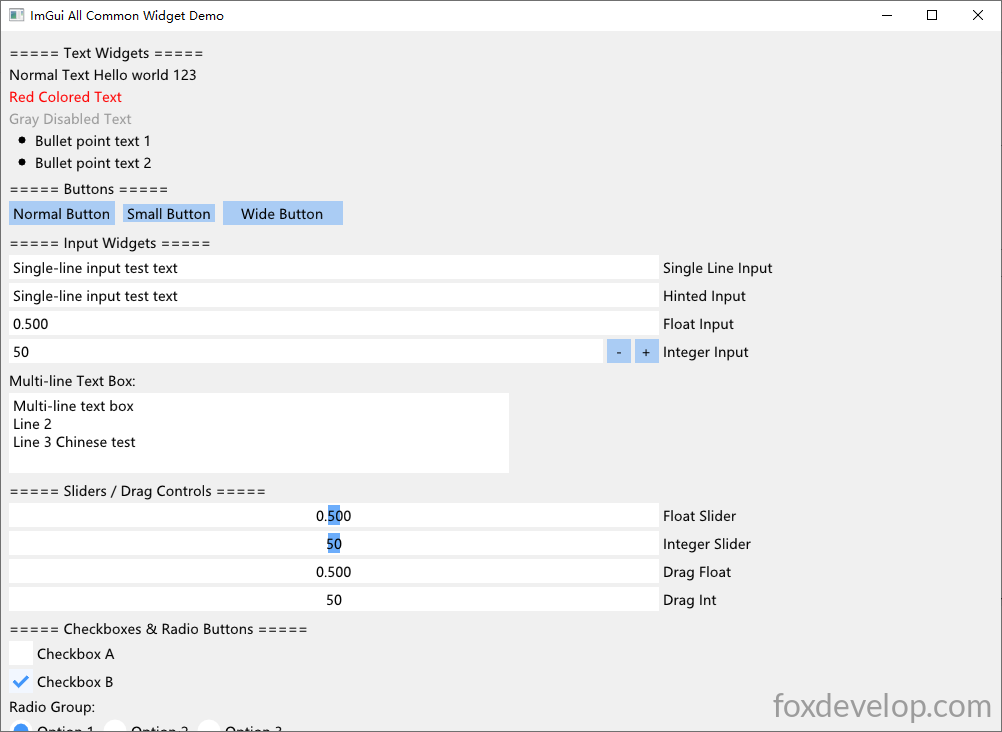
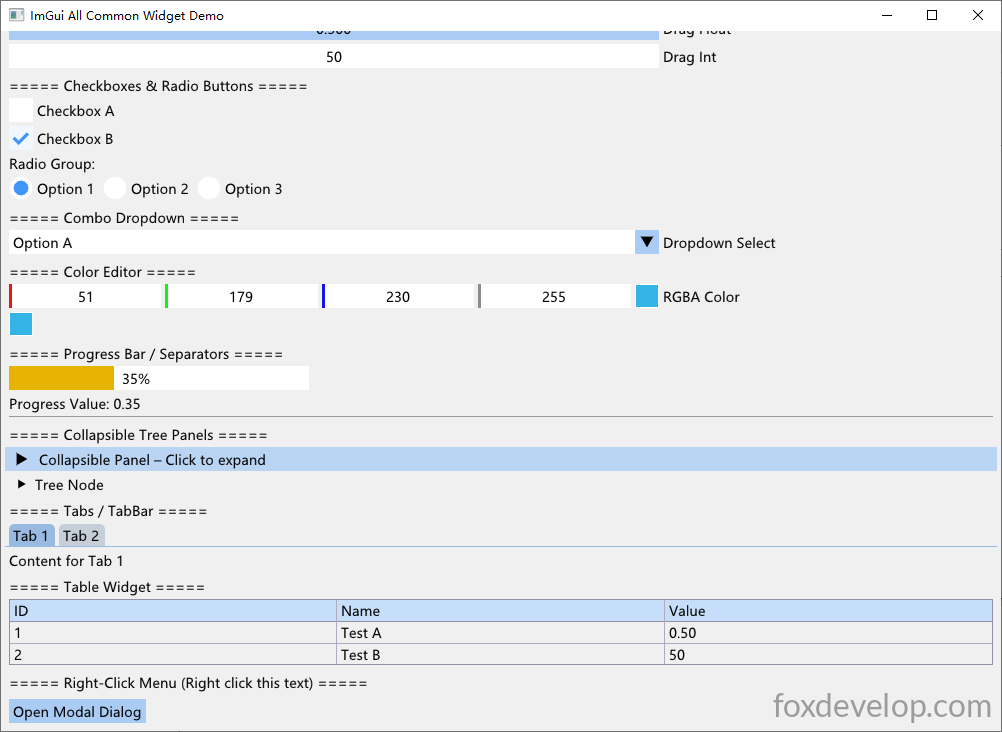
元件種類十分豐富,開發簡單小工具完全足夠使用。包含可折疊樹、分頁標籤、各種表單元件:單行/多行文字輸入、單選、核取方塊、下拉選單、進度條、折疊面板、表格、右鍵選單、顏色選擇器等等,各位可以自行嘗試操作。
Previous: ImGui實現選單與儲存對話視窗 – 建立TXT記事本範例