引用
import 'dart:io';Code language: JavaScript (javascript)注意
dart:io はWebプラットフォームで利用できません!
対応環境:Dartコマンドラインプログラム、サーバー、非Web向けFlutterアプリ(Android/iOS/Windows/macOS/Linux)。
ファイル・ディレクトリ操作
FileSystemEntity は親クラスで、File(ファイル)、Directory(ディレクトリ)がこれを継承します。
1. ファイル読み込み
一括読み込み(小さいファイル向け)
void main() async {
  var file = File("config.txt");
  try {
    // ファイル全体を文字列として一括読み込み(UTF-8)
    String content = await file.readAsString();
    // 一括読み込みし、行ごとに分割し文字列配列へ
    List<String> lines = await file.readAsLines();
    // バイナリデータを一括取得 List<int>
    List<int> bytes = await file.readAsBytes();
  } catch (e) {
    print("読み込み失敗:$e");
  }
}Code language: Dart (dart)
完全なサンプルコード
事前にtxtファイルを作成し、下記パスを自身のファイルパスに変更してください D:/dartdemo/firstdart/bin/config.txt
import 'dart:io';

void main() async {
  var file = File("D:/dartdemo/firstdart/bin/config.txt");
  try {
    // ファイル全体を文字列として一括読み込み(UTF-8)
    String content = await file.readAsString();
    print("===== readAsString 全文テキスト =====");
    print(content);

    // 一括読み込みし、行ごとに分割し文字列配列へ
    List<String> lines = await file.readAsLines();
    print("\n===== readAsLines 行単位読み込み =====");
    for (var line in lines) {
      print(line);
    }

    // バイナリデータを一括取得 List<int>
    List<int> bytes = await file.readAsBytes();
    print("\n===== readAsBytes バイト配列(先頭30件) =====");
    print(bytes.take(30).toList());
    print("ファイル総バイト数:${bytes.length}");
  } catch (e) {
    print("読み込み失敗:$e");
  }
}Code language: Dart (dart)
実行結果
D:\dartdemo\firstdart>dart run
Building package executable...
Built firstdart:firstdart.
===== readAsString 全文テキスト =====
The minimal requirements for a library are:

pubspec file
The pubspec.yaml file for a library is the same as for an application package
—there is no special designation to indicate that the package is a library.

lib directory
As you might expect, the library code lives under the lib directory and is public to other packages. You can create any hierarchy under lib, as needed. By convention, implementation code is placed under lib/src. Code under lib/src is considered private; other packages should never need to import src/.... To make APIs under lib/src public, you can export lib/src files from a file that's directly under lib.

===== readAsLines 行単位読み込み =====
The minimal requirements for a library are:

pubspec file
The pubspec.yaml file for a library is the same as for an application package
—there is no special designation to indicate that the package is a library.

lib directory
As you might expect, the library code lives under the lib directory and is public to other packages. You can create any hierarchy under lib, as needed. By convention, implementation code is placed under lib/src. Code under lib/src is considered private; other packages should never need to import src/.... To make APIs under lib/src public, you can export lib/src files from a file that's directly under lib.

===== readAsBytes バイト配列(先頭30件) =====
[84, 104, 101, 32, 109, 105, 110, 105, 109, 97, 108, 32, 114, 101, 113, 117, 105, 114, 101, 109, 101, 110, 116, 115, 32, 102, 111, 114, 32, 97]
ファイル総バイト数:644Code language: PHP (php)
ストリーム読み込み
大容量ファイルに推奨、逐次読み込みながら処理を実行
dart:convert のデコーダーと組み合わせ、Stream<List<int>> を返します
import 'dart:io';
import 'dart:convert';

void main() async {
  var file = File("D:/dartdemo/firstdart/bin/config.txt");
  Stream<List<int>> stream = file.openRead();

  var lineStream = stream
      .transform(utf8.decoder)          // バイトストリーム → 文字列ストリーム
      .transform(const LineSplitter());  // 文字列 → 行単位に分割

  try {
    await for (var line in lineStream) {
      print(line);
    }
    print("読み込み完了");
  } catch (e) {
    print(e);
  }
}Code language: Dart (dart)
実行結果
D:\dartdemo\firstdart>dart run
Building package executable...
Built firstdart:firstdart.
The minimal requirements for a library are:

pubspec file
The pubspec.yaml file for a library is the same as for an application package
—there is no special designation to indicate that the package is a library.

lib directory
As you might expect, the library code lives under the lib directory and is public to other packages.
You can create any hierarchy under lib, as needed. By convention, implementation code is placed under lib/src.
 Code under lib/src is considered private; other packages should never need to import src/.... To make APIs under lib/src public,
 you can export lib/src files from a file that's directly under lib.
読み込み完了Code language: PHP (php)
2. ファイル書き込み(IOSink)
import 'dart:io';

void main() async {
  var logFile = File("log.txt");
  // FileMode.write:既存内容を上書き(既定値)
  var sink = logFile.openWrite(mode: FileMode.write);

  sink.write("ログテキスト\n");
  sink.add([48,49]); // バイナリデータ書き込み

  await sink.flush(); // バッファをフラッシュ
  await sink.close(); // 必ずクローズする

  // 追記モード
  // var sink = logFile.openWrite(mode: FileMode.append);
}Code language: Dart (dart)
実行後
プロジェクトフォルダ D:\dartdemo\firstdart に log.txt が作成されます
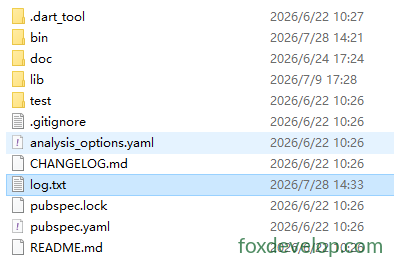
利用可能モード:
FileMode.write:上書き作成FileMode.append:ファイル末尾へ追記FileMode.writeOnly/readWrite読み書きモード
3. ディレクトリ走査
Directory.list() はStreamを返し、フォルダ内のファイル・サブフォルダを列挙します
void main() async {
  var dir = Directory("./tmp");
  try {
    var entityStream = dir.list();
    await for (FileSystemEntity entity in entityStream) {
      if (entity is File) {
        print("ファイル:${entity.path}");
      } else if (entity is Directory) {
        print("ディレクトリ:${entity.path}");
      }
    }
  } catch (e) {
    print(e);
  }
}Code language: Dart (dart)
4. ファイル・ディレクトリ汎用操作
var f = File("test.txt");
await f.create();          // ファイル作成
await f.delete();          // ファイル削除
await f.length();          // ファイルサイズ取得

var d = Directory("data");
await d.create(recursive: true); // 複数階層を再帰的作成
await d.delete(recursive: true);  // 再帰的にディレクトリ削除Code language: JavaScript (javascript)
HTTPサーバー HttpServer
DartでWebサーバーを構築し、ポートを監視しリクエストを処理します。
void main() async {
  // アドレスとポートをバインド
  HttpServer server = await HttpServer.bind("localhost", 8888);
  print("サーバー起動 http://localhost:8888");

  await for (HttpRequest request in server) {
    handleRequest(request);
  }
}

void handleRequest(HttpRequest req) {
  HttpResponse res = req.response;
  if (req.uri.path == "/dart") {
    res.headers.contentType = ContentType.text;
    res.write("Hello Dart HttpServer");
  } else {
    res.statusCode = HttpStatus.notFound;
  }
  res.close(); // 必ずレスポンスをクローズしデータ送信
}Code language: JavaScript (javascript)
実装サンプル
import 'dart:io';

void main() async {
  // アドレスとポートをバインド
  HttpServer server = await HttpServer.bind("localhost", 8888);
  print("サーバー起動 http://localhost:8888");
  print("アクセス先:http://localhost:8888/dart");

  await for (HttpRequest request in server) {
    handleRequest(request);
  }
}

void handleRequest(HttpRequest req) {
  HttpResponse res = req.response;
  // リクエストパス判定
  if (req.uri.path == "/dart") {
    res.headers.contentType = ContentType.text;
    res.write("Hello Dart HttpServer");
  } else if (req.uri.path == "/") {
    res.headers.contentType = ContentType.text;
    res.write("トップページ!/dart にアクセスしてください");
  } else {
    res.statusCode = HttpStatus.notFound;
    res.write("404 Not Found");
  }
  res.close(); // 必ずレスポンスをクローズしデータ送信
}Code language: Dart (dart)
ブラウザから localhost:8888/dart にアクセス
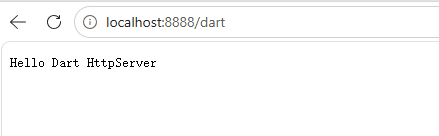
HTTPクライアント HttpClient
公式重要アドバイス:HttpClient を直接利用しないでください!
HttpClientは内部実装がdart:ioに依存し、クロスプラットフォーム互換性が低いです。業務開発ではサードパーティパッケージpackage:httpの使用を推奨します。
理解用の簡単なサンプル:
void main() async {
  var client = HttpClient();
  try {
    var req = await client.getUrl(Uri.parse("https://foxdevelop.com"));
    var res = await req.close();
    await for(var chunk in res) {
      // レスポンスのバイトストリームを受信
    }
  } finally {
    client.close();
  }
}Code language: Dart (dart)
下記は実行可能なサンプル
import 'dart:io';
import 'dart:convert';

void main() async {
  var client = HttpClient();
  try {
    var req = await client.getUrl(Uri.parse("https://foxdevelop.com"));
    var res = await req.close();

    // 全バイナリデータを収集
    List<int> allBytes = [];
    await for (var chunk in res) {
      allBytes.addAll(chunk);
    }
    // バイト配列をUTF8のHTML文字列へ変換
    String html = utf8.decode(allBytes);
    print(html);
  } finally {
    client.close();
  }
}Code language: Dart (dart)
dart:io
Previous: dart:core コアライブラリ
Next: dart:async ライブラリ