Référence
import 'dart:io';Langage du code : JavaScript (javascript)Attention
dart:io ne fonctionne pas sur la plateforme Web !
Prise en charge : programmes en ligne de commande Dart, serveurs, applications Flutter hors Web (Android/iOS/Windows/macOS/Linux).
Opérations sur les fichiers et répertoires
FileSystemEntity est la classe parente ; File (fichier) et Directory (répertoire) en héritent.
1. Lecture de fichier
Lecture complète (adaptée aux petits fichiers)
void main() async {
  var file = File("config.txt");
  try {
    // Lecture complète sous forme de chaîne (UTF-8)
    String content = await file.readAsString();
    // Lecture complète, découpage par lignes dans un tableau de chaînes
    List<String> lines = await file.readAsLines();
    // Lecture binaire sous forme de tableau d'octets List<int>
    List<int> bytes = await file.readAsBytes();
  } catch (e) {
    print("Échec de la lecture : $e");
  }
}Langage du code : Dart (dart)
Exemple complet
Créez préalablement un fichier txt, puis adaptez le chemin ci-dessous : D:/dartdemo/firstdart/bin/config.txt
import 'dart:io';

void main() async {
  var file = File("D:/dartdemo/firstdart/bin/config.txt");
  try {
    // Lecture complète sous forme de chaîne (UTF-8)
    String content = await file.readAsString();
    print("===== readAsString Texte complet =====");
    print(content);

    // Lecture complète, découpage par lignes dans un tableau de chaînes
    List<String> lines = await file.readAsLines();
    print("\n===== readAsLines Lecture ligne par ligne =====");
    for (var line in lines) {
      print(line);
    }

    // Lecture binaire sous forme de tableau d'octets List<int>
    List<int> bytes = await file.readAsBytes();
    print("\n===== readAsBytes Tableau d'octets (30 premiers) =====");
    print(bytes.take(30).toList());
    print("Nombre total d'octets du fichier : ${bytes.length}");
  } catch (e) {
    print("Échec de la lecture : $e");
  }
}Langage du code : Dart (dart)
Résultat d’exécution
D:\dartdemo\firstdart>dart run
Building package executable...
Built firstdart:firstdart.
===== readAsString Texte complet =====
The minimal requirements for a library are:

pubspec file
The pubspec.yaml file for a library is the same as for an application package
—there is no special designation to indicate that the package is a library.

lib directory
As you might expect, the library code lives under the lib directory and is public to other packages. You can create any hierarchy under lib, as needed. By convention, implementation code is placed under lib/src. Code under lib/src is considered private; other packages should never need to import src/.... To make APIs under lib/src public, you can export lib/src files from a file that's directly under lib.

===== readAsLines Lecture ligne par ligne =====
The minimal requirements for a library are:

pubspec file
The pubspec.yaml file for a library is the same as for an application package
—there is no special designation to indicate that the package is a library.

lib directory
As you might expect, the library code lives under the lib directory and is public to other packages. You can create any hierarchy under lib, as needed. By convention, implementation code is placed under lib/src. Code under lib/src is considered private; other packages should never need to import src/.... To make APIs under lib/src public, you can export lib/src files from a file that's directly under lib.

===== readAsBytes Tableau d'octets (30 premiers) =====
[84, 104, 101, 32, 109, 105, 110, 105, 109, 97, 108, 32, 114, 101, 113, 117, 105, 114, 101, 109, 101, 110, 116, 115, 32, 102, 111, 114, 32, 97]
Nombre total d'octets du fichier : 644Langage du code : PHP (php)
Lecture en flux
Recommandé pour les gros fichiers : traitement au fur et à mesure de la lecture
À associer au décodeur de dart:convert, renvoie un Stream<List<int>>
import 'dart:io';
import 'dart:convert';

void main() async {
  var file = File("D:/dartdemo/firstdart/bin/config.txt");
  Stream<List<int>> stream = file.openRead();

  var lineStream = stream
      .transform(utf8.decoder)          // Flux d'octets → flux de chaînes
      .transform(const LineSplitter());  // Chaîne → séparation par lignes

  try {
    await for (var line in lineStream) {
      print(line);
    }
    print("Lecture terminée");
  } catch (e) {
    print(e);
  }
}Langage du code : Dart (dart)
Résultat d’exécution
D:\dartdemo\firstdart>dart run
Building package executable...
Built firstdart:firstdart.
The minimal requirements for a library are:

pubspec file
The pubspec.yaml file for a library is the same as for an application package
—there is no special designation to indicate that the package is a library.

lib directory
As you might expect, the library code lives under the lib directory and is public to other packages.
You can create any hierarchy under lib, as needed. By convention, implementation code is placed under lib/src.
 Code under lib/src is considered private; other packages should never need to import src/.... To make APIs under lib/src public,
 you can export lib/src files from a file that's directly under lib.
Lecture terminéeLangage du code : PHP (php)
2. Écriture de fichier (IOSink)
import 'dart:io';

void main() async {
  var logFile = File("log.txt");
  // FileMode.write : écrase le contenu existant (valeur par défaut)
  var sink = logFile.openWrite(mode: FileMode.write);

  sink.write("Contenu du journal\n");
  sink.add([48,49]); // Écriture d'octets binaires

  await sink.flush(); // Vider le tampon
  await sink.close(); // Fermeture obligatoire

  // Mode d'ajout
  // var sink = logFile.openWrite(mode: FileMode.append);
}Langage du code : Dart (dart)
Après exécution
Un fichier log.txt est créé dans le dossier du projet D:\dartdemo\firstdart
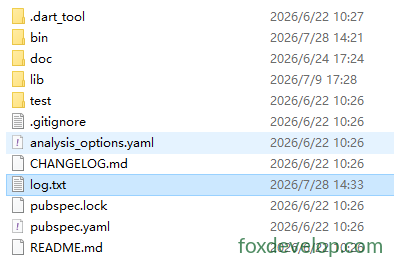
Modes disponibles :
FileMode.write: création avec écrasementFileMode.append: ajout à la fin du fichierFileMode.writeOnly/readWritemodes lecture-écriture
3. Parcours de répertoire
Directory.list() renvoie un Stream pour parcourir tous les fichiers et dossiers du répertoire
void main() async {
  var dir = Directory("./tmp");
  try {
    var entityStream = dir.list();
    await for (FileSystemEntity entity in entityStream) {
      if (entity is File) {
        print("Fichier : ${entity.path}");
      } else if (entity is Directory) {
        print("Répertoire : ${entity.path}");
      }
    }
  } catch (e) {
    print(e);
  }
}Langage du code : Dart (dart)
4. Opérations courantes sur fichiers / répertoires
var f = File("test.txt");
await f.create();          // Créer un fichier
await f.delete();          // Supprimer un fichier
await f.length();          // Obtenir la taille du fichier en octets

var d = Directory("data");
await d.create(recursive: true); // Créer récursivement des sous-répertoires
await d.delete(recursive: true);  // Supprimer récursivement un répertoireLangage du code : JavaScript (javascript)
Serveur HTTP HttpServer
Permet de mettre en place un serveur Web Dart, d’écouter un port et de traiter les requêtes.
void main() async {
  // Lier l'adresse et le port
  HttpServer server = await HttpServer.bind("localhost", 8888);
  print("Serveur démarré http://localhost:8888");

  await for (HttpRequest request in server) {
    handleRequest(request);
  }
}

void handleRequest(HttpRequest req) {
  HttpResponse res = req.response;
  if (req.uri.path == "/dart") {
    res.headers.contentType = ContentType.text;
    res.write("Hello Dart HttpServer");
  } else {
    res.statusCode = HttpStatus.notFound;
  }
  res.close(); // Fermer la réponse obligatoirement pour envoyer les données
}Langage du code : JavaScript (javascript)
Exemple concret
import 'dart:io';

void main() async {
  // Lier l'adresse et le port
  HttpServer server = await HttpServer.bind("localhost", 8888);
  print("Serveur démarré http://localhost:8888");
  print("Adresse d'accès : http://localhost:8888/dart");

  await for (HttpRequest request in server) {
    handleRequest(request);
  }
}

void handleRequest(HttpRequest req) {
  HttpResponse res = req.response;
  // Vérifier le chemin de la requête
  if (req.uri.path == "/dart") {
    res.headers.contentType = ContentType.text;
    res.write("Hello Dart HttpServer");
  } else if (req.uri.path == "/") {
    res.headers.contentType = ContentType.text;
    res.write("Page d'accueil ! Veuillez accéder à /dart");
  } else {
    res.statusCode = HttpStatus.notFound;
    res.write("404 Not Found");
  }
  res.close(); // Fermer la réponse obligatoirement pour envoyer les données
}Langage du code : Dart (dart)
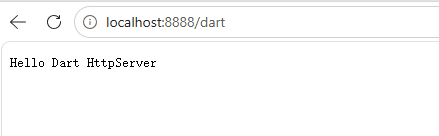
Accédez avec votre navigateur à localhost:8888/dart
Client HTTP HttpClient
Conseil officiel important : évitez d’utiliser directement HttpClient !
HttpClientdépend de dart:io dans son implémentation, sa compatibilité multiplateforme est limitée. Pour les projets, préférez le paquet tierspackage:http.
Exemple simplifié à titre informatif :
void main() async {
  var client = HttpClient();
  try {
    var req = await client.getUrl(Uri.parse("https://foxdevelop.com"));
    var res = await req.close();
    await for(var chunk in res) {
      // Recevoir le flux d'octets de la réponse
    }
  } finally {
    client.close();
  }
}Langage du code : Dart (dart)
Voici un exemple exécutable
import 'dart:io';
import 'dart:convert';

void main() async {
  var client = HttpClient();
  try {
    var req = await client.getUrl(Uri.parse("https://foxdevelop.com"));
    var res = await req.close();

    // Collecter tous les fragments binaires
    List<int> allBytes = [];
    await for (var chunk in res) {
      allBytes.addAll(chunk);
    }
    // Convertir le tableau d'octets en HTML UTF8
    String html = utf8.decode(allBytes);
    print(html);
  } finally {
    client.close();
  }
}Langage du code : Dart (dart)
dart:io