In our last lesson, we walked through building your first Dart program. Now let’s create a Hello World example from scratch ourselves.
1 Hello World
- Every Dart program requires a top-level
main()function; this is where code execution begins - Mark functions with no return value using
void - Use
print()to output text to the console
// Program entry point
void main() {
  print('Hello, World!');
}
Code language: Dart (dart)
We’ll continue using the project we created last time. Open firstdart.dart located under C:\dartdemo\firstdart\bin
Replace the existing code with the snippet shown above
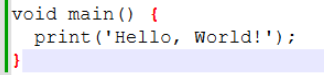
Open Command Prompt, navigate to the C:\dartdemo\firstdart directory, then run the dart run command
C:\dartdemo\firstdart>dart run
Building package executable...
Built firstdart:firstdart.
Hello, World!Code language: CSS (css)
2 Variables (var for automatic type inference)
- Declare variables with
var. Dart automatically detects the data type based on the assigned value, no manual type declaration required - Supports strings, integers, decimals, lists, and maps (objects)
Sample code:
// Program entry point
void main() {
        var name = 'Voyager 1';    // String type
	var year = 1977;           // Integer (int)
	var width = 3.7;           // Decimal (double)
	var planets = ['Jupiter','Saturn']; // List array
	var info = {
	  'tag': ['Saturn'],
	  'url': 'Image link address'
	}; // Map dictionary
}
Code language: Dart (dart)
The code above declares several variables. Variables store data and act as named small memory blocks. The assigned name lets you easily manipulate data stored in that memory space.
Theoretically, this memory block can hold any binary 0/1 data—all computer information is stored as sequences of 0s and 1s. Data types like strings or integers exist to simplify data parsing: for example, the compiler reads values marked as int as whole numbers.
Here’s how you can work with the variables we defined above:
// Program entry point
void main() {
  var name = 'Voyager 1';    // String
  var year = 1977;           // int
  var width = 3.7;           // double
  var planets = ['Jupiter', 'Saturn']; // List
  var info = {
    'tag': ['Saturn'],
    'url': 'Image link address'
  }; // Map

  // String usage examples
  print('Probe name: $name');
  print('Name character count: ${name.length}');
  print('Contains the character "1": ${name.contains('1')}');

  // Integer usage examples
  print('Launch year: $year');
  print('Years since launch: ${DateTime.now().year - year}');

  // Decimal usage examples
  print('Probe width: $width meters');
  print('Width squared: ${width * width}');

  // List usage examples
  print('Target planet list: $planets');
  planets.add('Uranus'); // Append new element
  print('Updated planet list: $planets');
  print('First target planet: ${planets[0]}');

  // Map usage examples
  print('Info tags: ${info['tag']}');
  print('Image URL: ${info['url']}');
  info['status'] = 'Active'; // Add new key-value pair
  print('Full data record: $info');
}
Code language: PHP (php)
The code above uses formatted string output, which we haven’t covered yet. You can get a basic understanding now; we will dive deeper into this feature later on.
3 Control Flow Statements (Conditionals / Loops)
if else Conditionals
The code block inside the curly braces after if runs only when the condition inside its parentheses evaluates to true. If the condition returns false, the code under else executes instead.
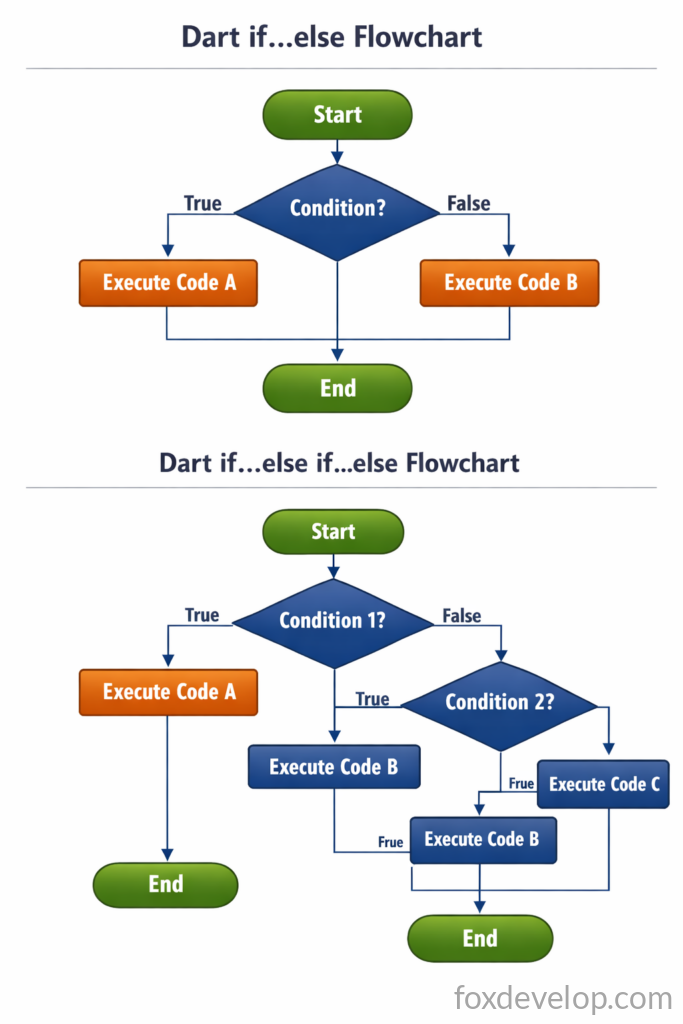
if (condition) {
  // Runs when condition equals true
} else {
  // Runs when condition equals false
}Code language: JavaScript (javascript)
For example, checking if a vehicle is speeding looks like this:
var speed = 25;

if (speed > 60) {
  print('Speeding!');
} else {
  print('Speed within limit.');
}Code language: PHP (php)
You can also chain multiple conditional checks:
if (speed > 100) {
  print('Dangerously fast!');
} else if (speed > 60) {
  print('Slightly over speed limit.');
} else {
  print('Safe driving speed.');
}Code language: PHP (php)
void main() {
var year = 1977;
if (year >= 2001) {
print('21st century');
} else if (year >= 1901) {
print('20th century');
}
}
Code language: Dart (dart)C:\dartdemo\firstdart>dart run
Building package executable...
Built firstdart:firstdart.
20th centuryCode language: CSS (css)for-in: Iterate over Lists
In Dart, the for‑in loop offers a clean syntax to iterate over List, Set, and other iterable data types.
The loop checks whether the collection contains another element. If an element exists, the code inside curly braces runs; if not, the loop terminates and moves to subsequent code.
Syntax reference:
for (var item in collection) {
  // Operate on individual item
}Code language: JavaScript (javascript)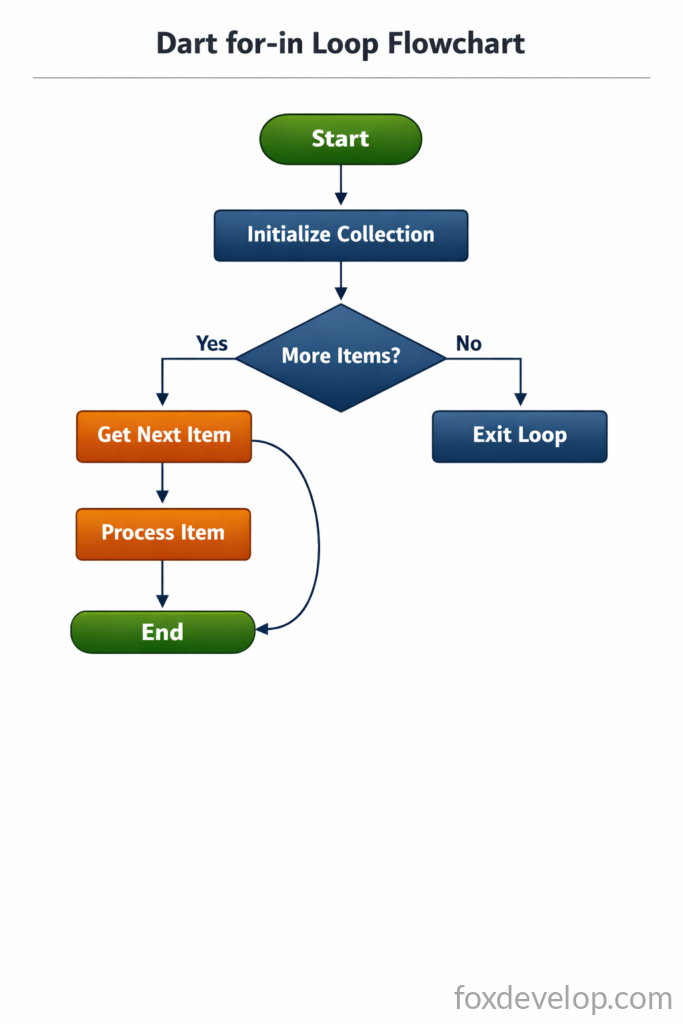
Sample implementation:
void main() {
	var planets = ['Jupiter','Saturn'];
	for (final item in planets) {
	  print(item);
	}
}
Code language: Dart (dart)
Program output:
C:\dartdemo\firstdart>dart run
Building package executable...
Built firstdart:firstdart.
Jupiter
SaturnCode language: CSS (css)
Standard Numeric for Loop
This loop starts at i=1 and continues up to and including 12 due to the <= operator. After each print statement, the code jumps to the i++ increment step.
void main() {
	for (int i = 1; i <= 12; i++) {
	  print(i);
	}
}Code language: JavaScript (javascript)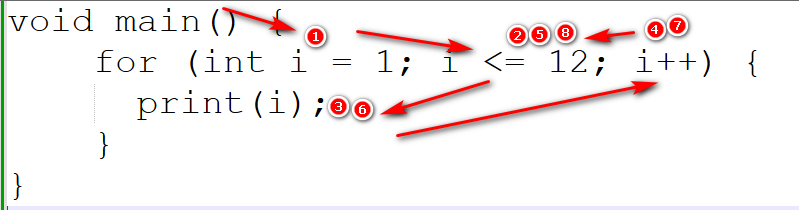
Execution output:
C:\dartdemo\firstdart>dart run
Building package executable...
Built firstdart:firstdart.
1
2
3
4
5
6
7
8
9
10
11
12Code language: CSS (css)- Initialize int i = 1 once at the start
- Evaluate whether the condition i <=12 holds true
- If true, execute print(i) and output value 1
- Run i++ to increment i to 2
- Recheck i<=12; since 2<=12 evaluates to true, run print(i) and output value 2
- Repeat i++ increment and condition check again
- This process continues repeating
- Once i becomes 13, the i<=12 condition fails, the loop exits, and code resumes after the for block
The initialization segment int i=1; only runs once at the very beginning and never repeats. Its sole purpose is setting the starting value of i. You can rewrite the code like this instead:
void main() {
    int i = 1;
	for (; i <= 12; i++) {
	  print(i);
	}
}
Code language: Dart (dart)
4. while Loops
while loops function similarly to for loops. In Dart, while loops repeat a block of code as long as its condition remains true. The syntax is straightforward:
while (condition) {
  // Loop body logic
}Code language: JavaScript (javascript)
Execution flow breakdown:
- First check if the condition evaluates to
true. - If true, execute all code inside the loop body.
- After finishing the loop body, recheck the condition.
- The loop terminates completely once the condition returns
false.
You must modify variables inside the loop body to eventually make the condition false. If no variables change, the loop runs infinitely—this is known as an infinite loop.
var year = 2010;
while(year < 2016){
  year += 1;
}
Code language: JavaScript (javascript)
Break down the execution step by step below 👇
Initialization Stage
- Declare variable
yearwith an initial value of2010.
Condition Evaluation Stage
- Test whether
year < 2016returns true. - If true, enter the loop body; if false, exit the loop entirely.
Loop Body Execution Stage
- Run
year += 1, equivalent to writingyear = year + 1. - Increase the value of
yearby 1 on every single loop iteration.
Repeat Condition Check Stage
- Re-evaluate the condition
year < 2016. - The condition stays true while
yearincrements from 2010 all the way to 2015. - Once
yearreaches 2016, the condition becomes false and the loop stops.
Final Stage
- After the loop finishes running, the final stored value of
yearis 2016.
This loop runs a total of 6 times (covering years 2010 through 2015), incrementing year by one each pass until the conditional check fails. Always remember: if you forget to update the year variable inside the loop body, the loop will run endlessly.