Reference
import 'dart:io';Code language: JavaScript (javascript)Notice
dart:io cannot be used on the Web platform!
Supported targets: Dart command-line programs, server-side applications, non-Web Flutter apps (Android/iOS/Windows/macOS/Linux).
File & Directory Operations
FileSystemEntity is the base class. File (file) and Directory (folder) inherit from it.
1. Reading Files
One-shot reading (ideal for small files)
void main() async {
  var file = File("config.txt");
  try {
    // Read full string at once (UTF-8)
    String content = await file.readAsString();
    // Read all contents and split into a string list by lines
    List<String> lines = await file.readAsLines();
    // Read raw binary bytes as List<int>
    List<int> bytes = await file.readAsBytes();
  } catch (e) {
    print("Read failed: $e");
  }
}Code language: Dart (dart)
Complete Example
Create a TXT file beforehand, and update the file path below to match your file: D:/dartdemo/firstdart/bin/config.txt
import 'dart:io';

void main() async {
  var file = File("D:/dartdemo/firstdart/bin/config.txt");
  try {
    // Read full string at once (UTF-8)
    String content = await file.readAsString();
    print("===== readAsString Full Text =====");
    print(content);

    // Read all contents and split into a string list by lines
    List<String> lines = await file.readAsLines();
    print("\n===== readAsLines Read Line by Line =====");
    for (var line in lines) {
      print(line);
    }

    // Read raw binary bytes as List<int>
    List<int> bytes = await file.readAsBytes();
    print("\n===== readAsBytes Byte Array (First 30 Bytes) =====");
    print(bytes.take(30).toList());
    print("Total file bytes: ${bytes.length}");
  } catch (e) {
    print("Read failed: $e");
  }
}Code language: Dart (dart)
Execution Output
D:\dartdemo\firstdart>dart run
Building package executable...
Built firstdart:firstdart.
===== readAsString Full Text =====
The minimal requirements for a library are:

pubspec file
The pubspec.yaml file for a library is the same as for an application package
—there is no special designation to indicate that the package is a library.

lib directory
As you might expect, the library code lives under the lib directory and is public to other packages. You can create any hierarchy under lib, as needed. By convention, implementation code is placed under lib/src. Code under lib/src is considered private; other packages should never need to import src/.... To make APIs under lib/src public, you can export lib/src files from a file that's directly under lib.

===== readAsLines Read Line by Line =====
The minimal requirements for a library are:

pubspec file
The pubspec.yaml file for a library is the same as for an application package
—there is no special designation to indicate that the package is a library.

lib directory
As you might expect, the library code lives under the lib directory and is public to other packages. You can create any hierarchy under lib, as needed. By convention, implementation code is placed under lib/src. Code under lib/src is considered private; other packages should never need to import src/.... To make APIs under lib/src public, you can export lib/src files from a file that's directly under lib.

===== readAsBytes Byte Array (First 30 Bytes) =====
[84, 104, 101, 32, 109, 105, 110, 105, 109, 97, 108, 32, 114, 101, 113, 117, 105, 114, 101, 109, 101, 110, 116, 115, 32, 102, 111, 114, 32, 97]
Total file bytes: 644Code language: PHP (php)
Stream Reading
Recommended for large files; process data incrementally while reading
Use decoders from dart:convert, returns Stream<List<int>>
import 'dart:io';
import 'dart:convert';

void main() async {
  var file = File("D:/dartdemo/firstdart/bin/config.txt");
  Stream<List<int>> stream = file.openRead();

  var lineStream = stream
      .transform(utf8.decoder)          // Byte stream → String stream
      .transform(const LineSplitter());  // String stream → separate lines

  try {
    await for (var line in lineStream) {
      print(line);
    }
    print("Reading completed");
  } catch (e) {
    print(e);
  }
}Code language: Dart (dart)
Execution Output
D:\dartdemo\firstdart>dart run
Building package executable...
Built firstdart:firstdart.
The minimal requirements for a library are:

pubspec file
The pubspec.yaml file for a library is the same as for an application package
—there is no special designation to indicate that the package is a library.

lib directory
As you might expect, the library code lives under the lib directory and is public to other packages.
You can create any hierarchy under lib, as needed. By convention, implementation code is placed under lib/src.
 Code under lib/src is considered private; other packages should never need to import src/.... To make APIs under lib/src public,
 you can export lib/src files from a file that's directly under lib.
Reading completedCode language: PHP (php)
2. Writing Files (IOSink)
import 'dart:io';

void main() async {
  var logFile = File("log.txt");
  // FileMode.write: Overwrite existing content (default)
  var sink = logFile.openWrite(mode: FileMode.write);

  sink.write("Log content\n");
  sink.add([48,49]); // Write raw binary bytes

  await sink.flush(); // Flush buffer
  await sink.close(); // Must close the sink

  // Append mode
  // var sink = logFile.openWrite(mode: FileMode.append);
}Code language: Dart (dart)
After Execution
A new log.txt file will appear in D:\dartdemo\firstdart inside your project folder
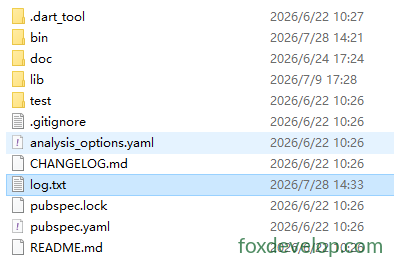
Available modes:
FileMode.write: Create & overwriteFileMode.append: Append to file endFileMode.writeOnly/readWrite: Read-write modes
3. Directory Traversal
Directory.list() returns a Stream to iterate all files/folders inside the directory
void main() async {
  var dir = Directory("./tmp");
  try {
    var entityStream = dir.list();
    await for (FileSystemEntity entity in entityStream) {
      if (entity is File) {
        print("File: ${entity.path}");
      } else if (entity is Directory) {
        print("Directory: ${entity.path}");
      }
    }
  } catch (e) {
    print(e);
  }
}Code language: Dart (dart)
4. Common File & Directory Methods
var f = File("test.txt");
await f.create();          // Create file
await f.delete();          // Delete file
await f.length();          // Get file size in bytes

var d = Directory("data");
await d.create(recursive: true); // Recursively create nested folders
await d.delete(recursive: true);  // Recursively delete folder contentsCode language: JavaScript (javascript)
HTTP Server: HttpServer
Used to build Dart web services, listen on ports and handle incoming requests.
void main() async {
  // Bind address and port
  HttpServer server = await HttpServer.bind("localhost", 8888);
  print("Server running at http://localhost:8888");

  await for (HttpRequest request in server) {
    handleRequest(request);
  }
}

void handleRequest(HttpRequest req) {
  HttpResponse res = req.response;
  if (req.uri.path == "/dart") {
    res.headers.contentType = ContentType.text;
    res.write("Hello Dart HttpServer");
  } else {
    res.statusCode = HttpStatus.notFound;
  }
  res.close(); // Must close response to send data
}Code language: JavaScript (javascript)
Practical Example
import 'dart:io';

void main() async {
  // Bind address and port
  HttpServer server = await HttpServer.bind("localhost", 8888);
  print("Server running at http://localhost:8888");
  print("Visit: http://localhost:8888/dart");

  await for (HttpRequest request in server) {
    handleRequest(request);
  }
}

void handleRequest(HttpRequest req) {
  HttpResponse res = req.response;
  // Check request path
  if (req.uri.path == "/dart") {
    res.headers.contentType = ContentType.text;
    res.write("Hello Dart HttpServer");
  } else if (req.uri.path == "/") {
    res.headers.contentType = ContentType.text;
    res.write("Homepage! Visit /dart");
  } else {
    res.statusCode = HttpStatus.notFound;
    res.write("404 Not Found");
  }
  res.close(); // Must close response to send data
}Code language: Dart (dart)
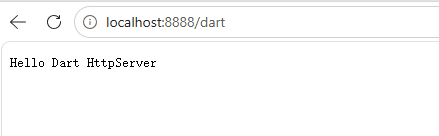
Open in browser: localhost:8888/dart
HTTP Client: HttpClient
Official Important Note: Avoid using HttpClient directly!
HttpClientis built on dart:io and has poor cross-platform compatibility. Prefer the third-party packagepackage:httpin production code.
Simple demo for reference only:
void main() async {
  var client = HttpClient();
  try {
    var req = await client.getUrl(Uri.parse("https://foxdevelop.com"));
    var res = await req.close();
    await for(var chunk in res) {
      // Receive response byte chunks
    }
  } finally {
    client.close();
  }
}Code language: Dart (dart)
Fully runnable example below
import 'dart:io';
import 'dart:convert';

void main() async {
  var client = HttpClient();
  try {
    var req = await client.getUrl(Uri.parse("https://foxdevelop.com"));
    var res = await req.close();

    // Collect all binary chunks
    List<int> allBytes = [];
    await for (var chunk in res) {
      allBytes.addAll(chunk);
    }
    // Convert byte array to UTF8 webpage HTML
    String html = utf8.decode(allBytes);
    print(html);
  } finally {
    client.close();
  }
}Code language: Dart (dart)
dart:io