What Are Comments
Comments are explanatory text inserted within source code to help developers understand program logic. They are not treated as executable code; compilers will skip and ignore all comment content entirely during compilation.
Comments also come in handy when debugging errors. If you cannot pinpoint the source of a bug, you can comment out suspect code segments. Once commented, these lines get ignored by the compiler, letting you isolate problematic logic step by step.
Comments work much like marginal notes you jot down in textbooks during school—these extra remarks make the core content far easier to comprehend.
Types of Comments
| Comment Type | Opening Marker | Closing Marker | Core Rules |
|---|---|---|---|
| Single-line Comment | // | End of current line | Takes effect for the whole line; all text after // on the same line is discarded |
| Delimited Block Comment | /* | */ | Covers multiple full lines or inline code snippets; nesting is not supported |
| Documentation Comment | /// | End of current line | Supports embedded XML tags, used to auto-generate project API reference documentation |
1. Single-line Comments //
- Everything starting from
//up to the end of the current line is ignored by the compiler; - Can be placed at the start of a line or appended after functional code;
- No nesting limitations, no parsing conflicts with
/* */block comments.
// Single-line comment at line start: declare integer variable
int num = 10; // Trailing single-line comment: stores numeric value 10
// int temp = 99; // Entire line commented out for debugging; temporarily disables code without deletion for easy recovery laterCode language: JavaScript (javascript)
2. Block Comments /* */
- Requires matching opening and closing markers; all text between
/*and*/is ignored; - Supports multi-line coverage and inline partial code masking;
- Block comment nesting is forbidden. The compiler terminates the comment block at the first encountered
*/, leaving any subsequent stray*/to trigger syntax errors.
Basic Example
/*
Multi-line block comment demonstration
Compiler skips all content inside
You may write text spanning any number of lines
*/
string str = "Test Text";Code language: PHP (php)
/*
Multi-line delimited comment example
All content here is ignored by the compiler
Text can span any number of lines
wellcome to foxdevelop.com
*/
string greet = "wellcome to foxdevelop.com";
Console.WriteLine(greet);Code language: JavaScript (javascript)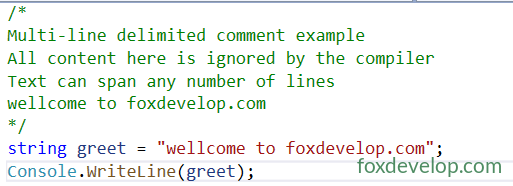
Nesting blocks will throw syntax errors
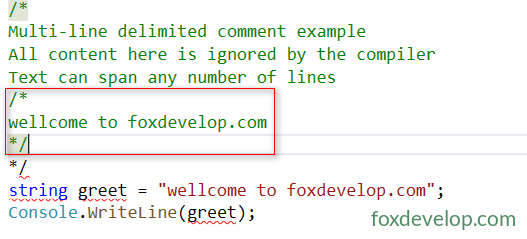
Embedding a secondary block comment inside an outer one leaves the final closing marker without a matching opening tag, resulting in compilation failure.
Inline Partial Comments
Masks only a fragment of inline code; the variable a shown below is fully commented out.
int /*a,*/ b;
// Equivalent to int b; the segment "a," between markers is excluded from executionCode language: JavaScript (javascript)
Invalid Nested Block Comment Example
Triggers compile error
/* Outer comment opening
    /* Inner nested comment (treated as plain text only) */
// The first */ above closes the outer block; the trailing */ below has no matching opening tag and breaks syntax
*/Code language: PHP (php)
/* inside // does not activate block comment parsing
The block comment syntax here is treated as plain text and does not take effect.
// This is a single-line comment /* the /* here is just regular text and will not start a block comment
int x = 5;
/* Opens block comment scope */ // Block comment terminates here; the trailing // functions normallyCode language: JavaScript (javascript)
3. Documentation Comments ///
- Visually resembles single-line comments, marked with three consecutive forward slashes
///; - Supports embedded XML markup; IDEs and tooling read these tags to generate API reference documentation;
- Typically placed directly above classes, methods and properties to document public-facing interfaces.
/// <summary>
/// Main entry point class of the application
/// </summary>
class Program
{
    /// <summary>
    /// Application entry method
    /// </summary>
    /// <param name="args">Array storing command line arguments</param>
    static void Main(string[] args)
    {

    }
}Code language: JavaScript (javascript)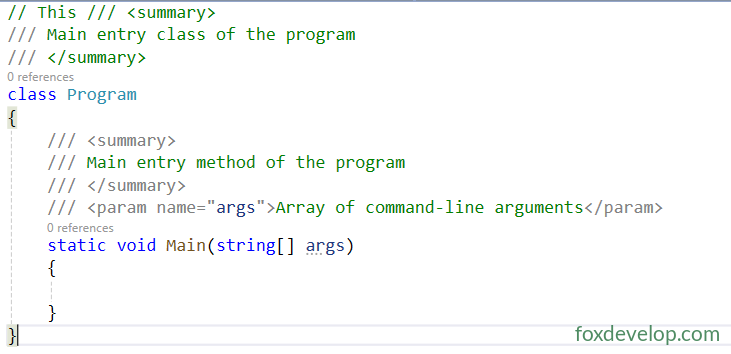
Summary
- Block comments
/* */cannot be nested; parsing stops immediately at the first*/encountered; - Single-line
//comments only apply to their containing line and never span lines; any/*inside them is treated as literal text; - C# single-line and block comment syntax behaves identically to C and C++;
- Best practices for writing comments: avoid restating what the code literally does; prioritize explaining business logic and design intent to simplify future maintenance. Comments that only repeat variable names add zero practical value.
- Brief inline explanations, temporary single-line code masking → use
// - Bulk multi-line code commenting, masking partial inline code fragments → use
/* */ - Documenting class/method public interfaces, auto-generating project reference docs → use
///
* Generating Documentation Files
The following section serves as a reference. Documentation comments are primarily utilized in large-scale enterprise projects; beginners only need to understand their existence during foundational learning.
Visual Studio Setup Steps
- Right-click your project → Properties → Build tab;
- Tick the checkbox labeled: Generate XML documentation file;
- Default output path:
bin\Debug\YourProjectName.xml, custom file paths are fully supported; - Apply this setting to All Configurations to enable XML output for both Debug and Release builds;
- Rebuild the project; a complete XML file containing all comment markup will appear in the target directory.
.NET CLI Command Line Configuration (No Visual Studio Installed)
Open your project’s .csproj file and insert the following property group node:
<PropertyGroup>
  <GenerateDocumentationFile>true</GenerateDocumentationFile>
</PropertyGroup>
Code language: HTML, XML (xml)
Run the build command in your terminal:
dotnet build
Core Functionality
This XML file stores all annotated content wrapped within <summary>, <param>, <returns> and other documentation tags, acting as the source dataset for generating formal reference documentation. Visual Studio also parses this file to display comment previews inside IntelliSense hover tooltips.
Third-Party Documentation Tools
Microsoft official DocFX (recommended, lightweight solution that exports static HTML documentation websites)
Sandcastle (legacy Microsoft toolchain for compiling offline CHM help files)
Lightweight open-source alternatives such as Doxygen
Three distinct comment syntax types covered above