Custom Types
Besides the 16 predefined built-in types native to C#, developers can create their own custom user types, split into six categories total:
- Class types
- Struct types
- Array types
- Enum types
- Delegate types
- Interface types
Custom types are created through type declarations
- The kind of type you want to build
- The name of your new custom type
- Declarations for all members belonging to this type (their names and definitions) — arrays and delegates are exceptions here, they do not carry named members
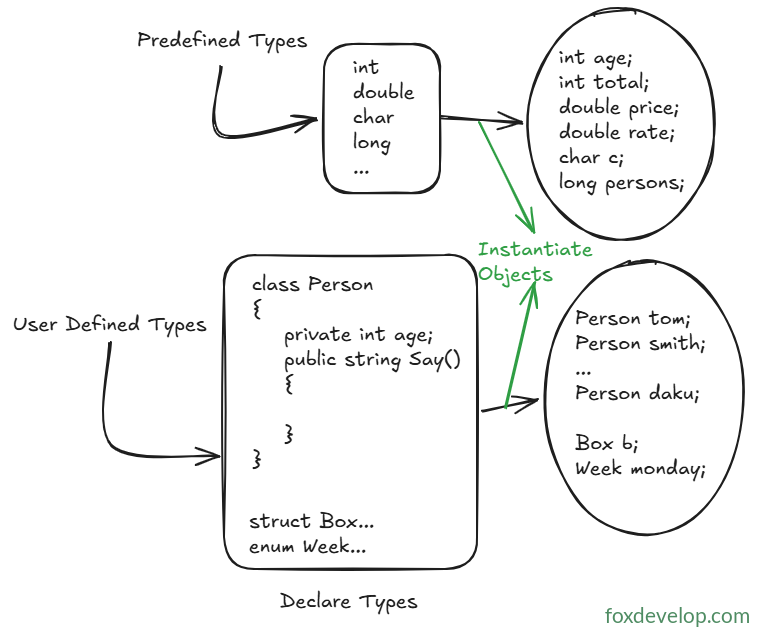
Once the declaration is finished, you can instantiate and work with objects of this type just like you would any predefined built-in type.
Predefined types, also known as built-in types, are ready to use out of the box and let you create object instances directly. Custom types, as the name suggests, require you to first define the type blueprint before you can instantiate objects from it.
Take int or float and other basic built-in types as an example: they work immediately with no prior setup, you can simply write lines like int age; float price;.
For the custom Person type we mentioned earlier, you need two separate steps:
Step one: Declaration (define the type template with class Person {})
Step two: Instantiation (create an object instance with Person lucas = new Person();)
// Car class
public class Car
{
    // 1. Private backing fields (raw data storage)
    private string _brand;    // Vehicle brand
    private string _color;    // Vehicle color

    // 2. Public properties (public access endpoints, support validation logic)
    public string Brand
    {
        get { return _brand; }
        set
        {
            // Basic validation: brand cannot be empty
            if (!string.IsNullOrEmpty(value))
                _brand = value;
            else
                Console.WriteLine("Brand name cannot be blank!");
        }
    }

    public string Color
    {
        get { return _color; }
        set { _color = value; }
    }

    // 3. Method for driving behaviour
    public void Drive()
    {
        Console.WriteLine($"A {Color} {Brand} vehicle is now moving!");
    }
}Code language: C# (cs)
The sample code above implements a Car class with two fields. Fields act as variables using built-in types to store raw underlying data. It also includes two public properties, Brand and Color, which are essentially wrapper functions we’ll cover later on. There’s also a function member public void Drive().
We’ll dive deep into each of these custom type varieties in later sections.
User-defined Types