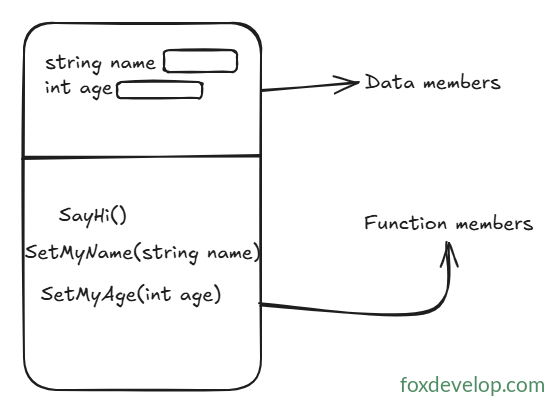
Class members fall into two categories: data members and function members
Simple types like int, long and short we’ve covered earlier are built straight into .NET. Microsoft’s developers coded these types in advance and packaged them with the framework. When you install Visual Studio 2022, .NET gets set up alongside it, bringing all these native simple types with it. Each of these types can only hold a single piece of data.
Later on you’ll learn other data types capable of storing multiple values, arrays being a prime example. An array stores several entries of the exact same type—multiple int values, for instance. Each individual value inside an array is called an element, which you retrieve by referencing its index. We’ll break down arrays thoroughly in later lessons.
We also have composite types that hold multiple data points of differing types; these individual data points are known as members. You reference each member using its defined name to read or modify its value.
Members are split into two distinct groups: data members and function members.
Data members: Store values tied to a specific instance of the class, or the class type as a whole
Function members: Run blocks of program logic, defining the actions a given type can perform
The Person class shown below contains two data members
class Person
{
    private string name;
    private int age;

    public void SayHi()
    {

    }

    public void SetMyName(string name)
    {
        this.name = name;
    }
}Code language: PHP (php)
Data Members (Fields / Properties): Hold state information, such as a user’s name and age within a User class
Function Members (Methods): Define available behaviors, like updating a username or printing a greeting to others
Arrays are accessed via numeric indexes; class members are accessed using custom assigned names
class Program
{
    static void Main(string[] args)
    {
        // This is a int array
        int[] array = new int[5] { 1,2,3,4,5 };
        Console.WriteLine(array[0]); // 1

        Person person = new Person();
        person.SetMyName("John");
        person.SetMyAge(30);
        person.SayHi(); // Hi, my name is John and I am 30 years old.
    }
}

class Person
{
    private string name;
    private int age;

    public void SayHi()
    {
        Console.WriteLine($"Hi, my name is {name} and I am {age} years old.");
    }

    public void SetMyName(string name)
    {
        this.name = name;
    }

    public void SetMyAge(int age)
    {
        this.age = age;
    }
}Code language: PHP (php)
In the sample above, we create an integer array with five slots, initializing its elements to 1, 2, 3, 4 and 5 respectively. To fetch the very first entry, use index number 0—always remember array indexes start counting from zero.
Class members, on the other hand, are accessed by writing the object variable name followed by a dot symbol, as seen with person.
A block written as Class Person { } represents a class definition. The logic inside will never execute unless another section of code invokes it. Left unused, it acts merely as a blueprint or template sitting idle in your project files.
Conversely, the Main entry point method is a static function (we’ll cover static modifiers later). You don’t need to instantiate an object to call it, since it belongs directly to the Program class. The operating system triggers Main automatically when you double-click your compiled .exe file to launch the program.
Class Members