A method can return data to the calling code, and the return value will replace the calling expression directly.
If your method needs to return data, you have to declare a return type before the method name. Mark it as void if there is no return value.
You can still use return in methods without return values, but you should not write return followed by a value. Simply use return;. This statement terminates execution; any code written after it will not run, and control flows back to the caller.
    int Add(int a, int b)  // Returns an int value
    {
        return a + b;
    }Code language: JavaScript (javascript)
void SayHi() // No return value
{
Console.WriteLine("hello welcome to foxdevelop.com");
}Code language: JavaScript (javascript)1. Methods with return values must use return expression;. The resulting type of the expression must match the declared return type;
    int Add(int a, int b)
    {
        return 1.2;  // Compile error. 1.2 is a double. It cannot be implicitly converted to int, so type mismatch causes an error.
    }Code language: JavaScript (javascript)
The snippet above attempts to return a double value. Literal 1.2 defaults to double, which represents floating-point numbers, or decimals in plain terms. The compiler cannot automatically convert decimals into integers, hence the error.
Now consider the reverse scenario
    double Add2()
    {
        return 10;  // 10 is an int. It can be implicitly converted to double, matching the return type with no error.
    }Code language: JavaScript (javascript)
This code compiles without errors. Although 10 is an integer literal, implicit conversion to double is allowed, making the types compatible. Do not just compare raw types; always check whether implicit conversion applies.
Implicit conversion means you do not manually write conversion logic. The compiler handles type conversion automatically. By contrast, conversions explicitly written by developers are known as explicit conversion.
We will cover type conversion in later sections.
2. Every possible execution path inside a value-returning method must eventually reach a return statement. No path can exit without returning a value.
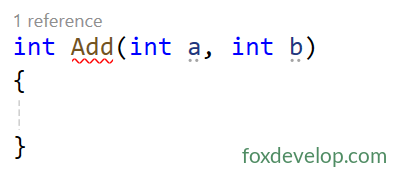
The method shown above declares an int return type before the name Add, yet there is no return statement anywhere inside the method body. This will trigger a compilation error.
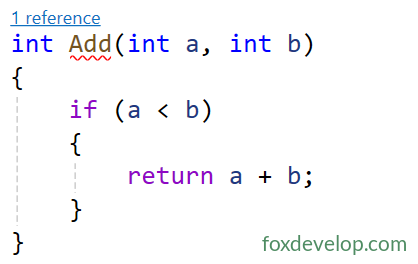
This implementation also produces an error. The return statement only executes when the if condition evaluates to true. When a >= b holds true, the code skips return, leaving an execution path without a return statement.
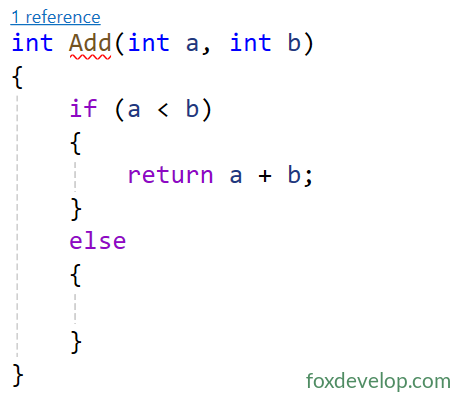
Even if you add an else block, omitting return inside it still causes the same issue: unfinished paths without return statements. This rule applies equally to other control flow structures. Ensure all execution branches are covered properly.
There is a simple workaround. Add a final return statement at the end of your method as a fallback. For example
    int Add(int a, int b)
    {
        if (a < b)
        {
            return a + b;
        }
        else
        {

        }
        return -1; // Code reaches here after all prior branches, guaranteeing a return value
        // This -1 serves as fallback return value.
    }Code language: C# (cs)
Return values support all data types including primitive types (int, string and so on), custom classes and collections;
The return keyword immediately terminates the current method; subsequent lines never run;
Calls to methods with return values can be embedded directly within expressions, print statements, assignments and other scenarios.
Return Value