A method is a named block of code. You can run this block by calling its name elsewhere in your program, pass data into the method, and receive output values returned by it.
Structure of a Method
As mentioned earlier, a method is a function member belonging to a class.
A method is essentially a function. We call it a “method” specifically when the function resides inside a class. In C language, these constructs are simply referred to as functions.
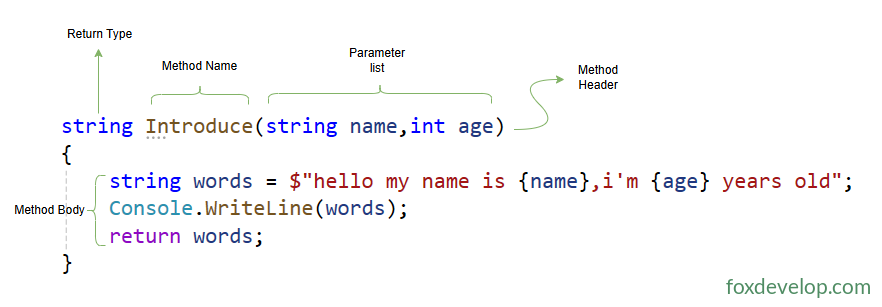
A method consists of two core components: method header (method declaration) and method body.
- Method Header: Defines all characteristics of the method and includes the following information:
- Whether the method returns a value; if yes, the corresponding return type must be specified
- The method name
- Data types that can be passed in / out, plus rules for data processing
- Method Body: Made up of a sequence of executable statements. Execution starts at the first statement inside the body and proceeds sequentially line by line.
Take a look at this example
    string Introduce(string name,int age)
    {
        string words = $"hello my name is {name},i'm {age} years old";
        Console.WriteLine(words);
        return words;
    }Code language: C# (cs)
Method header: string Introduce(string name,int age)
string: Return type, which is stringIntroduce: Method name(string name,int age): Parameter list. These two entries act as variables accepting the incoming name and age values, which you can then use within the method body.
How do we call this method?
The method belongs to the Program class alongside the Main method. However, Main is static code. Static methods cannot directly call non-static methods. If you want to invoke Introduce, you first need to create an instance of Program and call the method via that instance.
class Program
{
    static void Main()
    {
        Program program = new Program();
        program.Introduce("John", 30);
    }

    string Introduce(string name,int age)
    {
        string words = $"hello my name is {name},i'm {age} years old";
        Console.WriteLine(words);
        return words;
    }
}Code language: C# (cs)
A direct call like the one below will trigger a compile error
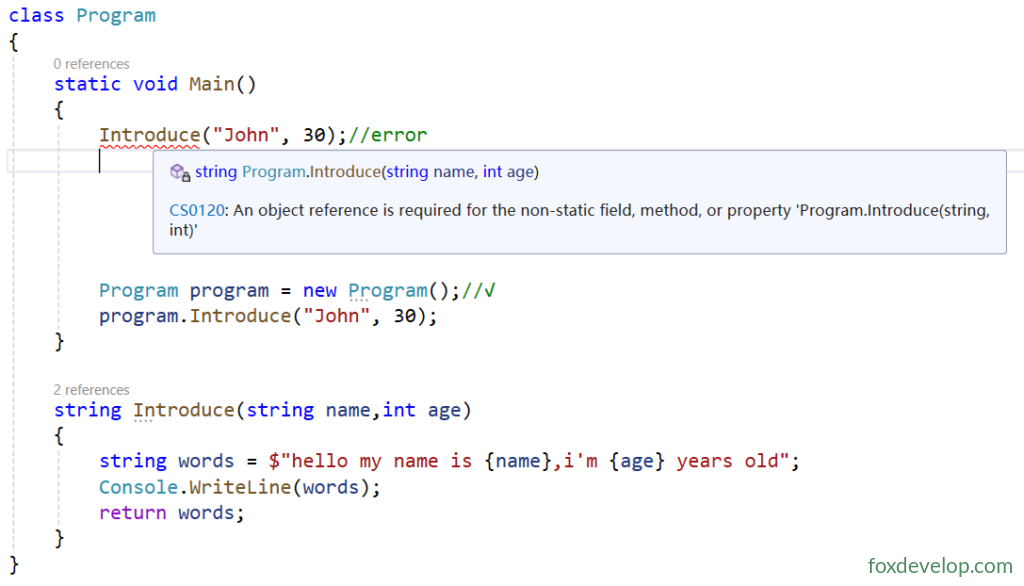
The correct approach is instantiating Program with new inside Main, then calling Introduce through that instance
Program program = new Program();//√
program.Introduce("John", 30);Code language: C# (cs)
Method Body
A method body contains zero or multiple executable statements.
A method body is a code block (a set of statements wrapped in curly braces). Inside a code block you may include:
- Local variables
- Flow control structures (loops, branches, etc.)
- Method calls to invoke other functions
- Nested sub code blocks
- Local functions (submethods defined inside a method) [covered later]
class Program
{
    static void Main()
    {
        int age = 3; // Local variable, initialized to 3
        while (age > 0) // Flow control structure
        {
            --age;
            Introduce("Tom", age); // Method call
        }

        {
            // Nested sub code block
        }
    }

    static string Introduce(string name,int age)
    {
        string words = $"hello my name is {name},i'm {age} years old";
        Console.WriteLine(words);
        return words;
    }
}
Code language: JavaScript (javascript)
In the sample code above, the Introduce function is marked static. Notice the static keyword added at the front. This turns it into a static method which you can directly call inside Main without creating an instance first.
Local Variables
Similar to instance fields mentioned before, local variables store data. Instance fields normally preserve object state, while local variables only hold temporary data for single computations.
Once execution finishes for the method containing local variables, these variables get popped off the stack. Value-type variables are destroyed immediately. Reference-type variables will be cleared by the garbage collector at some later time.
1. Syntax for Declaring Local Variables
Type VariableName = InitialValue;VariableName: User-defined identifier= InitialValue: Optional initializer to assign starting values to variables
2. Core Rules for Local Variables
- Lifetime & Scope: Only exist within the block they are declared in, plus all nested sub-blocks inside it
- A variable becomes valid starting on the line where it is declared
- When the code block finishes executing, the variable expires and gets destroyed
- No fixed restriction on declaration position: Can be written anywhere inside a method body, but must be declared before usage
    static void Main()
    {
        int age = 3; // Local variable
        Phone p = new Phone(); // Local variable of custom type

        {
            int one = 1; // Local variable belonging to sub code block
            bool two = false;
        }

        double d = 0;
    }Code language: JavaScript (javascript)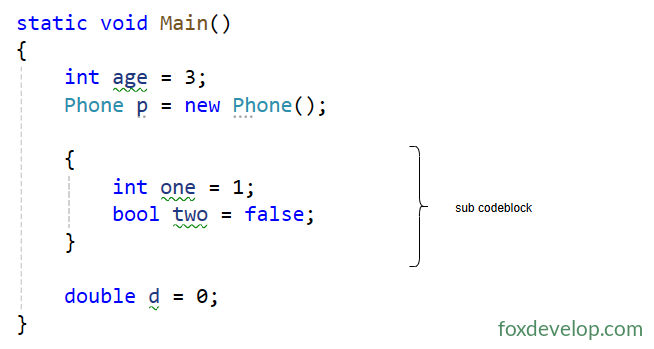
Instance Fields vs Local Variables
| Instance Field | Local Variable | |
|---|---|---|
| Lifetime | Created when an object instance is initialized; Destroyed once the object becomes unreachable | Activated at declaration line; Destroyed once its containing block finishes execution |
| Default Initialization | Compiler automatically assigns default value matching its type | No automatic initialization; Using unassigned variables causes compile errors |
| Memory Location | Allocated entirely on the Heap, for both value types and reference types | Value types reside on Stack; Reference: reference stored on Stack, object data stored on Heap |
Method