Parameters are divided into formal parameters and actual parameters
Formal Parameters
The formal parameter, full name Formal Parameter, is also commonly known as a parameter or formal argument.
A formal parameter is a special local variable declared inside the parentheses of a method declaration, not defined within the method body.
The two variables inside the parentheses after the function name shown below are formal parameters. Readers familiar with C language should already understand this concept.
// x and y are two formal parameters
public void PrintArea(int x, float y )
{
}
Code language: C# (cs)- It has a data type and variable name, supports both reading and writing;
- Defined outside the method body, automatically initialized before the method runs (except for
outoutput parameters); - Multiple parameters are separated by commas; there is no upper limit on the number of parameters;
- They can be used inside the method body exactly like ordinary local variables.
In short, formal parameters are special local variables designed to receive values passed in when calling a function. Their assignment happens at the moment of function invocation. By the time program execution enters the function body, formal parameters already hold their assigned values.
public void PrintArea( int x, float y )
{
    float area = x * y; // x, y are formal parameters; area is an ordinary local variable storing the product of x and y
    Console.WriteLine($"Calculate Area: { x } * { y } = { area }");
}
Code language: C# (cs)
Runable Example
class Program
{
    static void Main()
    {
        Program program = new Program();
        program.PrintArea(10,6.5F);
    }

    public void PrintArea(int x, float y)
    {
        float area = x * y; // x, y are formal parameters; area is an ordinary local variable storing the product of x and y
        Console.WriteLine($"Calculate Area: {x} * {y} = {area}");
    }
}Code language: C# (cs)
Output
Calculate Area: 10 * 6.5 = 65
When calling the function, it is equivalent to initializing x as 10 and y as 6.5
The suffix F after 6.5F marks this value as a single-precision floating point float. Without the F suffix, the compiler treats it as a double value and will throw an error.
Single-precision float and double-precision double occupy different amounts of bits in memory during storage, which results in different precision capabilities.
Precision means the maximum number of decimal places a data type can reliably store. Values exceeding this limit may become inaccurate, and this characteristic is determined by the number of memory bits allocated to the type.
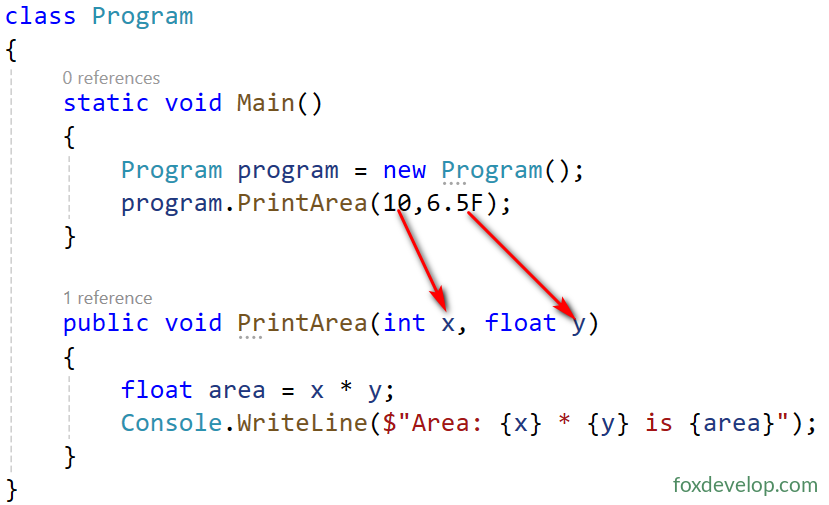
x and y are formal parameters. During function invocation
it works like initializing two local variables with these two values.
int x = 10;

float y = 6.5F;Code language: C# (cs)
Notice:
The type, order and format of formal parameters together with the method name form the method signature. You can think of a signature as the unique ID of a function. We will cover signatures later; matching signatures determine whether two methods are identical, and we will also learn about function overloading afterwards.
Actual Parameters
English term: Actual Parameters (also known as arguments)
The variables or expressions used to assign values to formal parameters during a method call are called actual parameters. Before the method executes, values from actual parameters will initialize the corresponding formal parameters.
- Actual parameters are written inside parentheses during method invocation;
- Type matching rule: The type of an actual parameter must match the corresponding formal parameter, or support implicit type conversion recognised by the compiler;
- Position matching: Parameters are matched sequentially by default (positional parameters).
For example, modify the Main function in the above code as shown below. The first argument at the call site is literal value 5, and the second one is local variable f.
Program program = new Program();
float f = 6.3F;
program.PrintArea(5,f);
// 5 is an actual parameter as constant expression, f is variable actual parameter
// Position mapping: 5 → x, f → y
Code language: C# (cs)
When invoking the method, values of actual parameters are copied into formal parameters at matching positions, then the method body runs.
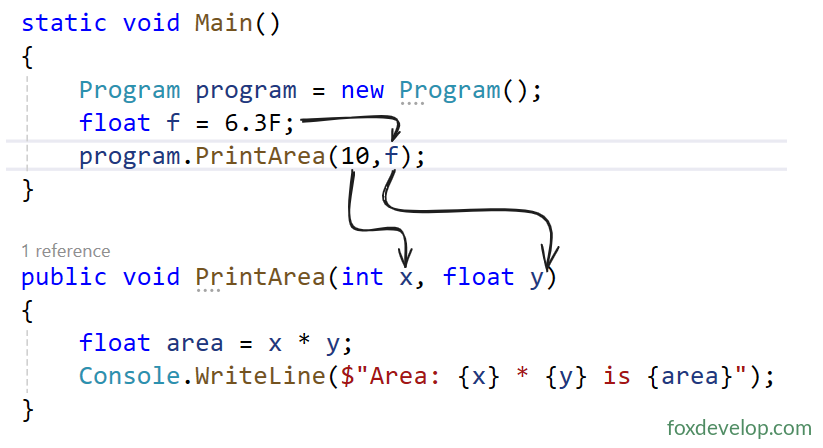
Positional Parameters
class Calculate
{
    // Two int formal parameters
    public int Sum(int x, int y)
    {
        return x + y;
    }

    // Two float formal parameters
    public float Avg(float x, float y)
    {
        return (x + y) / 2.0F;
    }
}

class Program
{
    static void Main()
    {
        Calculate cal = new Calculate();
        int num = 6;

        // Sum: int actual parameter matches int formal parameter
        Console.WriteLine("Sum: {0} and {1} is {2}",
            5, num, cal.Sum(5, num));

        // Avg: int actual parameter implicitly converted to float formal parameter
        Console.WriteLine("Avg: {0} and {1} is {2}",
            5, num, cal.Avg(5, num));
    }
}
Code language: PHP (php)
Output Result
Sum: 5 and 6 is 11
Avg: 5 and 6 is 5.5Code language: HTTP (http)
C# supports implicit conversion from narrower types to wider types (int → float). Conversion in reverse direction float → int triggers compilation error and requires explicit cast manually.
num is an int variable. When passed as actual parameter to the float formal parameter of Avg function, the compiler automatically applies implicit conversion from int to float without errors. This happens because the value range of int is fully covered within float’s range.
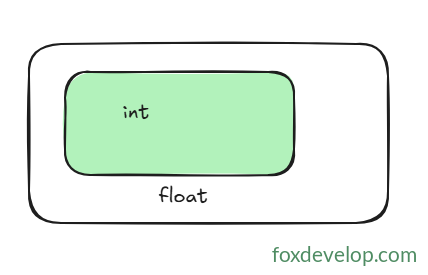
Passing int into float will not cause data loss. You can compare it to placing a small box inside a larger container. The reverse operation cannot work, you cannot fit a large box into a smaller one.
Parameters