Access modifiers only restrict code outside the class. There is no access isolation within the class.
As we have learned earlier, all members can be freely accessed from inside a class.
Next, we will look at accessing members from outside the class.
To access public instance members from outside a class, you must use dot syntax in the format objectVariable.MemberName.
class Program
{
    static void Main(string[] args)
    {
        Worker worker = new Worker(); // Create object
        int hours = worker.GetHours(); // Access public method via object instance
        worker.hours = 12; // Assign value to public field through object
        Console.WriteLine(worker.hours); // Directly read like an ordinary variable
    }
}

class Worker
{
    int age;
    private double savings;
    public int hours;

    void ReadSavings()
    {
        Console.WriteLine(savings);
    }

    public int GetHours()
    {
        return hours;
    }
}Code language: C# (cs)
The GetHours method of Worker is marked public, so it can be read and modified externally.
The Main method inside the Program class instantiates a Worker object named worker.
You access public members using the object name followed by a dot. Think of the object name like a pointer that holds a reference (memory address) to the actual data.

Syntax for accessing instance members externally: objectVariable.PublicField / PublicMethod().
private members cannot be accessed with dot syntax outside the class.
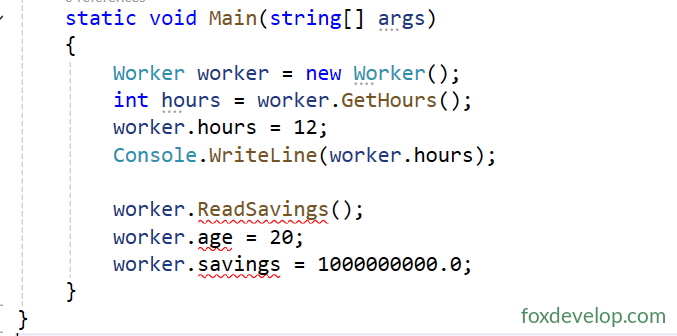
Your code will throw an error if you try to access private members (fields, methods) outside the class.
Broken example
class Program
{
    static void Main(string[] args)
    {
        Worker worker = new Worker();
        int hours = worker.GetHours();
        worker.hours = 12;
        Console.WriteLine(worker.hours);

        worker.ReadSavings();
        worker.age = 20;
        worker.savings = 1000000000.0;
    }
}

class Worker
{
    int age;
    private double savings;
    public int hours;

    void ReadSavings()
    {
        Console.WriteLine(savings);
    }

    public int GetHours()
    {
        return hours;
    }
}Code language: C# (cs)
Let’s check another sample
class Rectangle
{
    // Public instance fields: Length, Width
    public int Length, Width;

    // Instance method: calculate and return rectangle area
    public int GetArea()
    {
        return Length * Width;
    }
}

class Program
{
    static void Main()
    {
        // Create two independent rectangle instances
        Rectangle rect1 = new Rectangle();
        Rectangle rect2 = new Rectangle();

        // Assign dimensions separately; data is isolated between instances
        rect1.Length = 10; rect1.Width = 5;
        rect2.Length = 8;  rect2.Width = 7;

        // Read values and call method to print areas
        Console.WriteLine("Rectangle 1: Length {0}, Width {1}, Area {2}", rect1.Length, rect1.Width, rect1.GetArea());
        Console.WriteLine("Rectangle 2: Length {0}, Width {1}, Area {2}", rect2.Length, rect2.Width, rect2.GetArea());
    }
}Code language: C# (cs)
This Rectangle class contains two public fields Length and Width to store side lengths, plus a GetArea method to compute its area.
All of these members are public.
Program output
Rectangle 1: Length 10, Width 5, Area 50
Rectangle 2: Length 8, Width 7, Area 56
Memory layout looks like this
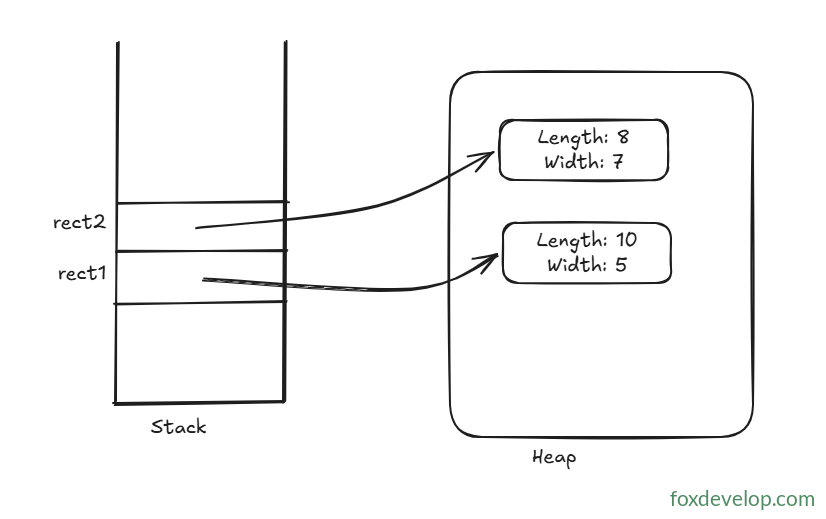
The two objects are stored independently. Each holds its own Length and Width without interfering with each other.
Accessing class members from outside the class